Category: Uncategorized

2021 Guide to UTBMS Codes and ABA Codes

The Uniform Task-Based Management System (UTBMS) details a series of code sets that law firms use to classify services on electronic invoices that they send to clients, such as legal operations and corporate legal departments.

UTBMS codes make detailed spend reporting possible by ensuring that each task and expense is categorized. That way, when you notice in Q1 that spending is out of control, you’re able to identify and solve the problem before Q4. Of course, in order for reporting to be accurate, you must first fully understand UTBMS codes and how to use them.

What are UTBMS codes?

UTBMS codes are a set of codes originally developed by the American Bar Association (ABA), the Association of Corporate Counsel (ACC), and PricewaterhouseCoopers (PwC). Now, UTMBS standards are maintained by the Legal Electronic Data Exchange Standard (LEDES) Oversight Committee, also known as LOC.

The creators designed UTBMS Codes to standardize the categorization of legal services and expenses so that legal work and the associated costs could be easily identified and analyzed. You can learn more about the LEDES file format and LOC here (https://www.simplelegal.com/blog/ledes-file-format-defined).

UTBMS codes are used in many legal systems around the world, including the United States, Canada, and the United Kingdom. For this article, we will focus on UTBMS standards for e-Billing set by the ABA and LOC.

American Bar Association UTBMS codes

When used consistently and properly, ABA UTBMS task codes allow you to monitor legal spending and associated activities.

All ABA UTBMS codes are broken into categories and phases. Categories are identified by the beginning letter (e.g., L for ABA litigation codes) while phases are specified by the number (100s for phase 1, 200s for phase 2, etc.). While some UTBMS codes are fairly self-explanatory, others require a deeper explanation. We’ll walk you through all of the ABA UTBMS codes, and provide more insight when necessary.

Activity

Activity codes identify the type of activity associated with a cost.

  • A101 Plan and prepare for
  • A102 Research
  • A103 Draft/revise
  • A104 Review/analyze
  • A105 Communicate (in firm)
  • A106 Communicate (with client)
  • A107 Communicate (other outside counsel)
  • A108 Communicate (other external)
  • A109 Appear for/attend
  • A110 Manage data/files
  • A111 Other

Although not all clients require the use of UTBMS activity codes, this code set is useful for segmenting specific types of work. For instance, the four separate communication codes ensure more accurate spend tracking for both the counsel and the client. In situations where you may need to consult with an expert as well as outside counsel, codes A108 and A107, respectively, would allow you to categorize time spent on each type of communication.

Bankruptcy

Derived from the code set published by the U.S. Department of Justice, bankruptcy UTBMS codes are intended only for bankruptcy matters. All adversarial tasks are covered by the litigation code set. The 21 bankruptcy ABA task codes are broken up into four phases.

B100 Administration

UTBMS codes in the B100 phase include administrative work during preparation, such as research, fee applications, and communication with creditors.

  • B110 Case Administration: Preparation of coordination and compliance matters, financial affairs statements, and general creditor inquiries
  • B120 Asset Analysis and Recovery: Identification and review of potential assets including causes of action and non-litigation recoveries
  • B130 Asset Disposition: Sales, abandonment and transaction work related to asset disposition
  • B140 Relief from Stay/Adequate Protection Proceedings: Matters relating to termination or continuation of automatic stay under 362 and motions for adequate protection
  • B150 Meetings of and Communications with Creditors: Preparing for and attending the conference of creditors, the 341(a) meeting and other creditors’ committee meetings
  • B160 Fee/Employment Applications: Preparations of employment and fee applications for self or others; motions to establish interim procedures
  • B170 Fee/Employment Objections: Review of and objections to the employment and fee applications of others
  • B180 Avoidance Action Analysis: Review of potential avoiding actions under Sections 544-549 of the Code to determine whether adversary proceedings are warranted
  • B185 Assumption/Rejection of Leases and Contracts: Analysis of leases and executory contracts and preparation of motions specifically to assume or reject
  • B190 Other Contested Matters (excluding assumption/rejection motions): Analysis and preparation of all other motions, opposition to motions and reply memoranda in support of motions
  • B195 Non-Working Travel: Non-working travel where the court reimburses at less than full hourly rates

B200 Operations

B200 codes cover business matters, such as document review, employee benefits, cash collaterals, real estate, and tax issues.

  • B210 Business Operations: Issues related to debtor-in-possession operating in chapter 11 such as employee, vendor, tenant issues and other similar problems
  • B220 Employee Benefits/Pensions: Review issues such as severance, retention, 401K coverage and continuance of pension plan
  • B230 Financing/Cash Collections: Matters under 361, 363 and 364 including cash collateral and secured claims; loan document analysis
  • B240 Tax Issues: Analyses and advice regarding tax-related issues, including the preservation of net operating loss carry forwards
  • B250 Real Estate: Review and analysis of real estate-related matters, including purchase agreements and lease provisions (e.g., common area maintenance clauses)
  • B260 Board of Directors Matters: Preparation of materials for and attendance at Board of Directors meetings; analysis and advice regarding corporate governance issues and review and preparation of corporate documents (e.g., Articles, Bylaws, employment agreements, compensation plans, etc.)

B300 Claims and Plan

The B300 codes are used for all work related to claim inquiries and preparing disclosure statements and business plans.

  • B310 Claims and Administration Objections: Specific claim inquiries; bar date motions; analyses, objections and allowances of claims
  • B320 Plan and Disclosure Statement (including Business Plan): Formulation, presentation and confirmation; compliance with the plan confirmation order, related orders and rules; disbursement and case closing activities, except those related to the allowance and objections to allowance of claims

B400 Bankruptcy-Related Advice

All advice, analyses, and consultations related to bankruptcy matters fall under the B400 code set.

  • B410 General Bankruptcy Advice/Options: Analysis, advice and/or opinions regarding potential bankruptcy related issues, where no bankruptcy case has been filed
  • B420 Restructurings: Analysis, consultation and drafting in connection with the restructuring of agreements, including financing agreements, where no bankruptcy case has been filed

Counseling

Counseling is one of the broader categories of UTBMS codes. This code set is designed to cover time used by attorneys preparing to provide legal advice. Generally, the counseling ABA task codes do not attribute time to a specific matter. Instead, they serve as a catchall billing code for time spent on research throughout a monthly billing period.

  • C100 Fact Gathering: All initial inquiries, meetings, and data/information collection related to the assignment
  • C200 Researching Law: Time spent researching relevant case law or general investigation as well as consultations with experts
  • C300 Analysis and Advice: Analysis of work performed under C100 and C200 along with providing opinions and advice to client
  • C400 Third Party Communication: Discussions with third parties such as regulators or parties to contracts with the client

Expense

Expense UTBMS codes help with budget tracking by categorizing types of spending.

  • E101 Copying
  • E102 Outside printing
  • E103 Word processing
  • E104 Facsimile
  • E105 Telephone
  • E106 Online research
  • E107 Delivery services/messengers
  • E108 Postage
  • E109 Local travel
  • E110 Out-of-town travel
  • E111 Meals
  • E112 Court fees
  • E113 Subpoena fees
  • E114 Witness fees
  • E115 Deposition transcripts
  • E116 Trial transcripts
  • E117 Trial exhibits
  • E118 Litigation support vendors
  • E119 Experts
  • E120 Private investigators
  • E121 Arbitrators/mediators
  • E122 Local counsel
  • E123 Other professionals
  • E124 Other

Expense UTBMS codes are generally combined with a related activity code. For example, an invoice might include activity code A102 paired with expense code E101. A102 categorizes the time spent researching, while E101 specifies money spent on printing copies of that research.

This code set not only facilitates educated budget planning but also simplifies the process of submitting attorney expenses.

Litigation

ABA litigation codes are broken into five phases and encapsulate the entire litigation process.

L100 Case Assessment, Development, and Administration

  • L110 Fact Investigation/Development
  • L120 Analysis/Strategy
  • L130 Experts/Consultants
  • L140 Document/File Management
  • L150 Budgeting
  • L160 Settlement/Non-Binding ADR
  • L190 Other Case Assessment, Development and Administration

During the initial stages, L100 codes could be combined with activity UTBMS codes. For example, A106 (Communicate with client) might be paired with L110 or L120 because client communication would help formulate the litigation strategy.

L200 Pre-Trial Pleadings and Motions

  • L210 Pleading
  • L220 Preliminary Injunctions/Provisional Remedies
  • L230 Court Mandated Conferences
  • L240 Dispositive Motions
  • L250 Other Written Motions and Submissions
  • L260 Class Action Certification and Notice

Expense codes often accompany L200 codes, such as E112 (Court fees) associated with filing for class certification (L260) or filing a pleading (L210).

L300 Discovery

  • L310 Written Discovery
  • L320 Document Production
  • L330 Depositions
  • L340 Expert Discovery
  • L350 Discovery Motions
  • L390 Other Discovery

L400 Trial Preparation and Trial

  • L410 Fact Witnesses
  • L420 Expert Witnesses
  • L430 Written Motions and Submissions
  • L440 Other Trial Preparation and Support
  • L450 Trial and Hearing Attendance
  • L460 Post-Trial Motions and Submissions
  • L470 Enforcement

This phase also calls for the use of expense fees, such as E114 (Witness fees) when interviewing an expert witness (L420).

L500 Appeal

  • L510 Appellate Motions and Submissions
  • L520 Appellate Briefs
  • L530 Oral Argument

L600 e-Discovery
In 2011, LOC and ABA ratified the litigation codes to include a sixth phase for an e-Discovery code set. Each parent task code has sub-task codes for more granular tracking. To keep this brief, we’ll list only the parent tasks.

  • L600 Identification
  • L610 Preservation
  • L620 Collection
  • L630 Processing
  • L650 Review
  • L660 Analysis
  • L670 Production
  • L680 Presentation
  • L690 Project management

Project

For non-litigation matters, project codes are used for administrative filings, transactions, and stand-alone projects. The project code set includes eight phases.

  • P100 Project Administration: All initial administration work such as developing, negotiating, and revising the plan and budget for the matter at hand
  • P200 Fact Gathering/Due Diligence

Codes within the P200 phase are used for time spent on fact investigation, document retrieval, and preparation of reports with clients. They also cover coordination with third parties related to these activities.

Each P200 UTBMS code designates time spent on fact investigation/due diligence from a specific perspective, such as tax or environmental.

  • P210 Corporate Review
  • P220 Tax
  • P230 Environmental
  • P240 Real and Personal Property
  • P250 Employee/Labor
  • P260 Intellectual Property
  • P270 Regulatory Reviews
  • P280 Other

P300-P800 make up the additional codes within this phase.

  • P300 Structure/Strategy/Analysis: Time spent on analysis done for the purposes of developing the strategy for a project or transaction. This includes all steps taken to create a written outline or description of the strategy
  • P400 Initial Document Preparation/Filing: Tasks performed to prepare documents and opinions before being sent to third parties. This includes filing documents, related communications with the client, and review of client-generated transaction documentation
  • P500 Negotiation/Revision/Responses: Time spent negotiating and revising P400 transaction documentation, including all related document review, meetings and client communications
  • P600 Completion/Closing: All tasks related to transaction pre-closing and closing, project completion or filing acceptance, such as attendance at closing
  • P700 Post-Completion/Post Closing: All post-completion or post-closing tasks such as amendments to final documentation and resolution of post-closing issues. Also includes all implementation tasks (e.g., funds held in escrow) and preparation of closing binders (i.e., primarily clerical actions)
  • P800 Maintenance and Renewal: All tasks related to subsequent maintenance and renewal requirements under the terms of the transaction or project such as monitoring of lease agreements, routine waivers and coordination of UCC requirements

Workers’ Compensation

The workers’ compensation code set was not originally included but was defined by a 2010 ratification. Many tasks include a “Commentary & Practice Tips” subset that shares the same code as the parent task. For example, WC 110 could refer to Fact Investigation/Development or the Commentary & Practice Tips related to that task.

This UTBMS code set includes a total of five phases and 27 ABA task codes. For the sake of brevity, we will provide a high-level description of each phase. It’s important to note that the Workers’ Compensation code set does not include phase-level parent tasks (WC 100, WC 200, WC 300, etc.)

WC 100 phase: All actions related to researching the case matter, strategizing, consulting with experts, and settlements.

  • WC 110 Fact Investigation/Development
  • WC 110 Commentary & Practice Tips
  • WC 120 Analysis/Strategy
  • WC120 Commentary & Practice Tips
  • WC 130 Experts/Consultants
  • WC130 Commentary & Practice Tips
  • WC 150 Budgeting
  • WC 150 Commentary & Practice Tips
  • WC 160 Settlement/Resolution
  • WC 160 Commentary & Practice Tips
  • WC 180 Alternative Fee Arrangements

WC 200 phase: Time spent preparing and filing pleadings, conferences with judge, negotiating alternative fee arrangements.

  • WC 210 Pleadings
  • WC 210 Commentary & Practice Tips
  • WC 230 Conferences with Judge
  • WC 230 Commentary & Practice Tips
  • WC 280 Alternative Fee Arrangements

WC 300 phase: Time spent on all discovery motions, document production/acquisition, and depositions.

  • WC 310 Written Discovery
  • WC 310 Commentary & Practice Tips
  • WC 320 Document Production/Acquisition
  • WC320 Commentary & Practice Tips
  • WC 330 Depositions
  • WC 330 Commentary & Practice Tips
  • WC 334 Deposition Report
  • WC 340 Expert Discovery
  • WC 340 Commentary & Practice Tips
  • WC 350 Discovery Motions
  • WC 350 Commentary & Practice Tips
  • WC 360 Discovery On-Site Inspections/Visits
  • WC 360 Commentary & Practice Tips
  • WC 380 Alternative Fee Arrangements

WC 400 phase: Time spent on preparing for and communicating with witnesses, drafting written motions, and preparing for and attending hearings.

  • WC 410 Fact Witnesses
  • WC 410 Commentary & Practice Tips
  • WC 420 Expert Witnesses
  • WC 420 Commentary & Practice Tips
  • WC 430 Written Motions/Submissions
  • WC 430 Commentary & Practice Tips
  • WC 440 Hearing Preparation and Support
  • WC 450 Hearing
  • WC 450 Commentary & Practice Tips
  • WC 460 Post-Hearing Conferences/Motions/Submissions
  • WC 460 Commentary & Practice Tips
  • WC 480 Alternative Fee Arrangements

WC 500 phase: Time spent on all appellate proceedings.

  • WC 510 Appellate Proceedings/Motions Practice
  • WC 510 Commentary & Practice Tips
  • WC 520 Appellate Briefs
  • WC 520 Commentary & Practice Tips
  • WC 530 Oral Argument

Easily track legal spend by UTBMS code with SimpleLegal

With SimpleLegal, you can easily process invoices using UTBMS codes to help customers better categorize outside counsel activity and track spend at a more granular level. Custom task, activity, and expense codes can also be used if your department leverages them.

When invoices are categorized, you can run standard or ad-hoc reports for matter-level comparisons of legal spend by task code as well as other insights, such as views into spend by tasks for your practice areas or specific vendors. SimpleLegal also provides a Spend Dashboard that quickly identifies your top task codes in use and provides information about average rates and how much was billed to each task code.

UTBMS codes also allow you to enforce billing guidelines and control spending. You can set limits and create warnings associated with specific codes in SimpleLegal’s platform so t expenses can be automatically approved, rejected, or adjusted.

Start using UTBMS codes to streamline spend management

Modern and intuitive, SimpleLegal provides all of the financial tools legal teams need to easily categorize spending, run detailed reports, enforce billing guidelines, and analyze budgets. Schedule a demo to see how you and your team can leverage SimpleLegal to gain total visibility into your legal spend.

What is legal operations?

In 2021, more than half of legal departments (54%) spent more internally than they spent on outside costs. Where did that budget go? Toward funding their legal operations.

Legal operations (also called “legal ops”) is the combination of all the business activities, processes, and people that empower an in-house legal team to serve a company’s legal needs using a strategic business approach.

Unlike the legal administration team in law firms, which focuses on admin tasks like answering calls, drafting documents, and conducting legal research, legal operations teams support in-house counsels with skills like planning, financial managementvendor managementmatter management, technology management, and legal data analytics.

How legal ops has changed over the years

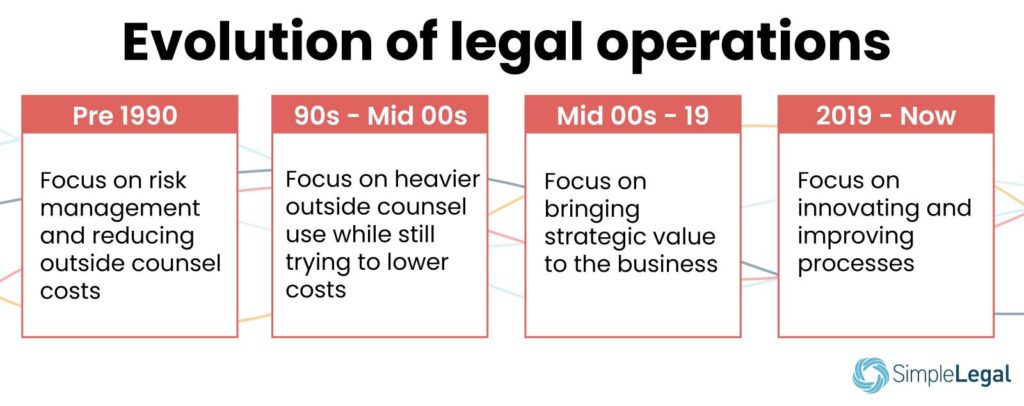
Before 1990, in-house legal departments were more focused on risk management than on maximizing resources. The goal was simple: Reduce outside counsel costs.

The ’90s through the mid-2000s saw the development of an official, more complex legal operations department that facilitated heavier use of outside counsel even though keeping costs low was still a goal.

The major transformation began in the mid-2000s and carried on to 2019.

Legal ops began to focus on not just reducing costs but also on the granular breakdown of those costs and the ROI they delivered. By embracing technology and automation, legal ops teams could break down spend by matter type and evaluate outside firms by their past performance.

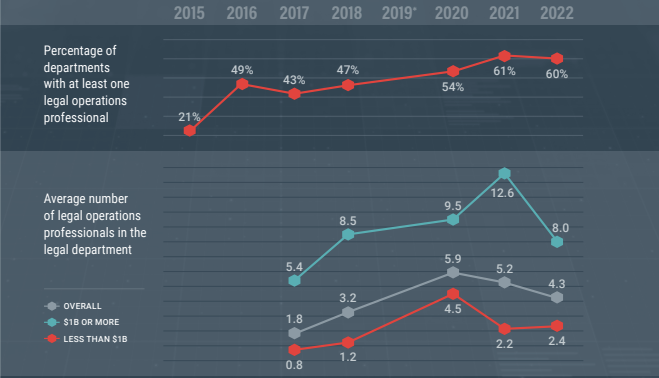
Because of the strategic insights legal ops delivered, legal departments could now see the value in having a legal ops team. Whereas only larger legal departments could afford a formal legal operations team before 2000, a formal legal operations team has become more common now, even at smaller companies.

In our own customer base, we’ve seen formal legal operations manager job titles in legal departments with as few as five people. But some teams are even smaller. A 2022 Association of Corporate Counsel (ACC) report found that 60% of legal departments have at least one legal operations professional on the team. (For comparison, in 2018, only 47% of departments had at least one legal ops professional employed.) On average, legal ops departments contain around four employees.

The 12 key functions of a legal ops team in 2022 and beyond

According to the Corporate Legal Operations Consortium’s (CLOC) “core 12” competencies list, these are the 12 key legal operations functions:

1. Business intelligence

Legal ops collects and analyzes business intelligence data based on important metrics to glean actionable insights for more strategic decision-making.

2. Financial management

Legal ops also plans legal spend, creates budgets, implements and monitors e-Billing for legal services, manages accruals, and forecasts expenses, among other things.

3. Firm and vendor management

Legal ops professionals choose the right firms by performing due diligence, uncovering opportunities, negotiating better rates, handling contract management, and, overall, onboarding new vendors quickly.

4. Information governance

With the goal of reducing corporate risk, legal ops is tasked with creating clear information governance policies, communicating those policies to employees, and managing data security and compliance.

5. Knowledge management

Legal ops also engages in knowledge management by facilitating knowledge hubs, creating templates, and preventing knowledge loss, e.g., from staff departure or role changes.

6. Organization optimization and health

Legal ops creates a hiring vision for cultural fit, encourages team members’ work/life balance, and maintains a good pipeline of talents — all in the interest of optimizing the health and productivity of their department.

7. Practice operations

Legal ops manages the practice by allocating tasks to the right skill level for better speed and efficiency.

8. Program and project management

The legal ops team comes up with ways to manage projects, workflows, and programs quickly (without compromising on quality).

9. Service delivery models

Legal ops defines and structures service provider relationships, breaks down larger projects into assignable tasks, and reduces reliance on more expensive law firms.

10. Strategic planning

Legal ops creates team goals that align with the priorities of internal and external stakeholders.

11. Legal Technology

Legal ops vets and leverages legal software to automate time-consuming and repetitive tasks and to increase accuracy in data collection.

12. Training and development

Legal ops also creates training resources for new hires and facilitates career development for employees.

Ideally, a good legal ops department will be able to carry out most of these functions to improve logistics and processes and, overall, allow your law team to focus on being better lawyers for your organization.

How do you build a legal operations team?

Building the right legal ops team for your department involves understanding what you need, hiring the right person for each role, and equipping them to do their job.

Determine what your department is ready for

There are three levels of legal operations:

  • Admin
  • Optimize
  • Strategizer

They all have different responsibilities. The admin-level focuses on basic management activities, such as vendor management, payments, compliance, and reporting. The optimizer-level focuses on improving those processes, and the strategizer focuses on maximizing results. Understanding your legal department’s maturity level will help you pinpoint what position you need to be hiring for.

Choose what role to hire for based on your needs

It can be overwhelming to try to build a complete team from scratch, and the time investment can be a drain on your internal resources. If you are just starting out (at the admin level), you need a manager more than you need an analyst.

Empower your team with the right tech

Legal operations is not nearly as effective without technology, and it seems like key decision-makers have begun to take notice. According to Gartner, the shake-up felt during the beginning of the pandemic led many business leaders to reevaluate their legal department’s tech use, with an eye toward increasing departmental capabilities to make strategic, data-driven decisions.

Tech allows you to automate manual legal work, streamline document management, and simplify data collection and reporting, to name a few benefits. Your team will need dedicated legal ops software that features e-Billing, reporting and analytics, spend, matter, and vendor management to run efficiently.

Typical legal ops jobs

There are three main legal operations jobs within corporate legal departments: the legal operations manager, the legal operations specialist, and the legal operations analyst. There’s a fourth position — the director of legal operations — who would be the overall head of the legal ops department, but it’s common for the department to be led by the legal operations manager.

These positions work together to manage, improve, and analyze activities in the legal ops department.

Here’s a brief rundown of what each role does.

Legal operations manager

Also called the legal operations director, the legal operations manager manages and supports the team around tasks like vendor management, budgeting, and staffing. Where there’s no director of legal operations (the head of legal operations), the legal operations manager also reports directly to the general counsel and oversees tasks like resource allocation, change management, and decision-making.

Legal ops managers may spend their day-to-day directly overseeing other members of the legal team. For the rest of the organization, they are the go-to source for project status updates, budget questions, and productivity reports.

Legal operations specialist

If the legal ops manager oversees the department, the specialist is the expert who executes on departmental projects and goals. The legal ops specialist works with the legal operations manager to create and improve processes for an efficient and effective legal team, facilitate change, and control costs. Specialists tackle the hands-on work of legal ops and report on their work to their manager.

Specialists may handle a variety of tasks, including updating each individual matter. Or they might handle the outreach to stakeholders in other departments who are needed to complete each step of the process.

Legal operations analyst

If a legal ops team uses a tech suite to track and understand analytics, the legal ops analyst would be the expert on those tools.

The legal ops analyst regularly examines the legal team’s operations to identify room for change and helps implement those changes. The analyst may study changes in the team’s budget to identify areas where they could better allocate resources and save costs. They may also handle other departmental reporting on core key performance indicators (KPIs), like average time spent per matter.

Qualities of good legal ops leaders

Legal ops leaders also have an increasingly important role to play as strategic advisors within the C-suite of the organization. According to the ACC, 98% of chief legal officers (CLOs) are consulted on important business decisions that affect the entire organization — not just legal. 36% say they spend more than one-third of their time advising business leaders on strategic initiatives, and 77% say they “almost always” attend board meetings.

Good legal operations leaders tend to fit one of four distinct personas:

  • The uber-analyst who brings quantitative rigor to the legal department
  • The MBA who brings additional operational and financial discipline to the legal department and their vendors
  • The lawyer who has chosen a more business-focused career path
  • The highly analytical JD/MBA who is valued for their legal and business expertise

And while a JD or an MBA is a great addition, the people you require for these roles don’t need to have those degrees. What they need to have is:

  • A strong understanding of the core business
  • The ability to translate the needs of business departments into legal requirements
  • The ability to manage outside law firm performance
  • A commitment to using the internal legal department to grow the company

It’s clear that, from the top down, business leaders have begun to see the strategic value in giving legal ops a seat at the decision-making table.

If building your legal operations team is something you want to focus on, we have four legal ops job description templates you can look at to get you started.

It’s time to embrace legal operations for a value-driven legal department

Legal departments have a company-wide responsibility to protect and grow the business while also managing internal and outside counsel budgets. They face increasing pressure to do more with less. That’s where the legal operations role comes in: these professionals drive efficiency and create value not just for their team of in-house lawyers but for the entire organization.

But a legal operations team is only as effective as the technology available to them. In fact, CLOC lists technology as one of the core competencies for effective legal operations professionals.

Want to empower your legal ops team with software that makes it easier to get results? SimpleLegal helps modern legal teams better manage their spend, matters, vendors, and so much more for efficient legal operations. Schedule a demo of SimpleLegal to learn more about how dedicated legal operations technology can help your team function.