SOLUTIONS
BY INDUSTRY
ELM isn’t new. What has not worked are rigid systems, disconnected applications, and manual workarounds as legal operations scale and evolve.
Unity ELM is different by design.
AI that answers questions is not enough. Legal operations require AI that operates inside governed systems, with permissions, policy enforcement, clean data models, and auditability.
This is Enterprise Legal Management built for today’s volume, scrutiny, and pace without locking teams into yesterday’s constraints.
No rebuilding your legal operations as requirements evolve.
No locked-in workflows that restrict flexibility.
No unnecessary investments.

The Operating Model for Modern Legal Operations
Unity ELM is built around a repeatable, governed way of working that scales without introducing risk.
Ask
Get clear answers from your own legal data. Embedded, assistive AI helps surface spend issues, risk signals, and operational gaps earlier—before they escalate.
Act
Execute workflows that enforce your policies by default. Invoice review, vendor oversight, and matter management operate with full traceability and control.
Automate
Reduce manual effort and shorten cycle times. Routine steps run consistently, so legal teams spend less time chasing and more time deciding.
This is how modern legal operations stay in control and increase responsiveness as complexity grows.

Standalone AI tools create answers. They do not create accountable execution.
Unity ELM enables AI to operate within permissioned workflows, enforce policies, and act on trusted data inside your system of record. Every action is governed, traceable, and auditable.
This is governed AI embedded inside the workflows that run your legal operations, not layered on top of them.

Unity ELM adapts to where you are today and scales as your needs evolve.
Start with what you need:
Expand as your team, workload, and governance requirements increase.
You can use what makes sense for your business without sacrificing structure, visibility, or control.

Unity ELM is designed specifically for in-house legal teams. It prevents the operational failures that slow teams down and create financial risk.

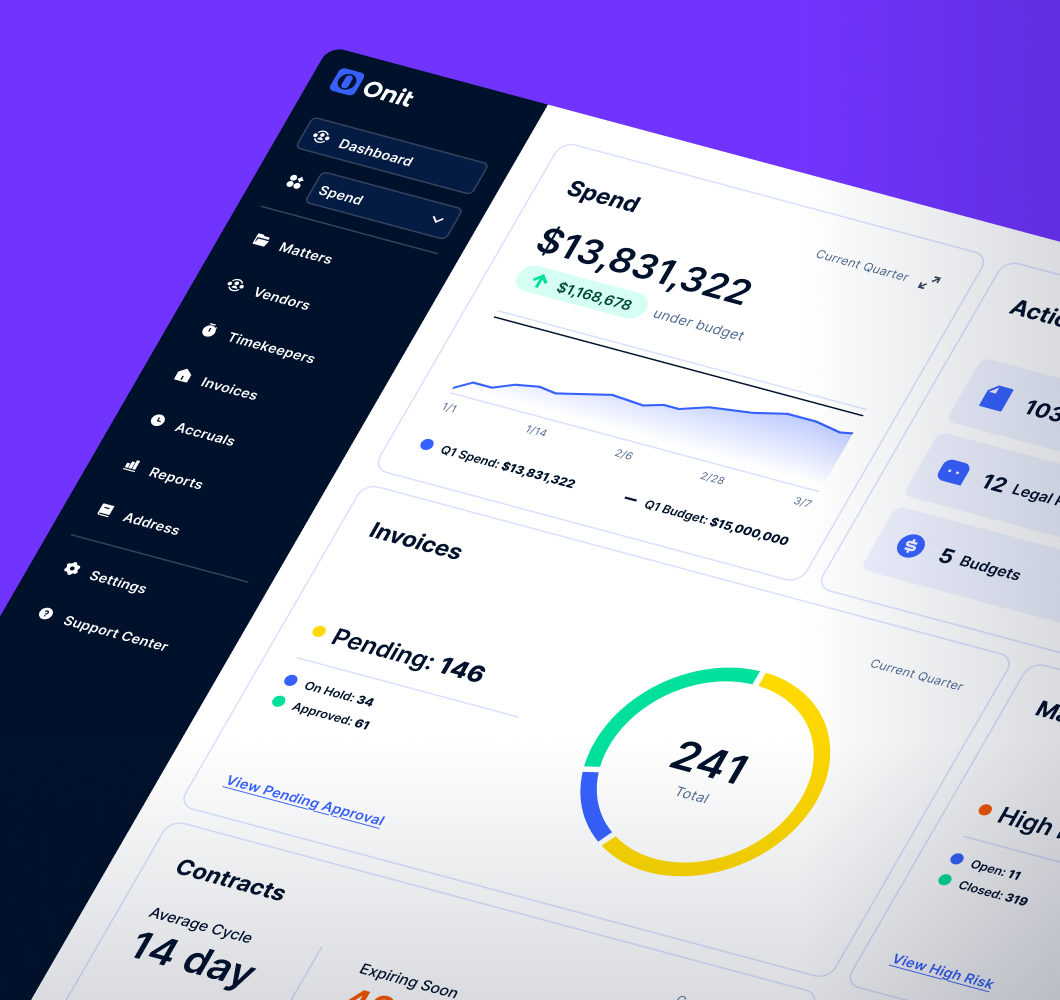
Centralize matters, invoices, vendors, and reporting in one governed system of record. Legal, Finance, and leadership operate from the same data without reconciliation.

Embed billing guidelines and approval controls directly into workflows. AI-assisted review helps flag compliance issues early while maintaining audit-ready traceability.

Provide cleaner accruals, steadier close inputs, and reporting that holds up when Finance asks hard questions. Fewer surprises. More predictable outcomes.
Unity ELM gives Legal operational control and gives Finance defensible numbers.
This is legal operations that work for the business, not around it.

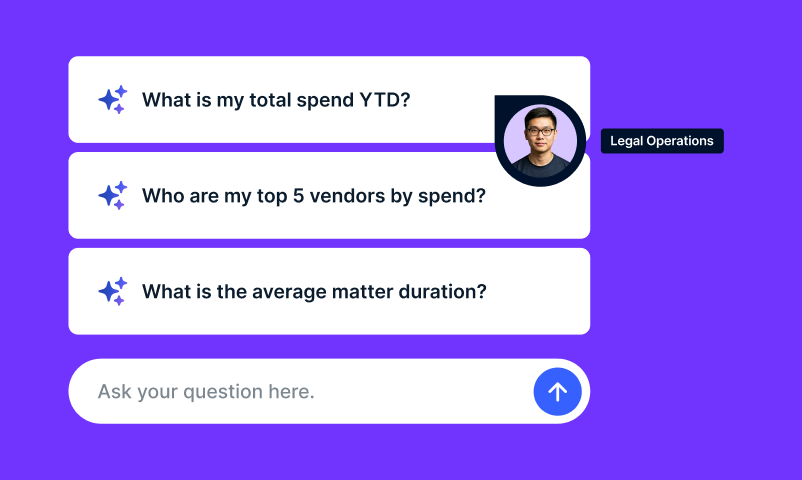
Ask Unity helps legal teams answer questions about matters, spend, vendors, and invoices directly inside Unity ELM. Ask in plain English and get structured answers tied to your system of record.
Answer leadership in minutes
Receive clear, organized answers and ready-to-use visuals without rebuilding reports for every update. Ask Unity helps Legal respond faster to Finance, leadership, and the business.
Stop rebuilding reports
Ask instead of exporting data, checking spreadsheets, or waiting on admins. Ask Unity reduces reporting drag for the questions legal teams answer every week.
Keep insight inside Unity ELM
Ask Unity works directly on governed Unity ELM data and respects role-based permissions. Teams get faster answers without moving sensitive data outside the platform.

Validate answers before acting
If a question needs clarification, Ask Unity asks for it. Results stay tied to the workflow so teams can review, confirm, and move forward with confidence.
Built for legal work
Ask Unity supports the questions legal teams ask under pressure, including spend trends, vendor oversight, billing patterns, and policy-sensitive analysis where context matters.
Ask. Act. Automate.
Ask Unity delivers answers inside Unity ELM. Unity workflows help teams move from insight to follow-through in the same governed environment.

Legal e-billing is the electronic submission, review, and approval of outside counsel invoices. Law firms submit invoices, typically in LEDES format, to the client’s e-Billing system. The system checks each invoice, looking for violations of billing guidelines, timekeeper rates, and budgets before routing it for approval.
With Unity ELM, law firms submit invoices through Counsel Exchange. Once submitted, Unity ELM validates the invoice charges against your configurable billing rules and your approved timekeeper rates. It routes invoices through automated approval workflows and logs every action in an audit trail. If an invoice is rejected, the reason appears in Counsel Exchange, so firms can correct it without manual follow-up. Unity ELM e-Billing dashboards show spend and vendor performance across multiple metrics. Spend Agent, an add-on to Unity, provides additional AI-powered invoice review of line items to find additional categories of savings.
UTBMS (Uniform Task-Based Management System) codes are standardized codes that classify the legal work on an invoice: the phase, task, activity, and expense. Because every firm uses the same codes, legal departments can compare cost and effort across matters and firms and analyze spend consistently.
UTBMS codes also let e-billing systems, like Unity ELM e-Billing, manage invoices automatically. UTBMS codes enable systems to automatically flag mismatches, such as an activity code that doesn’t fit the task, before a human reviews the invoice. Law firms typically pair UTBMS codes with the LEDES file format.
LEDES (Legal Electronic Data Exchange Standard) is the standard file format law firms use to send invoice data to their clients. It structures time entries, rates, UTBMS codes, and expenses into a consistent layout that e-billing systems can read and validate automatically, with more line-item detail than a PDF. Unlike an unstructured PDF, a LEDES file provides invoice data in defined fields that support automated processing and analysis.
With Unity ELM, law firms can submit invoices through Counsel Exchange by uploading LEDES or PDF files or entering invoices manually.
A legal billing guideline sets the rules for how outside counsel staff matters, bill for work, and get paid. Onit recommends five components:
In Unity ELM, configurable billing rules and approval workflows support consistent guideline enforcement. Spend Agent, an add-on to Unity, reviews invoice line items against uploaded billing guidelines and applicable matter-level engagement documents, helping identify issues that require contextual review. Your team controls how findings are handled and how much of the process is automated.
The most common legal invoice billing errors are:
Unity ELM e-Billing catches these through automated invoice validation, configurable billing rules, and timekeeper rate checks. The optional Spend Agent adds AI review for issues rules alone can miss, such as block billing.
Rollout time could be as little as 45 days, depending on how many billing rules, vendors, and integrations you configure. Your dedicated Onit implementation team can confirm a Unity ELM rollout plan based on your requirements and readiness.
Yes. Law firms submit invoices directly through Counsel Exchange, Onit’s vendor portal for electronic billing and collaboration. Firms can upload LEDES or PDF files or enter invoices manually, and they can track invoice status from submission through approval.
If an invoice is rejected, the reason appears in the portal, which reduces follow-up between the firm and the legal department. Invoice status and validation feedback help firms understand issues and support correction and resubmission, reducing back-and-forth with the legal department. Counsel Exchange also supports timekeeper and rate management, budget collaboration, and file sharing.
AI can help legal teams explore spending patterns, summarize matters and invoices, identify missing or outdated information, and investigate discrepancies using natural language.
Ask Unity, included with Unity ELM, lets users ask questions such as “How much did we spend on outside counsel last quarter?” or “Which matters are over budget?”. Teams can also review invoice status and approval timing, explore vendor and timekeeper information, and analyze budgets, accruals, purchase orders, and custom attributes. Support for follow-up questions enable users to refine the analysis or drill into the results.
Ask Unity returns answers, tables, and charts based on Unity ELM data and respects role-based permissions, helping teams understand costs and prepare for conversations with other departments and business leaders. Results can be downloaded for reporting and sharing. Available from any page, Ask Unity also answers product questions, such as how to create a matter or budget, so users can get help while they work.
Unity ELM stands is a complete solution for enterprise legal management. As part of the broader Unity platform, it also provides a path to expand, standardize, and scale over time.