

Category: Business Process Management

Sales Contract Management: What Do Top Performing Companies Have in Common?

Across your business, whether in sales, legal, marketing or vendor management, contracts help protect your company, define relationships and solidify business deals; contracts are the lifeblood of your organization. The sheer number of contracts the average Fortune 2000 company depends on is staggering; tens of thousands of active contracts at any given time. In addition to active contracts, your business also deals with tens of thousands of archived or defunct contracts. Further complicating the contract management predicament is that contract needs vary across business units. Contracts for legal and vendor management are concerned with compliance, for example, while a sales contract defines a specific set of deliverables or products to expedite a sale. Knowing these complicating factors, why do so many organizations employ ad hoc processes for a vital activity such as contract lifecycle management?

Or rather, maybe our question should be…how do top performing companies handle this seemingly endless cycle of contract management? There are many well-documented best practices for contract management in circulation, but one thing these proven techniques have in common is that they exist as part of a measurable, repeatable and visible sales contract management process. What exactly is sales contract management? It is a technology-enabled process by which a selling organization is able to create, store, manage, revise, and track progress around formal business contracts.1

According to Aberdeen Group, top performing sales organizations are 116% more likely to create a formal process to streamline sales contract workflow.2 We’ve seen it time and time again, across many different business activities such as legal matter and spend management, budgeting, or CRM; formal processes enable business units to increase their overall productivity. Here at Onit, we’re not surprised that contract review and approval processes are a major factor in these top performing companies meeting sales quotas and increasing their sales productivity and long-term client value. When Aberdeen Group evaluated key sales KPIs for organizations with and without sales contract management processes, they found that the average sales cycle among companies with a contract management process in place, was a month faster than lower-performing companies without contract management process.3

Sales contract management practices for top performing companies have these five traits:

Fully technology-enabled

Top performing companies usually have one thing in common; they utilize technology to enable their end-to-end sales contract process – from creation to fulfillment. Along the lifecycle, these companies employ e-signature capabilities to keep everything moving along in the digital workspace and a central repository for finalized contracts.

Collaborative

Account management is collaborative by nature. Top performing companies make use of technology-enabled management tools to help foster engagement amongst the sales team and between account managers and clients or prospects. The ability to allocate tasks and define roles and responsibilities in a digital workspace facilitates a more productive and efficient (and enjoyable!) workflow for the people involved. Another healthy side-effect of contract management workflow technology is that it reduces the non-collaborative, time-wasting, administrative tasks account managers must do, leaving them more time to devote to nurturing long-term client relationships. Learn more about adding engagement to your workflows

Transparent

In an optimal sales contract workflow, transparency is paramount. Each sales team member can view where his/her contracts are in the workflow, and what the next steps are to completion. Visibility into the lifecycle increases the ability of the sales team to build a track record of solid communication, an essential component of any long-term business relationship. In addition, a transparent process holds sales team members, managers, and invested parties accountable for their responsibilities within the workflow. With all of the stages of the process being conducted in a digital workspace, the time it takes to finalize contracts decreases. In fact, one Onit client saw a reduction of the time it took to complete contracts, from an average of 16 days down to around 24 hours!

Scalable

A top-functioning sales contract process has standard language and pricing models to fit the bulk of contracts the team will need, thereby creating time and space for legal and management to prioritize resources around the atypical, more complex contracts. The formal, measurable process around standard contracts increases the speed at which your sales team can close potential business. Utilizing a standard contract structure also helps build a solid foundation that can scale alongside the business and the sales organization to fit their evolving needs.

Data-driven

Having real-time contract workflow data into how the process is working and where the process is lacking or affecting the business negatively, enables top performing companies to allocate their people and monetary resources more efficiently. Analyzing the accessible data around your sales contract process also helps to foster an environment of continual improvement.

Could your sales process benefit from more engagement and collaboration? Onit Apps can help you bring transparency, efficiency, and collaboration to your sales contract management workflow. Contact us, or schedule a demo today!

Learn how to standardize and optimize workflows throughout your sales organization with our new whitepaper: Achieving Measurable Success in Account Management.


1. “Reducing Friction in the Sales Cycle: Best Practices in Sales Contract Management,” October, 2013. Aberdeen Group
2. “Getting it Right the First Time: Better Sales Contracting for Busy B2B Sales Operations Leaders,” February, 2015. Aberdeen Group
3. “Reducing Friction in the Sales Cycle: Best Practices in Sales Contract Management,” October, 2013. Aberdeen Group

The End of the Silo

The End of the Silo: How to Organize your Enterprise to Be “Customer-Centric”

Did you know that acquiring a new customer is seven times more expensive than the cost of properly maintaining an existing relationship? (Kissmetrics) So why are sales organizations hyper-focused on new customer acquisition versus nurturing the customers they already have? Many businesses operate as loosely connected groups of silos; each focused on its own responsibilities. The silo-ed sales approach leads to an unhealthy focus on short-term ROI rather than long-term customer success. 

In order to change the focus from short-term ROI to long-term, you must build your organizational structure around the client, making sure that each step in the sales process serves the ultimate goal of customer success. This change in focus is what makes an organization “customer-centric.” Instead of forcing customers to interact with a process that does not serve their interests, you should organize your processes to be adaptable and responsive to your customers’ needs. One way to facilitate this is through automating the sales process.

Here are seven customer-centric benefits of sales automation:

1. It democratizes account management. Rather than reserving the highest standards of service for key accounts, automating parts of the process enables your sales organization to apply those same standards to every single account. 

2. It stops reps from gaming the system. How? With clear visibility into progress toward leading performance indicators, sales reps can compete amongst themselves to “win” the game instead of trying to beat the system. 

3. It limits variance within large sales organizations. A good control system with a high level of visibility for management will limit variation and help sculpt positive customer experiences by holding sales representatives directly responsible for how they carry out their duties.

4. It creates more time for human-intensive work. When you automate the low-skill, low-reward tasks you cut down on errors and unnecessary labor hours spent. Sales automation is estimated to save companies five hours of labor per employee per week. By eliminating the human element where it isn’t efficient, you free up time for reps to focus on responsibilities such as sales and support calls which require the human touch. 

5. It puts metrics at your fingertips. An automated system can be used to analyze account and representative success and intelligently determine the best KPIs. 

6. It turns account management into a product. Automated capabilities will allow your company to differentiate itself within your industry, offering a customer experience other organizations would be hard pressed to match. Account management can be your flagship product.

7. It gives you visibility into the entire customer relationship. With a clear image of the customer supplier-relationship, you can trust that your clients will notice the effort your organization puts into account management.

For more information, download our Whitepaper: Achieving Measurable Success in Account Management.

Clean up your CRM process with an Onit Account Management App. Contact us today!

The New Enterprise Legal Management Curve: It’s About Process and Evolution

The landscape of legal technology is all about Enterprise Legal Management (ELM). As a category of technology, ELM solutions are loosely identified as integrated matter and spend management systems, but their overall goal is to help an enterprise manage legal issues and risk consistently throughout the organization.

Legal departments are adopting integrated solutions in droves because they help in-house counsel streamline matter, contract, and e-billing processes. The result of this streamlining effect is that departments are better able to handle the increased risk and compliance burdens and reduce their overall legal spend. With more work moving in-house and departments tasked with doing more with tighter budgets, advanced legal operations management is no longer a luxury, it is a necessity. Many legal departments have adopted enterprise systems to handle either matter or spend management or both.

Unfortunately, many enterprise management systems are not helping legal departments address the most critical issues facing their organization – mainly project visibility and risk-management.

The Limitations of Traditional Enterprise Legal Management Software

Enterprise legal management software does not effectively address process or collaboration.

Traditional enterprise legal management systems are mostly data and task-oriented systems that focus on maintaining large databases of information related to matters and spend. A traditional enterprise legal management solution is a system of record, so it will be less likely to track day-to-day activities within the legal department. Although some claim to address process and collaboration, the very nature of these large data-driven solutions prohibit them from doing so effectively. What results from a traditional enterprise system is a recording of the final data, such as a contract or document relating to a matter, without the context of the activities that surround it.

What these systems claim to do is enterprise legal “management,” when, what they actually do is provide a “database.” Traditional matter and spend management solutions do not address process or collaboration in a way that facilitates the implementation of consistent, repeatable processes for the variety of legal issues managed across a large enterprise. This lack of visibility into the context around these legal issues exposes companies to undue amounts of risk. And, the lack of process-driven workflow engines that work the way you work keeps adoption rates low and return on investment difficult to achieve.

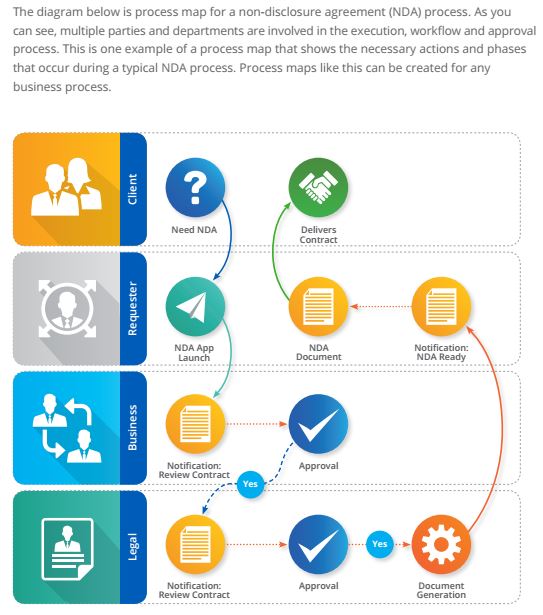
One example of this is the process of reviewing and approving NDAs. For many organizations, the non-disclosure agreement (NDA) lifecycle is an often-overlooked Achilles heel. Traditional enterprise legal management solutions may store the final document, but there are no productivity tools around its request, creation and execution. These critical documents protect intellectual property, but too often they are pulled together haphazardly, not countersigned, and left to languish in an email inbox. Work commences, and both parties forget about the NDA until a problem arises. While your existing enterprise legal management software may provide a database for the final NDA, how does it handle the process of actually requesting and managing the various approval stages? Moreover, once signed, do you know where to find the executed NDA if a problem arises? Read more: How Ad Hoc Turns NDAs into Nightmares.

Enterprise Legal Software is Not Designed to Evolve with Your Business.

The simple fact is that enterprise legal management software does not work for legal departments and the business users they support in the way IT and management wants to believe it will. For one, enterprise legal management systems take an incredible amount of resources – both time and money. The time it takes to develop and deploy one of these cumbersome systems can take months, even years. Moreover, once implemented, it can take a very long time for the business to see value from the software.

Secondly, changing the software to support new business initiatives is difficult. For as long as it took to create the original enterprise system, it can be just as expensive and time-consuming to bring in new functionality that meets changing business needs.

Facilitate True Enterprise Legal Management with Enterprise Apps

Enterprise Apps are about people and process first.

Innovative legal departments are changing and adapting to help the business they support grow and thrive. In order to do so, they recognize that matter management is not about the database, but rather, successfully managing a legal matter is about process. Implementing and enforcing consistent processes is critical to gaining visibility into how all the various business units may be exposing the company to risk.  That visibility leads to better business risk mitigation and more efficient handling of litigation when it does arise.

While a database to store final information is certainly needed, Enterprise Apps like those developed by Onit can fill the “process and collaboration gaps” left by these database-driven systems. For example, when turning out NDAs become a simple, repeatable process, leveraging the NDA App to add consistency and visibility, organizations can stay on top of their legal obligations and reduce their exposure to risk. An App will help you manage the NDA lifecycle from creation to execution, jump-starting what will be a productive working relationship in a fraction of the time and effort than an ad hoc “process.” Read more: Closing the Loop in the NDA Lifecycle.

Enterprise Apps are Designed to Evolve with Your Business.

Enterprise Apps are easy to deploy, support, learn and use. App building platforms like Onit enable non-developers to write SaaS web applications to solve human process problems for enterprise users. Enterprise Apps are hyper-focused on solving problems for your team, and have remarkably high success and adoption rates. Because they are designed to fill the process and collaboration gaps, Enterprise Apps can evolve quickly to meet your changing business needs at a fraction of the customization and administration costs associated with enterprise systems.

While your enterprise legal management software may have a long list of features, our Enterprise App clients measure success by user adoption, rather than feature checklists. Why spend big money on a complex legal management tool that does not address the visibility and the productivity of the human processes at the core of the task?

Ready to consider a new way to manage legal operations? Onit Apps for matter, contract, and spend management will help your legal department provide better service to your businesses and improve your operational efficiency. Contact us or schedule a demo today!
Five Reasons Your Legal Department Needs an Enterprise App Today

Enterprise Apps are the nimble, simple-to-create, and quick-to-deploy cousins of the traditional enterprise legal management system. If you have not yet turned to enterprise apps to help you manage your legal department operations, here are five reasons to why your department needs to take a second look.

1. You are under the gun to do more work, with fewer resources.

There isn’t a legal department today that isn’t faced with this contradictory set of mandates. You are under pressure to reduce your outside counsel spend, work leaner and more efficiently, and eke more productivity out of your in-house team. An enterprise legal app can help you do just this. By focusing on process, these apps can help you gain visibility into the way your department works, find ways to make the processes more efficient, and free your people up to do more valuable work. Showing how this can be done, Onit client ZS Associates won the ACC Value Challenge in part by their implementation of technology to automate workflows, in particular for contracts. Read more about how ZS Associates facilitated changes in order to better meet corporate growth objectives.

2. Critical processes are currently being managed primarily through email and network folders.

If you are struggling under the weight of managing critical workflows through traditional enterprise legal management or other database systems, you’ll know how difficult it is to have real visibility into the legal processes taking place throughout your organization. This can be the case even if your department uses an enterprise legal management system for the “big” stuff like matter and spend data. These antiquated systems, while still useful, open your department up to undue risk and frustration when it comes to mission-critical processes. In one example, Onit helped a Fortune 500 client identify no fewer than 72 processes, across six internal groups and ten external vendors, which were being managed the old fashioned way. The solution was a suite of 50 enterprise apps that have since helped to process 20,000+ transactions in a transparent, defensible, and efficient way. Here are five quick telltale signs a process is ripe for a change.

3.  Enterprise Apps can bring new life to your existing ELM system.

Traditional enterprise legal management systems function as systems-of-record, a place where end data is stored. The primary function of an Enterprise App is to add a layer of engagement onto a system-of-record to make the processes happening around the data easier to manage and track. A system of record is only as good as the data included. Without a clear process for capturing and sharing data, the records in a database can quickly get outdated and even provide incorrect information. Enterprise Apps provide an easy-to-use front-end for your internal users while pushing back relevant data to the system-of-record already in place, all without major infrastructure changes. Read more about filling in the gaps by adding engagement to your enterprise software.

4.  Enterprise Apps address the primary problem you face, as a GC.

The day-to-day support activities that take too much time and pull your in-house team away from meaningful involvement in strategic priorities is a major issue for general counsel. With Gartner asserting about enterprise legal management, “It’s no longer just about matter and spend management,” it is important that GCs also involve themselves in business processes. The individual steps and tasks within workflows such as contract review and approval are largely untracked and invisible, which results in a much slower completion rate and less accountability along the way. Enterprise Apps bring these workflows out of the dark, bring accountability and visibility to the entire workflow, and allow for a quicker response time. All of these benefits mean that your in-house team is spending less time chasing “where” they are in a workflow, and leaves them more time to do the highly-skilled work that they are trained to do.

5.  You need a process solution, FAST.

You’ve identified your department’s workflow Achilles heel, yet you are afraid to start the long process of implementation that typically occurs with a traditional enterprise legal management system. Understandably so! It can take months, even years of development, testing, and training to roll out an enterprise software solution. In addition, the failure rate for enterprise systems is high because by the time the software is implemented your needs will have changed. You don’t have endless piles of cash due to your mandate to save money. Therefore, you don’t want to spend said money only to have that technology solution fail after a long implementation process. By contrast, Enterprise Apps are simple-to-create and are iterative by nature so they will evolve to meet your changing business needs. You can configure an Onit App in just 30-60 minutes at a fraction of the price of traditional ELM systems. In our Fortune 500 example above, the average development time for the 50 Enterprise Apps Onit created was 19 days.


To learn more about Enterprise Legal Apps, contact Onit today.

Onit is proud of the relationships we’ve built and the process improvement we’ve achieved with our valued customers. However, don’t take our word for it, check out what our clients have to say about Onit Enterprise Apps.

Ten Things You Need to Know About Enterprise Apps and How They Relate to Enterprise Legal Management (ELM)

1. The landscape for in-house legal departments has fundamentally changed. General Counsel (GCs) must think outside of his/her department when it comes to managing the entire enterprise’s legal affairs. This shift has meant that visibility into risk and compliance issues handled across the company, and metrics around spending and productivity are essential to a GCs success. Enterprise Legal Management is a term that has evolved to define this greater need for aggregated information across disparate departments in order to make better company decisions. 

2.  Enterprise Legal Management is a class of technology that helps GCs navigate this new landscape. The aim of ELM technology is to organize and inform through data. This class of technology makes it easier for GCs to gain visibility into potential legal risk across the wider organization, moving away from the siloed approach of yesterday. This enables a more proactive approach to managing the enterprise’s legal affairs and mitigating risk wherever it exists. 

3.  Enterprise Apps are the nimble cousin of your existing Enterprise Legal Management system. While larger ELM systems can give you easier access to global data, these systems don’t necessarily address the collaboration required to harness and use that data to benefit the organization. Built from the ground-up, Enterprise Apps are simple-to-configure, and easy-to-deploy solutions that aim to address complex and everyday processes that require a high degree of collaboration between knowledge workers. 

4. Enterprise Apps can integrate with existing ELM systems. Although these Apps can replace larger systems of record, they are more often than not, a way to bridge the gap that exists in those larger systems. Do you have a gap in functionality in an existing enterprise system that requires collaborative workflow? An Enterprise App can be used to bridge that gap at a fraction of the cost, rather than having to reconfigure your existing system. 

5. Companies of any size can benefit from Enterprise Apps. In-house legal departments dealing with organizations of any size, from small businesses to multi-billion dollar global corporations, can benefit from Enterprise Apps.

6.  Enterprise Apps are a quick way to drive meaningful operational improvements. Unlike the development and implementation process for a large enterprise legal management system, which can take several months or years, the average time it takes our clients to implement an Onit App is 19 days. While the most complex implementations can take up to 90 days, this still beats the average for ELM systems by months. 

7.  Enterprise Apps can help your legal department transform the way it works. In one example, Onit partnered with a large Fortune 500 client to deploy an NDA App. The company’s in-house legal department dealt with over 10,000 NDAs annually, with the average time from start to finish taking over 16 days. Onit developed a prototype App to handle global submission, negotiation and electronic signature of NDAs. The result? The company processed over 1000 NDAs in the first month of deployment, with the completion time reduced to just 24 hours and 90% of the NDAs being processed without lawyer involvement. 

8.  Enterprise Apps are secure.  Like your larger Enterprise Legal Management system, your Enterprise App data is hosted in secure commercial data centers. In most cases, your data is more secure than if you hosted it in your environment. 

9.  Enterprise Apps require little or no IT involvement. In many cases, customers can configure, deploy, and support enterprise Apps with no corporate IT involvement. App developers, such as Onit, achieve a “low code” or no code development structure, which also speeds up the time to value for our clients.

10.  There is an Enterprise App for every need/process/workflow. Apps for very standard processes like contract review and approval, NDAs, alternative fee arrangements, and matter or legal spend management are available.. Alternatively, Apps can be created from scratch to meet a particular process or set of circumstances unique to your business.

When you are exploring enterprise legal management systems, it helps to have a technology partner who can walk you through the process of creating an effective solution that works for your department. Onit can help you determine your best course of action, and we’ll be there every step of the development process.

With a small investment of your time – typically 60 to 90 minutes – to help us understand your business process, we can configure an App. Contact us today!

A Simple Process Improvement Plan for Legal Departments

The business climate around us has changed, and in many cases, not for the better, with undue value placed on eking out more productivity (not the good kind), while spending less. For legal departments, this means a triple whammy of smaller budgets, fewer resources, and increasing workloads being brought back in-house. Businesses that best adapt to their changing climate will not only survive, but thrive. In the words of Charles Darwin, “It is not the strongest or the most intelligent who will survive but those who can best manage change.” One way to ensure your business continues to thrive is by engaging in strategic process improvement.

In a recent article by George Dunn and Wendy Hufford, both experts in process improvement, the authors lay out a simple 3-step process improvement plan for legal departments. Process improvement can be an overwhelming project with many teams stalling just out of the gate because of the truly daunting nature of change. The article does a great job of distilling change down to a few exercises so that you can start putting pen to paper when it comes to a much-needed change.

According to the authors, step one is to get acquainted with the various process methodologies out there. Everyone may be talking about process, but there are many different ways to approach it. The five methodologies noted by the authors are Continuous Process Improvement, Business Process Management, Re-engineering, LEAN, and Six Sigma. Sometimes, it takes a combination of methods to find the right fit for your organization. At Onit, our solutions employ a combination of business process management (BPM), which focuses on “innovation and flexibility through combining process and technology changes,” and the continuous process improvement methodology, which focuses on making small changes over time rather than one big overall change.

Next, you should identify the areas within your department that could use improvement. Anyone who’s worked on an in-house legal team will be familiar with the common departmental vulnerabilities outlined by the article. Onit Smart Process Apps aim to create efficiency in common tasks that typically cause a lot of backlog and frustration. Processes such as contract management and administration, records retention and storage, and email communication are ripe with unnecessary frustration due to lack of visibility, the tracking down of documents, approval delays, and exposure to risk. So, how can you tell if a process is ripe for change? Look out for these five signs.

At Onit, we offer Smart Process Apps to tame common processes such as contract review and approval, NDAs or alternative fee arrangements. Need a custom solution? Our nimble App Builder platform allows you to create a customized solution that can adapt to grow with your business. Onit’s overarching philosophy across all of our technology solutions is to provide a new level of visibility and transparency into processes to help knowledge workers involved in the process be more productive, happier and more successful.

The third and last step is to create a process improvement plan for your department. The article lays out some specific items to think about, consider, and finalize, in order to put that plan into place. One important item is to start creating a culture of change within your organization. One way to do this is to build a coalition of like-minded individuals united around one inefficient process area. Check out our blog post: “3 Steps to Creating a Solid Foundation for Your Change Initiative.

Another big part of creating a plan is to prioritize potential process improvement initiatives and to audit current processes to find soft spots and opportunities. Need help conducting a process audit? We’ve put together four exercises that will help you deconstruct your process in order to figure out your baseline and lay out a plan for improvement. Finally, an important step as you engage in any process improvement initiative is to enlist the help of a third-party partner who can help you every step of the way.

Have some process improvement ideas for your legal department, but not sure where to start? Onit can help! Contact us or schedule a demo to learn more about our Smart Process Apps and App Builder platform.

Need more inspiration to start a change initiative? The Darwin quote above comes from an excellent list of quotes about change from Inc.com.


Four Exercises to Help You Set Change Goals for Your Organization in 2015

Are there changes you’d like to drive in your organization this year? Now is the perfect time to sit down and draw up a basic framework for that initiative. We’ve put together a list of questions to help you perform a basic process audit of your organizational processes. Once you go through a process audit, you’ll be able to set goals for your organization for 2015.

Before you can determine which processes your initiative will tackle, you need to understand how those processes affect the customers within and throughout your organization. Any change that improves efficiency in delivering product or services to customers will provide a return on your investment in making the change.

Exercise #1 – Which processes drive your business?

Choose three processes or workflows that drive how your organization delivers on its objectives. For our example, we’ll be looking at sales contract administration for Corporation X.

Exercise #2 – Are these processes delivering on their objectives?

To help you choose a few processes to isolate, here are some high-level questions to answer:

  • How do these workflows help or hinder the overall productivity of your team or organization?
  • Is there an inefficient, but critically important part of the process in which team members are repeatedly bogged down?
  • Do you deliver any product/service to internal or external customers without a formal process? (major red flag)
  • Are these processes hard to manage because a gap exists around them in your existing software?

Exercise #3 – What are the considerations for each process?

Now it’s time to conduct a basic process audit for each of the three you’ve identified through the preliminary questions.

Process/Workflow Name

Example: Sales Contract Administration

What is the deliverable?

Example: an executed contract for client XYZ…

Who is (are) the client(s)?

Examples: CTO at client XYZ and VP of Sales and Accountant at X Corp

What are the steps involved in completing the process?

Ex. 1. – Client XYZ is interested in purchasing goods or services, and the sales executive requests a contract to solidify the deal.
2 – Contract is drawn up at X Corp and sent to XYZ to sign.
3 – Contract is reviewed at XYZ.
4 – Edits or signed contract sent back to X Corp
5 – X Corp reviews edits and/or signs contract (steps 4 & 5 may happen more than once)
6 – Contracted executed by XYZ and X Corp and delivered to both parties
7 – Final document stored for reference
8 – Sale of widgets, or services to be rendered between X Corp and XYZ can begin.
9 – Contract must be managed for compliance, deadlines, expirations, etc.

Which roles are involved in delivering this product?

Examples: Sales at X Corp; VP Sales at X Corp; Legal team at X Corp; Admin at X Corp; Requesting Department at XYZ; CTO at XYZ; Legal team at XYZ; Admin at X Corp

How do you measure success?

Examples: number and velocity of executed contracts has a direct impact on sales revenue; client XYZ and X Corp receive a clear contract document

How successful is the current workflow?

Examples:

  • 5 clients went to competitor because they needed an executed contract in a much quicker timeframe;
  • Admins at X Corp have to do a lot of back and forth with version tracking and mistakes are often made; due to mistakes made in version tracking, several client relationships are strained;
  • The process is much more expensive from a time perspective than it needs to be;
  • Due to the added time spent by personnel, the process is more expensive than it needs to be;
  • Executed contracts cannot be located quickly and produced on the fly

Exercise #4 – How can the process be improved to deliver on objectives more successfully?

By examining each step of the process under a microscope, you can more easily see issues and identify opportunities for improvement.

Look at your process audit and determine what changes would improve it.

Examples of improvements could be:

  • Team members collaborating in real-time will reduce the potential for mistakes that happen when tracking versions of a contract in a static environment;
  • A quicker process from start to end will improve efficiency overall and lead to quicker delivery of product;
  • Transparency of process gives team members visibility into where the process is currently

In evaluating the outcome of your potential changes, make sure the answer to the following questions will be a resounding YES.

  • Will the process be quicker, therefore allowing for more efficiency?
  • Will the accuracy of the process be improved by the change?
  • Will the optimization of the process increase productivity?

Now that you’ve gone through the exercises, we hope that you are inspired to take on advocating meaningful change in your organization in 2015. Check out these additional resources on our blog:

3 Steps to Creating a Solid Foundation for Your Change Initiative

5 Telltale Signs a Process is Ripe For Change

How to Map and Organizational Process in 5 Steps

Ready to get started on your First Enterprise App? Download our whitepaper Your First Enterprise App: 6 Steps to Successfully Implement Change in Your Company.

Whistleblowing is Evolving; is Your Organization Prepared?

From the continued ripple effect resulting from Edward Snowden’s leak of NSA surveillance programs, to increased reporting stemming from the Dodd-Frank Wall Street Reform and Consumer Protection Act, whistleblowing is a hot topic. A recent article in Corporate Counsel, Lawyers on All Sides See Whistleblowing Evolving Fast, explains the changing whistleblowing landscape. For one, the sheer number of whistleblowers has exploded. Take Dodd-Frank for example; according to a SEC report, in 2011 there were 334 tips compared with 3,620 in 2014. Secondly, the awards are getting bigger, with one recent payout amounting to an impressive $30 million. With statistics like these, companies have to be prepared.

Is your organization prepared?

Do you currently have an internal or external reporting policy or program? Even well-intentioned companies with reporting systems in place, haven’t quite found the right balance between encouraging reporting, protecting employees who come forward and protecting the company interests over time. A recent article in the Journal of Accountancy, Are Organizations Hindering Employee Whistleblowing?, discusses this phenomenon:

“Companies that maximize their employees’ willingness to report fraud in-house position themselves to learn about problems before they become bigger issues – and before employees feel the need to report them outside the organization.”

The article also references a 2009 study published in Auditing: Practice & Theory, that found that employees are more hesitant to report possible fraud to outsiders as opposed to using internal company reporting programs. In addition, employees are much more willing to report if they can do so anonymously.

Onit can help.

The Onit Whistleblower App enables you to customize an internal reporting & case management system for your organization’s needs. Using simple reporting forms, employees can anonymously report issues into a single repository, giving management visibility into potential problems that might otherwise go unnoticed or unreported. The larger benefit to the company, of course, is that by getting early insight into exposed risk, management can start internal investigations and address the issue before it becomes a much larger problem. As with other Onit solutions, the Whistleblower App allows for a collaborative workspace, enhanced visibility into cases, and supports compliance with the Sarbanes-Oxley Act.  Affordable, intuitive and easy to use, Onit’s Whistleblower App can help you effectively manage your organization’s risk and exposure in a way that encourages employee reporting in a protected environment.

Click here to learn more about our Whistleblower App. Contact us to find out how Onit Apps can help streamline any number of your business processes.

2015 Business Resolution: Change

Resolution: Change
Where is your organization headed in 2015?

It’s that time of year again, where we take stock of what happened over the past year, both the good and the bad, and declare our hopes for 2015. What are the things you’d like your business to accomplish next year? What changes or improvements are necessary to bring this about? Taking stock of where your business is today, how can you evolve to meet the demands of digital business next year and beyond?

First, we think it’s helpful to look at the trajectory of technology and digital business. It serves as a reminder that the world is changing around us, whether we like it or not. Looking at these trends also reminds us that we are in this boat together, so let’s learn from each other and grow together. Working with our clients over the past few years, we’ve observed that technology as a business tool has fundamentally changed, so has the role of IT. The move towards customer-driven solutions, and away from large-scale systems of record has had far-reaching consequences. The way our customers research vendors and buy products now is accomplished largely outside of a direct human-human sales context.

Gartner’s recent predictions for 2015 and beyond tell a similar story. In their list of Top 10 Strategic Technology Trends for 2015, analytics will play a huge role in critical app functionality. However, it’s not enough to have access to big data, instead “we’ll need big questions and big answers,” in order to put those analytics to work. Also on the list are Cloud/Client Architecture (centrally coordinated apps that can be delivered to any device) and Software-Defined Infrastructure and Apps. Of the latter, Gartner says, “computing will have to move away from static models to deal with the changing demands of digital business.” With regards to who is engaging the new technology, Gartner found that almost 38% of technology spending is happening outside of IT, signaling “a shift of demand and control away from IT and towards business units closer to the customer.” (Gil Press, Forbes). This is something we see at Onit all the time, given that most of our buyers are from legal or sales departments.

For the first time, Gartner predicts that technology through connected devices will improve our overall health. Technology is better responding to the needs of consumers and is providing incredibly useful tools to manage our health and to reduce the amount of mundane processes we go through to get information or to accomplish our objective. As mobile technology will impact our individual health and efficiency, Onit believes that nimble app-centric solutions will impact our businesses’ health for the better. By removing or improving the tactical processes that impede or delay progress, these apps can drive department efficiency and reduce risk, impacting both employee’s job satisfaction and the bottom line.

Evolution is a necessity for business survival, but you needn’t scrap your existing systems and start over. We have found that meaningful change can come from some of the smallest, projects or processes. Our customers have developed apps for everything from contract administration to whistleblowing, to vendor management and sales enablement and have seen tremendous success.

So, what are your improvement goals for 2015? Onit can help. Contact our team, and check out our new whitepaper, Your First Enterprise App: 6 Steps to Successfully Implement Change in Your Organization.

Sources:

http://www.forbes.com/sites/gilpress/2014/10/09/gartner-predicts-top-trends-for-technology-it-organizations-and-consumers-for-2015-and-beyond/

http://www.forbes.com/pictures/fgjd45eldm/4-advanced-pervasive-invisible-analytics-2/

Your Change Initiative: Four Strategies for Preparing for and Overcoming Resistance

Advocating change in any organization is a daunting process. A major hurdle for every change initiative is overcoming resistance. Your idea could be sound backed up by solid facts and figures, but you are still likely to encounter resistance. No matter how beneficial your change is, you’ll have to get around the “corporate immune system”. As can the immune system in our bodies, the corporate immune system can squelch things that are outside the “normal” way of doing things.

Once you have established a solid foundation for your change initiative, it is important to develop a set of strategies and tactics for overcoming the inevitable headwinds that precede meaningful improvement.

75% of organizational change programs fail because leadership didn’t create the necessary groundswell of support among employees.
(pwc.com: How to Build and Agile Foundation for Change)

Here are four strategies for preparing for and overcoming resistance:

Balance your coalition with people from all angles of the problem

The common element that will bring your coalition together is the problem that needs changing. If you’ve seen a need for process change, there is no doubt that this need for change has firmly rooted itself inside and across cross-functional teams. Form your coalition from all angles of the organization, from different departmental perspectives. For example, there may be strategic concerns in addition to tactical when dealing with an inefficient process. Colleagues working behind the scenes will view the problem differently than the sales team. If you have identified how the problem affects people at all levels of the organization, and have built your coalition to reflect those varied perspectives, you are more likely to get buy-in. The added benefit of a diverse coalition is that when it comes time to sell the initiative to the larger organization, you will have already addressed a variety of perspectives, including those of your resisters.

Present an emotionally compelling case for change

Change can be difficult for people. Although your case for change has a solid foundation of facts and data, don’t discount the human, emotional component. The inefficient process you want to change may cost your company money, but it also causes undue frustration and wasted time on the part of the people involved in the process. Present not only facts and figures, but convey how the improved workflow will help them be happier and more successful in their jobs.

Analyze organizational factors that can help or hinder your change initiative.

In “Choosing Strategies for Change,” from the Harvard Business Review, John Kotter and Leonard Schlesinger recommend asking the following questions when preparing for potential resistance:

  • How urgently does your organization need this change?
  • How powerful is your coalition in relation to resisters?

The strategy for your organization-wide persuasion tour will revolve around these two questions. If the change you are advocating for is extremely urgent and your coalition is more powerful than your potential resisters, it is full steam ahead. When the polar opposite is true, you’ll need to proceed more delicately. If the change is urgent, but your coalition is less powerful than the resistance, it might be helpful to bolster your coalition with a member of the leadership team. By analyzing and anticipating these factors, you can better prepare your coalition for the necessary selling-in process. You can also set more realistic expectations when it comes to change deployment.

Put tools in place to mitigate ongoing resistance

Just because you’ve sold your idea for change, and the larger organization is on board, your job as change-agent is not done. Kotter and Schlesinger recommend implementing tools to help manage ongoing resistance. Consider an infrastructure that will enable education, skills training, support and the offering of incentives. No matter how good a job your coalition did at convincing the company to embrace the change, success of the initiative hinges on a support infrastructure. Getting to the stage of being able to deploy the process change is the first step, but having people use the improved process in their daily jobs is the key to long-term success.

Onit can help you be an agent for change. Now that you have strategies for overcoming resistance learn more about embarking on your first change initiative. Download our whitepaper, Your First Enterprise App: 6 Ways to Successfully Implement Change in Your Company.