Category: Business Process Management

The Contract Administration Challenge: Find a Two-Year Old Contract in 30 Seconds

How organized are you? If your client asks for a copy of a contract from two years ago, can you find it in minutes? Seconds? Or do you find yourself wasting hours by drudging through piles of files and canyons of paper?

If you’re relying on paper-, email or spreadsheet-based processes for contract administration, chances are you won’t be able to keep an accurate track of contracts.  The lack of a central repository means there is no easily accessible access to the contract library and the ability to perform robust searches.  It’s difficult to correlate specific communications – especially ones from two years ago – with the right contract. You can lose track of renewal dates or even pull up the wrong version of a contract. 

Don’t make contract administration difficult. The right tools – such as the Onit Contract Administration App – can streamline, automate and access the contract information you need in the snap of a finger. But don’t take my word for it. Check out how Amy and Ben handle contract administration.

How Well Do Your Paper Surf?


We’ve all seen those offices – the offices with more paper than the Library of Congress. Folders perched on desk tops, piled high and proudly defying gravity. Stacks of paper poke out from inboxes. The trash bin is choked with cast off drafts and shelves sag under paper weight.

The people that own this office will look at you and say, “I have a system.”

They probably do. But how quickly can they track down pertinent information when its data is spread across multiple files on multiple pages in multiple locations?  Can they easily access the big picture? Can they surf the paper waves quickly enough to report on budget performance for a particular legal matter, grab the absolutely latest version of a document or ascertain the status of an important task assigned to a team member?

The right App can take all the information that exists on reams of paper and make it meaningful, insightful and accessible from your smartphone or desktop. Because if you don’t have the right tools for matter management, you may end up like … well, this woman.

Click here to schedule a demo today.

The End of the Contract Management by Spreadsheet Era

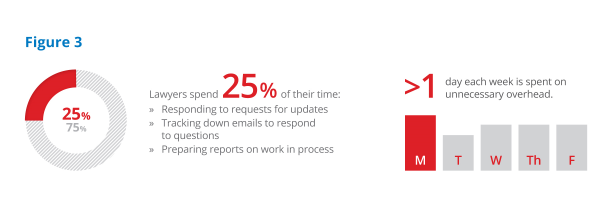
Thanks to a highly manual review process supported by tools like email, spreadsheets, word processing software and shared drives, an incredible amount of time is spent on administrative work that has nothing to do with actually getting the contract negotiated. In fact, surveys suggest that lawyers spend as much as 25% of their time — more than one day out of each week — responding to requests for updates, tracking down emails to respond to questions and preparing reports on work in process.

onitfinaostage.wpenginepowered.comEndOfEraFigures 3 resized 600

With most law departments facing dwindling budgets and personnel, coupled with the rise in workload and client expectations, how can productivity and quality be maintained?

Contract Management with Flint and Steel

Every action counts. Every process must be examined.

Quick question: Which tool would you use to light a candle?
A. Flint and steel
B. Match

Both tools accomplish the task — one way or another, your candle gets lit. However, you would only choose flint and steel if a match were unavailable.

Similarly, email, spreadsheets, and word processing were the tools of choice simply because they were available, needed no IT support and were familiar to the users. Now, as transaction volumes increase and demand for faster turnaround times from the business become the norm, these tools simply do not have the capability of doing the job well.

Corporate law departments—and the business units they support—are simply unable to effectively manage the review, approval and management of contracts with tools such as Outlook and Excel. The business demands and processes now far exceed the capability of these tools to get work done in an efficient, collaborative manner. Law departments need more than what these tools can offer in order to meet the expectations of the business units they support.

Contract Management Made Easy with Apps

Since the advent of smart phones such as the iPhone or Android devices, Apps have proven especially popular with consumers due to their ability to simply and capably solve a specific problem. These highly focused software programs are easy to install, easy to use and give you the information you need quickly.

An App can easily furnish you with what you need now. And, Apps are crossing from the consumer world into the business environment. Read our white paper “The End of an Era: Evolving Beyond Email and Spreadsheets to Manage Your Law Department” to learn more about improving contract management and contract review processes.


Banishing the “Black Hole Mentality” of ReviewAI

Quick: How many contracts are pending review in your department? How many have been approved in the last 30 days? Who is reviewing each pending contract right now and how long does it take for a contract to be approved?

If you can’t easily answer these questions, chances are that you might not have the right tools or practices in place. A lack of transparency can lead to impaired overview and decreased service that can impact revenue. As one general counsel of a Fortune 500 corporation shared, We weren’t tracking assignments properly, and we weren’t being responsive to customers. I felt we had to get rid of the black hole mentality, and one way was to have a better way to track contracts coming in.

Find out how to banish the black hole mentality with this new whitepaper: Streamlining ReviewAI & Approval to Drive Revenue Velocity & Increase Client Satisfaction.

The white paper examines common contract review and approval processes and tools to determine:

  • How tools like email and spreadsheets fall short
  • Why traditional approaches are not sustainable
  • How Apps are reinventing the contract review and approval process
  • Why Apps are the wave of the future

Download the white paper today.

The Sourcing Manager’s Contract Conundrum

file000661441636Sourcing managers know: Contracts are the foundation of business. They spend a majority of their time reviewing, negotiating, shepherding and gaining approval for pieces of paper that will ultimately help their companies drive down costs, create beneficial alliances and reduce risk.

They handle full portfolios of contracts that range from pending to finalized to executed and work with numerous departments within the company to attain final approval – that’s no small numbers of important negotiations to keep tabs on. One mistake can seriously jeopardize progress, costs and projects.

So why would a sourcing manager rely on email or spreadsheets to handle such an important task? Manual processes = more risks.

With the right software, a sourcing manager can gain greater visibility into a contract portfolio which means:

– Enhanced insight into total time for approval

– Iron-clad audit trains to support compliance

– Establishment of a proven process to manage risk

– On-demand status reports of all outstanding contracts

Here’s how one sourcing manager accomplished this.

How a Simple App Can Increase Sales Revenue

Anyone who grew up watching PBS or has kids will probably recognize the Sesame Street jingle “One of these things is not like the others.” The song preceded a visual of several things and the adults would dare the muppets to find the one that doesn’t match.

So here’s our own version of One of These Things is Not like the Other:

  1. Lawyer: I love contracts.
  2. Sourcing manager: I love contracts.
  3. Salesperson: I love contracts.

Did you spot the item that doesn’t belong? Here’s a hint: It isn’t a lawyer or sourcing manager.

Sure, contracts mean the completion of a successful sales effort and a new client. But most sales people would argue that they’d prefer to be working towards new contracts as opposed to being mired in the administration-level efforts of tracking the progress of several existing ones, coordinating with internal stakeholders and pounding the pavement for the most updated copy.

That’s where Onit comes in. With the Onit ReviewAI and Approval App, sales managers can easily get a contract reviewed and approved. This means:

  1. A quicker sales cycle
  2. Automated handling of review and approval from inception to close
  3. Advanced and automated notice for contract renewals
  4. Enhanced insight into contract performance and intelligence
  5. Improved communications with clients and external parties throughout the process

Let’s see how this sales manager did it.

How Excel and Outlook Kill Contract Transparency for Legal

When corporate legal departments shut down at night, I bet Excel and Outlook catch up. They poke their iconized heads out of computer screens, look both ways, step out slowly and start gossiping. The conversation probably goes something like this:

Excel: Did you see my latest spreadsheet? One thousand lines tracking the contract for the new client. I’m working on blinding the attorney cell by cell.

Outlook: Totally saw that in her in-box. Five hundred emails about it and counting!


[Cue the maniacal laugh from them both.]

So maybe I’m being a bit dramatic, but if you’re a lawyer in a corporate legal department this conversation may strike a chord. You may spend all day drafting, negotiating and executing licensing and contract agreements. Hey, it’s your job to minimize risk and exposure. You turn to the tools to help you accomplish this and coordinate with the necessary departments to finalize the contracts be it sales, IT, HR, sourcing etc. But while it is natural to turn to everyday tools such as Excel, Outlook or even a collaborative tool, your old friends may fail you when it comes to handling this process.

For one, they’re not efficient. Chances are you’ve seen an uptick in the amount of contracts coming in the door. And chances are your company has had staff reductions. Doing more with fewer resources demands that the correct tools are introduced for efficiency’s sake. What tools are you currently using for contract review? Do they help eliminate confusions such as which version is the most current or if it reflects the customer’s requirements? Can you easily pinpoint where you are in the process?

Also consider that manual processes can’t provide contract transparency. Less transparency equals greater risk. The review process is often too complex in today’s corporations to be accurately recorded with manual processes. This means important questions such as “Where is that contract?, “How long has it been there?” and “Is the correct party reviewing it?” – are difficult to answer. Manual processes, such as tracking with email or spreadsheets, break down the contract automation and management process. This means your company is vulnerable to more risks for errors and control gaps that slow down or sideline contract review.

So what tool do you need? Is it time to go to enterprise systems?

Not so fast. That’s a natural progression of thought, but remember that enterprise solutions are often hard to alter or update, normally don’t scale well and require extensive dependence on IT. With the best of intentions that enterprise solutions offer, often its characteristics impede the process more than aid it.

So what’s the right-sized solution for this challenge? Let’s see what Susan has done.

You are not an ENTERPRISE!

An enterprise, according to Wikipedia is defined as follows: 

“A business (also known as enterprise or firm) is an organization engaged in the trade of goods, services, or both to consumers.[1] Businesses are predominant in capitalist economies, where most of them are privately owned and administered to earn profit to increase the wealth of their owners. Businesses may also be not-for-profit or state-owned. A business owned by multiple individuals may be referred to as a company, although that term also has a more precise meaning.”

Clearly, you are NOT an Enterprise! You likely “work” for an enterprise though, and probably find yourself using “enterprise class” software to do your job, such as:

        • Enterprise application integration
        • Enterprise architecture
        • Enterprise automation
        • Enterprise cloud services 
        • Enterprise compliance management
        • Enterprise content management
        • Enterprise customer relationship management
        • Enterprise legal management
        • Enterprise management software
        • Enterprise resourcing planning
        • Enterprise risk management

Having been built to solve enterprise problems though, many of these systems simply get in the way of the work you have to do and in many cases even create more work.  As a professional trying to get a job done, you likely end up defaulting to email, documents and spreadsheets to manage and keep track of your work. Think about a lawyer whose job is to negotiate contracts.


describe the imageThis lawyer spends all day drafting and negotiating licensing agreements and other transactions critical to her company. The enterprise depends upon her to minimize risk and exposure. Her clients, the people she works with, need her to turn work around quickly.

She’s good at her job, is a consummate professional and doesn’t need a lot of help, but it seems crazy that she doesn’t have a simple system that helps her keep track of all the work she’s responsible for, a system that lets everybody she works with know what she’s working on and when to expect it. 

Although the work she does is critical to the lifeblood of the enterprise, any enterprise tool she’s seen doesn’t really help her do it! They tend to be way too complicated and try to do too way too much. I guess it’s not surprising given the years of design and implementation spent to produce these comprehensive “best of breed” solutions. 

In truth, to get her job done, she doesn’t need “best of breed.” She needs something far simpler than an enterprise contract management system, but significantly “better than email.”

She simply wants a tool for the way she works so she can stay on top of work, keep her colleagues informed and update her boss about her workload and priorities.

You are NOT an enterprise and do NOT have to use enterprise tools to deliver quality service to your colleagues and customers.

Learn how an Onit App can be customized to suit your needs – the enterprise of one.

5 Key Benefits of Process Management

In many paper-based offices and departments, process management is defined as just having a system in place: emails, task-list spreadsheets, or even interoffice envelopes that float back and forth between departments.  Some more forward-thinking companies will implement a task list that lets a manager assign items to staff, but overall, it requires a lot of manual input and is not intuitive – and when a new task comes in, the manager and staff scramble to assign it and account for it.  Technology can take the pain out of this process – particularly a system that allows for automatic routing of tasks and creates accountability.  Here are just five ways investing in the technology can streamline difficult processes:

    1. Creates a front office for legal departments. In an organization with a legal department, there is no receptionist, unlike private law firms.  No one is taking messages with information on new cases; often, an email will be sent to someone in the legal department, and work will be expected to commence.  That person may be out of the office or may have to reroute the work.  With process management, that work gets routed automatically.  For example, general counsel may need to review contracts for over $1 million, which the sales department may NOT know.  Process management alerts the general counsel to the need and allows her to get right to work, rather than have it routed through a more junior attorney.
    2. Enables legal departments to track and account for work. In the traditional paper- and email-based project management world, it’s very hard to account for who is doing what.  This leads to confusion and wasted time.  With process management, each task is accounted for by assigning it to the person best suited for the job – which you define.  There is no more of this “I thought Susie was handling the discovery requests.”  Now you know that Bob is responsible, and Bob can update the team of the requests’ status easily.
    3. Enables legal departments to budget for work. In today’s economy, budgets are at the forefront of law offices and legal departments.  For law offices looking at alternative fee arrangements, process management can help them better estimate flat-fee agreements and ensure that they are staying on budget by tracking the hours spent working on matters.  (Yes, it seems counter-intuitive to a flat fee arrangement, but tracking hours is the best way to gauge how much to charge.)
    4. Improves efficiency. This goes back to tracking and accounting for work: a good system definitely improves efficiency across the business.  It automatically assigns tasks and allows the requestor to track how the task is progressing, eliminating the need for multiple emails, phone calls, or trips to the department to get updates.
    5. Allows insight into performance. Let’s face it, the sales force or marketing department isn’t quite sure what goes on behind the curtain of the legal department.  They only know that they need a contract created or a subpoena answered, and Nervous Nellies may call repeatedly.  “Where’s my contract?”  With a process management system, Nellie can check on the status of the contract.  “Oh, it’s gone to General Counsel,” she’ll realize.  “That might take a few hours.”  And she’ll get back to what she does best – selling the company’s product or service – while she waits for the contract.

If you’re considering how technology can improve your processes, don’t hesitate to examine some of the systems out there.  They can improve efficiency and increase internal customer satisfaction, something that can’t be measured.

Driving Value with Legal Technology

 
Today’s economy is about doing more with less, period. For corporate legal departments, that means keeping as much work as possible in-house, justifying the use of outside counsel, and managing resources as efficiently as possible. The Association of Corporate Counsel’s (ACC) 2011 Chief Legal Officer Survey revealed that CLOs are affected by this reality, and at the same time, they want to improve their relationships with outside counsel and within their own legal departments.
Technology can be the string that ties these goals of so many CLOs together. It can seamlessly pull together the in-house legal department and outside counsel, as well as streamline processes and keep work in-house – without the legal department staff being buried under piles of work.

Collaborating with the in-house legal department

Unless the legal department consists of one attorney and one paralegal, it’s nearly impossible to know who is working on what at any given time. But technology can change that – a process management system can show, with one click, which attorney is working on the $500,000 contract that Sue from Sales just requested, or which paralegal is compiling documents in response to a subpoena. Tasks can be assigned – and tracked, something that doesn’t happen when emails are forwarded and discovery requests are left in someone’s inbox. CLOs can more easily delegate and manage projects, as well as track the project’s budget.

Freeing up administrative time

Technology also adds value by freeing up “administrative” time – time spent managing to-do lists, emailing colleagues for status updates, or answering emails and phone calls about matters. With a good software package, legal departments can streamline these processes, leaving more time for legal work and less time for distractions – which can mean doing more work in-house, instead of engaging outside counsel.

Justifying outside counsel

Every legal department grapples with outside counsel costs. Most CLOs are getting pressured to keep these costs down, but outside counsel is still necessary in many scenarios. However, the large legal bills for things like phone calls ($50 for a five-minute call with lead counsel on a matter for a status update) are frustrating. Using technology can increase collaboration with outside counsel and allow CLOs to view the status of matters without having to make phone calls, similar to how they can easily view the status of in-house matters. This kind of money-saver adds up, and anything that adds up to more savings pleases the number-crunchers.

It’s no surprise that, for CLOs, it’s all about value, and technology is one of the most important parts of getting the most value from not only their own legal departments but also from outside counsel. With the right technology, it’s possible to do more with less and improve relationships both inside and outside the legal department.