Author: carl.murray

Five Ways to Better Manage Legal Requests with Legal Software

From the moment a legal request comes in, there is no shortage of important activities that must take place—from evaluation, assignment, tracking and resolution—you need a way to manage every step along the way. 

Today, many organizations are still doing everything manually. But, what if you could simplify this process and help your staff more easily manage legal cases from beginning to end? 

Legal case management software allows you to use the latest technology to your advantage so you don’t have to rely on time-consuming or outdated processes any longer. With software that can automate and store everything you need to manage your legal requests and cases—from critical matter data, emails, tasks and to-dos to reporting, tracking and analytics— you have all the information you need in one place to stay up-to-date and respond quickly to every request.

How Legal Software Helps You Manage Cases From Beginning to End 

There are multiple ways legal case management software can help you become more efficient and effective in managing your critical legal requests and related activities. Here’s a look at how legal case management software can help you every step of the way: 

  1. Intake

Legal intake is the first step in the process when a legal request comes in. This can occur in numerous ways: emails, handwritten notes, jotting down data in Microsoft Office, having requesters complete PDFs to print and scan back and more. Legal case management software enables you to switch from paper files to online intake forms, which allow you to maintain better organization and decrease the amount of time spent on administrative tasks. 

The software also allows you to establish a customized workflow to ensure that each intake request is automatically routed to the right person or persons on your team. This gives you peace of mind knowing that no important information gets lost and all relevant information is included the first time. 

  1. Evaluation 

In the evaluation stage, you are tasked with determining which category the intake request falls under. Since legal case management software can help you create a customized template for intake requests, this helps greatly with determining where the request should be routed to. 

By examining the intake form and the legal services requested, you can set up an automatic workflow to send the information to the right individuals for evaluation based on the details captured in the intake form. Here are just a few of the details captured in the intake form that can help with the evaluation process: 

  • Contact Information: This section includes fields for contact information (i.e., requester name, emails, phone, etc.), as well as department details if necessary. 
  • Legal Services Requested: This section can include a checklist of services or matter types offered so that the requester can select what may apply. Depending on your office, these types of requests may include contract reviews, general advice/issues, complaints, human resources investigations, trademark searches and more.
  • Case Explanation: This section provides the requester the opportunity to describe the incident or help needed. There may be specific prompts to include based on your unique organization to ensure you get all the information you need.

The beauty of customizable legal software is the opportunities are endless when it comes to creating an evaluation process that works for your unique department or organization.

  1. Assignment 

In the assignment phase, you are tasked with determining which team member should handle the request. Armed with all the information you need from the online intake form, the time it takes to make an assignment is much faster than traditional routes. With software designed to manage the influx of requests that come in through a designated workflow, you can respond to each request with ease and ensure nothing gets overlooked. 

If you want to assign a request to the right individual within the organization, you can simply filter and sort to delineate which requests need attention first and assign a specific person to each case. This proactive approach helps ensure that your requesters are receiving faster responses and better service—which is a win for everyone. 

  1. Status

In the status phase it is important to properly track the request after it is assigned. With built-in tracking dashboards, you can do this and more. 

Legal case management software’s tracking functionality gives you a better picture of where your requests originate, how quickly requests are completed, which requests have the highest value or priority, and more to better analyze your organization’s activities. With this technology, you can learn quickly what’s working and what isn’t—automatically. 

  1. Resolution

The resolution phase is the final step in the process. Legal requests are sometimes time-sensitive, so the faster they’re resolved, the better. Legal case management software lets you pull up analytics on open requests, cases and complaints within seconds and analyze action items at a glance. This increased visibility helps with determining which cases are closest to resolution so you can report back to upper management. 

With intuitive features that keep track of all your legal cases, you can take a proactive approach to identify trends, which can help you manage cases and disputes before they even arise. Legal case management software makes it possible to achieve a 360-degree-view across all departments and locations for ultimate intentionality.

Streamline Your Important Legal Processes From Beginning to End  

The benefits of utilizing legal case management software to manage your legal requests and processes are numerous—increased efficiency, more information up-front and better service— just to name a few. And since your legal professionals are already tasked with doing more with less, you can almost immediately boost morale across the entire department by eliminating time-consuming manual processes.

With Legal Files Software, you can maximize productivity from beginning to end. You no longer have to worry about capturing all the details from a potential matter or case and relaying the information to others, but can execute all your important intake request activities from a single platform that synchronizes with your team members’ calendars and to-dos so you can assign the right person to the right request. 

Legal Files offers 30+ years of experience supporting organizations across a number of industries. Its legal software, Legal Files gives professionals the complete package when it comes to managing your legal process.

What is Enterprise Legal Management?

Legal compliance and risk management are the building blocks of success for any enterprise. From contract negotiations to regulatory compliance, legal matter management touches every aspect of corporate business operations. This highlights the importance of having a robust framework for managing enterprise legal matters.

Enterprise Legal Management Defined

Enterprise legal management, also referred to as ELM, is a comprehensive approach to streamlining legal processes, enhancing compliance, and mitigating risks across organizations of all sizes and industries. ELM first emerged in the 1990s to address increasing corporate demands for accountability and transparency.

From a legal perspective, the term “enterprise” refers to all the activities carried out by individuals or groups working together towards a common business goal. This includes everything done under one roof, by different units within a company, and those operating through leasing arrangements.

What are Examples of Enterprise Legal Matters?

Enterprise legal teams handle every aspect of legal management including case management, document handling, client communication, billing, and task management. Below are 5 examples of common enterprise legal matters:

1. Contract Lifecycle Management (CLM)

Contracts drive business relationships forth, and managing them efficiently can make or break that relationship. Hiccups in contract processes such as contract creation, negotiation, or approval can pose risks associated with non-compliance or missed deadlines.

2. Litigation Management

Legal disputes and lawsuits often involve collaboration between in-house legal teams, external counsel, and other stakeholders. From case assessment to court hearings, each step of litigation management requires careful handling to mitigate corporate risk.

3. Regulatory Compliance

Staying compliant with laws and regulations is essential for maintaining corporate integrity and minimizing legal risks. Regulatory compliance requires businesses to stay on top of changes in laws and regulations relevant to the industry and ensure adherence to them.

4. Legal Spend Management

Properly tracking legal expenditures is a must when it comes time to optimize budgets and achieve cost savings. Legal spend management involves managing and monitoring the costs associated with legal services, including attorney fees, litigation expenses, and settlement costs. 

5. Document Management

Managing legal documentation efficiently ensures compliance, and collaboration, and helps mitigate risks. Document management encompasses the systematic organization, storage, and retrieval of legal documents, including contracts, agreements, and correspondence.

The Benefits of Legal Management Systems

Legal management systems help law firms improve their daily workflows and client services by providing firms with quick accessibility to business-critical info like correspondences, documents, and case deadlines across all facets of their operations.

  • Maximize Efficiency: By automating routine tasks and providing easy access to documents in multiple places, ELM solutions enable legal departments to operate more efficiently, freeing up time for strategic initiatives.
  • Cut Costs: Through better management of legal spend, including billing review, budgeting, and vendor management, enterprises can achieve significant cost savings over time.
  • Inform Decision-Making: Access to comprehensive legal data and analytics enables informed decision-making at all levels of the organization, from operational to strategic.

Choosing Legal Files as Your ELM Software

Enterprise legal management software eliminates the common frustrations behind managing legal matters from external and internal sources. With automation offering a centralized approach to routine processes, embracing technology is no longer a luxury for law firms—it’s a necessity for success in the modern legal industry.

Legal Files corporate legal software provides a central hub for managing all matter-related information, streamlining operations, and enhancing efficiency for your legal department. Request a demo to learn how Legal Files enables enterprise legal teams to automate processes, monitor legal spending, and manage every new legal matter with ease.

Case Management in Higher Education

Higher education institutions are entrusted with not only educating students but also ensuring the well-being and safety of their students and staff. This responsibility is further heightened in colleges and universities which offer on-campus housing increasing the need for robust case and matter management processes. From academic disputes to disciplinary matters a myriad of instances will require case management in varying capacities.

What is Case Management in Higher Education?

Case management in higher education serves as a structured approach to handling a wide range of instances that occur within academic institutions. Examples of case management in colleges and universities include student affairs, Title IX compliance, crisis response and faculty & staff support.

Crisis case management in particular is of the utmost importance for academic institutions. We saw a clear example of this when COVID-19 forced students into remote learning. Case management systems played a large role managing this sudden switch, allowing higher education institutions to develop and track emergency response plans. This could include allocating remote learning resources, implementing safety protocols, and coordinating campus-wide response efforts.

How Does Effective Case Management Reduce Risk?

Remote learning was just one of many crisis instances legal departments within academic institutions face. With the safety of so many individuals in their hands and intensified scrutiny regarding public perception, the higher education sector is exposed to higher risk of significant repercussions stemming from ineffective case management.

  • Timely resolution: By efficiently managing cases, institutions can address issues promptly before they escalate, minimizing the potential for legal liabilities, reputational damage, and financial losses.
  • Compliance with regulations: Compliance with relevant laws, regulations, and institutional policies is simplified by centralized case management. By adhering to legal requirements and due process standards, institutions mitigate the risk of non-compliance penalties and lawsuits.
  • Consistency and fairness: Consistent policies and procedures across cases minimizes the risk of bias, discrimination, and disparate treatment. Case management can promote consistency and fairness in decision-making when done properly.
  • Continuous improvement: Institutions can adapt to changing needs, emerging risks, and evolving best practices by reviewing and reflecting records of past cases, enhancing resilience and risk management capabilities over time.

Four Steps to Optimize Case Management in Higher Education

1. Define Priorities and Identify Hidden Processes

Create a comprehensive list of relevant issues and matters to ensure that your case management system aligns with its specific needs. This list can aid in uncovering and addressing any undisclosed activities, such as undocumented processes or tools, hindering efficiency and transparency.

2. Transition to Efficient Systems

Move beyond spreadsheets and disparate emails to a collaborative case management system that prioritizes organized, accessible data and document storage. The case management system should facilitate seamless collaboration among team members, enable easy access to information, and ensure consistency in procedures.

3. Track Expenses and Customize

Utilize expense tracking within your case management for cost monitoring of expenses related to outside counsel fees, litigation costs, and other legal expenditures—this includes the cost of your current case management software or lack thereof. This information can be used to adjust the current case management process to fit your department’s evolving needs.

4. Measure Key Metrics

Implement reporting mechanisms capturing essential data points on workload distribution, expenditure trends, regulatory compliance, and other key areas. By analyzing these metrics, academic institutions can make informed decisions, identify areas for improvement, and align strategies with organizational goals.

Higher Education Case Management Software

Higher education case management software is a specialized software solution designed to meet the unique needs of colleges and universities in managing various cases and matters. It plays a vital role in minimizing risk while promoting transparency, efficiency, and compliance.

By implementing case management software academic institutions can create a centralized repository allowing easy access to critical data such as contract statuses and negotiation updates. Contract tracking and monitoring can also be streamlined enabling accurate oversight of contract lifecycles, including expirations and extensions. This ensures timely renewals and compliance with deadlines, enhancing overall contract management effectiveness.

Case management software also offers opportunities for insights into process efficiency by identifying bottlenecks and delays. Through case management analysis, legal teams can pinpoint areas for improvement and implement targeted solutions to enhance operational efficiency continually.

As higher education institutions continue navigating increasingly complex cases, case management software can serve as a strategic imperative for achieving operational excellence and delivering value to stakeholders. Request a demo to learn why Legal Files is trusted by higher ed institutions such as the University of Connecticut and the Illinois Education Association.

What is Government Case Management?

In government operations, efficiency, transparency and responsiveness are must-haves in building public trust and delivering effective services. Government case management software can act as a tool that aids in achieving these objectives playing a pivotal role in streamlining processes, managing data and ensuring that government agencies deliver effective services to citizens and stakeholders. Taking the right approach to case management within your government agency is essential to promote good governance, reducing administrative burden, and increasing accountability.

Government Case Management Defined

Case management in the context of government refers to the structured and organized handling of individual cases or instances through a systematic workflow. A “case” typically represents a specific issue, request, or transaction that requires attention and resolution by a government agency. Properly managing these cases ensures order, efficiency, and accountability across the wide range of responsibilities government agencies face.

For example, a government case could include:

  • Managing a citizen’s complaint or request for a service.
  • Addressing legal or regulatory compliance issues.
  • Handling internal personnel cases within government departments.
  • Overseeing social service programs or benefits applications.

By using best practices in case management and strong software, government agencies can handle cases quickly. This helps them stay transparent and create an audit trail that improves accountability.

What are the 4 steps of case management?

Effective case management in government agencies requires a thoughtful and systematic approach to handling individual cases from initiation to resolution. Below are four fundamental that form the backbone of any successful government case management system:

1. Intake and Identification

The case management process begins with the intake of a new case, where government agencies capture essential information, such as the nature of the request, the individuals involved and any relevant documentation. During intake, government agencies must identify the case’s priority level. They should then assign it to the right department or staff. Government case management software can facilitate this step by automating the intake process and ensuring that no details are missed.

Example: When a citizen files a complaint about a public service, case management software allows the agency to log the complaint, categorize it, and automatically route it to the appropriate team for resolution.

2. Assessment and Planning

Once a case is identified, the next step involves a thorough assessment. Government agencies review the documentation, conduct interviews if necessary and utilize data analysis tools to determine the best course of action. This helps in outlining timelines and milestones needed to resolve the case. By using case management software, agencies can simplify this step. This ensures that the needed information is always available. It also makes it easier to create a resolution plan.

Example: In a human resource management (HRM) case, such as a grievance or a promotion, agencies can use case management software to store and analyze employee records, ensuring that the decision-making process is data-driven and transparent.

3. Implementation and Monitoring

With a plan in place, the case moves to the implementation phase. The agency can proceed with executing the necessary tasks, collaborating with stakeholders and ensuring that the case progresses through the predefined workflow. During implementation, government case management software can reduce manual work. It can send notifications and reminders automatically. It also helps track case progress in real-time. Continuous monitoring allows agency management to identify potential issues and make adjustments as needed.
Example: For a government procurement case, the software can track bids, store vendor documentation, and ensure all procurement stages—such as evaluations and approvals—are completed on time.

4. Resolution and Follow-up

The main goal of case management is to find a solution. Closing the case happens after all needed actions are taken and a result is reached. Post-resolution, the agency should follow-up on any necessary documentation, feedback, or lessons learned during resolution to contribute to ongoing improvements in case management procedures. Government case management software helps ensure that post-resolution follow-ups are conducted efficiently and that any documentation related to the case is stored securely for future reference.

Example: After resolving a social services case, such as approving a benefit application, the software can schedule automated follow-ups to ensure that the applicant received their benefits and that any necessary documentation has been completed.

Government agencies can handle the many cases they receive more clearly and efficiently by following these four steps. A well-executed government case management framework heavily impacts overall success in delivering public services.

Real-World Example of Case Management in Action

Consider the example of the City of Boston’s 311 system, which allows citizens to report non-emergency issues, such as potholes or graffiti. By using a centralized case management system, the city efficiently categorizes and routes these reports to the appropriate departments. This process allows for real-time updates, ensuring that citizens can track the progress of their requests while city managers can oversee staff performance and resource allocation.

Implementing such a system resulted in faster response times, reduced administrative burden, and a higher level of public trust in city services.

The Benefits of Effective Case Management in Government

Adopting a robust case management system brings numerous benefits to government agencies, ultimately improving service delivery and public trust.

  • Enhanced Citizen Experience: By streamlining processes and improving response times, government case management contributes to an enhanced citizen experience. Timely and efficient services simplify internal responsibilities while building trust and satisfaction among citizens.
  • Increased Accountability: The transparency provided by case management systems enhances accountability within government agencies. Stakeholders can easily access and track the progress of cases, making it easier to identify and address bottlenecks or inefficiencies. Clear audit trails ensure that decisions can be justified and scrutinized if necessary.
  • Improved Resource Allocation: Government case management software can enable government agencies to allocate resources more effectively. By identifying trends and analyzing data, government agencies can allocate personnel and funds where they are most needed.
  • Compliance and Data Security: Modern case management software adheres to stringent data protection laws such as GDPR and CCPA, ensuring that sensitive government and citizen data is handled securely. This minimizes the risk of data breaches and ensures compliance with regulatory requirements.

How Government Case Management Software Can Help

Government case management software acts as a central place to store and manage data for individual cases. This makes information easy to access, cuts down on duplicate data, and improves teamwork among different departments. Workflows are designed to guide cases through various stages, ensuring that each step is completed efficiently.

Government case management software offers transparency and easy access. It lets all necessary staff track cases in real-time. At the same time, it keeps files secure. This promotes better resource allocation, minimizes manual errors, accelerates processes and enhances overall productivity.

Government agencies can leverage case management software to simplify documentation and internal processes. Effective case management software often integrates with other systems and databases, streamlining processes and ensuring that relevant information is accessible when needed.
As government agencies continue to evolve, case management software will play a central role in shaping the future of public administration. Ready to see how case management software can transform your government agency? Request a demo of Legal Files today and learn how our software can streamline your processes, enhance accountability, and ensure better service delivery for citizens.

Do You Have a Disaster Recovery Plan in Place?

Case and matter management software systems like Legal Files serve as the technology backbone for many legal departments, universities, government agencies and other organizations. They offer a centralized platform for storing and sharing documents, data and other critical information. These collaborative systems replace traditional methods like email inboxes, network/shared drives, local hard drives and handwritten notes. They facilitate streamlined coordination among staff, reinforce risk management and compliance capabilities and provide valuable metrics for monitoring and optimizing operations.

The importance of having your valuable case and matter data in a software system such as Legal Files can’t be overstated. In fact, the American Bar Association recommends that organizations establish plans for storing all files electronically and recovering data in the event of a disaster.

Today, cyberattacks are on the rise, server failures are a possibility and network problems can arise unexpectantly. While no one likes to think about losing important information and files, it’s crucial to be prepared for worst-case scenarios. A well-structured disaster recovery plan that encompasses routine network and server backups is indispensable for safeguarding your data and minimizing staff downtime.

Whether your organization’s matter management system is hosted internally or hosted with an external vendor or a service (such as Amazon Web Services, Microsoft Azure, Rackspace or others), you need to check to make sure that your IT department or your vendor has an emergency backup plan in place and regularly tests its backup recovery processes.

Here are some proactive steps you can take to help plan for and respond to a technology disaster:

  • Conduct a business impact analysis to anticipate the consequences of a technology failure, ransomware attack or any other type of intrusion and develop recovery strategies and procedures.
  • Create multiple backups to restore critical systems in case your files are destroyed or unrecoverable.
  • If you are the target of a ransomware attack, promptly contact law enforcement, including the FBI’s Internet Crime Complaint Center.
  • Provide ongoing training and education for your employees on how to identify and respond to suspicious emails and conduct phishing exercises to gauge their preparedness.

With a proper disaster recovery plan in place, you can protect your organization’s critical case and matter information, ensuring its security and availability to your staff.

Foolproof Your Legal Matter Management Implementation in Five Easy Steps

Legal software investments have continued to rise in recent years due to the increasing pressure to better manage the growing legal workload and drive efficiency. Gartner estimates in a recent report that legal departments will increase their spend on technology threefold by 2025. In today’s economic climate, where hiring additional staff is often challenging, adopting legal software empowers teams to achieve more, streamline workflows and meet the rising productivity requirements.

Once you’ve decided to make an important investment in legal software, the next step is implementation. A successful software implementation process is critical to your organization’s success—so it is important to do it right. Here are five steps you can take to help your software implementation process go seamlessly: 

1. Assess your current legal operations. 

Just like any good goal-planning session, understanding your current position is vital for determining where you aim to be in the future. If you take the time to assess your current technology usage, processes and staffing, you can better understand what areas are working and where improvements need to be made. It’s important to choose a legal software partner who can join you in this assessment process and can provide expertise where you may be lacking. Armed with a comprehensive understanding of what works and what doesn’t, you can take this information to your team of legal software experts and they can help you build a customized platform for your organization’s unique needs. 

2. Examine your legal operations workflow.

A legal organization’s workflow consists of the many tasks and information processes that occur for each case/matter. A common workflow is submitting a request for legal services. It’s important to assess how your organization manages its workflow so that you can uncover possible areas of improvement. If you always do the same thing, you will get the same results. Since you are in the mode of analyzing your processes, this is a key area to keep in mind since many legal software providers offer automation tools to help your workflow process run automatically behind the scenes—eliminating extra work for you and increasing efficiency in the process.  

3. Evaluate tracking needs. 

Legal organizations vary in the type of information they need to track and why. This can be related to government regulations or industry-specific standards. No matter the case or the industry, it is essential to understand what information your organization needs to track to stay in compliance and ensure that no critical piece of data gets overlooked. By determining your tracking and reporting needs for each department or area, you can make a list of daily tracking and strategic needs. 

This information will be critical in setting up your legal software with the best possible chance of success in capturing all the information you need it to. Sometimes it is a good idea to get best practices and advice from your legal software provider who can provide an outside perspective of what a good tracking/reporting program looks like. There may be gaps you haven’t even thought of that can give you a new perspective on data you have previously overlooked or neglected.

4. Consider ROI.
When assessing the potential return on investment (ROI) of legal software, several categories should be considered. You’ll want to see how the legal software can lead to process efficiencies that make life better for your organization and also result in cost savings. Some of the key areas to look at include: workload, risk management, response time and spending versus savings.

By selecting the right legal software provider, you can track metrics that help you determine the true value you are receiving from your investment. You can also possibly avoid costly issues by ensuring compliance and being proactive in setting up a program that works for you. Good legal operations combined with the right legal technology leads to less risk and more reward overall.

5. Help facilitate positive organizational change. 

The transition to a new legal software program doesn’t happen in a day. It takes time to transition your team to a new way of working so you will want to be patient with yourself and your team members as you adjust. By having the right mindset that there will be bumps along the way, you can better respond to problems or issues as they arise. 

The best way to transition your organization is to partner with your software provider to guide employees through the multi-step process. Ideally, you will want to slowly make changes and move to the next step once everyone has mastered the previous step. By incrementally rolling out new features, you can build competency slowly before hitting your staff with more complex features they will encounter. How detailed and complex your system becomes is all based on your organization’s unique needs. The best legal software system is designed to manage what matters to you. 

Foolproof Your Implementation Process with Trusted Tools and Advice   

If you want a better way to manage your legal activities and are looking to increase efficiency and productivity, then legal case management software is the tool you are looking for. You can lay the foundation for successful legal operations by implementing basic functions while having the freedom to adapt and add-on as your organization evolves. Finally, you can say goodbye to siloed systems and manual, outdated processes that no longer serve you.

With Legal Files Software, you can consolidate all your contacts, email, file progress and documents into manageable, collaborative containers that give you a 360 degree view of your cases/matters. With support for an unlimited number of cases, matters, documents and users, there is no limit to what Legal Files can offer you.

As a partner in the implementation process, Legal Files Software, Inc. offers 30+ years of experience supporting organizations across numerous types of industries. Expertise is offered by full-time, professional team members who are committed to your success. Based on our years of experience helping other organizations improve and thrive through legal software, we can help you configure a system that meets your unique needs.

Six Data Migration Tips to Help You Successfully Transition Your Legal Software

There are a variety of reasons legal teams are hesitant to adopt legal technology, but the two most common concerns are losing data during migration and potential downtime while transitioning to a new platform. 

The importance of having your valuable case and matter data in a software system you trust can’t be overstated. In fact, the American Bar Association recommends that organizations should have a plan for storing files electronically should data ever need to be recovered in the event of a disaster. 

Even though data migration fears may exist, there are numerous protections that legal technology providers have adopted over the years to help alleviate concerns and ensure the process goes smoothly. By delaying the adoption of legal technology, you could face worse problems such as security issues, hindered growth, or lower productivity and profitability—which no legal organization wants to experience. 

What is Data Migration?

Data migration is the process of transferring data from one location, application or format to another. For legal teams, this typically means adopting new legal software or condensing legacy data into a new format or application. 

Six Tips to Help You Successfully Migrate Your Legal Data 

Whether you have a legacy system in place or you are migrating data from another platform—there are a variety of actions you can take to help the process go smoothly. You also want to lean on your software provider’s expertise and best practices since it has likely learned from previous successes and failures and can be a valuable resource. 

Here are six tips for how to successfully migrate your legal data so that you can be productive and efficient from the start. 

  1. Understand your data. 

If you are like most legal organizations, you are using multiple applications to manage business, client and financial information. This means that multiple sources of data will need to be migrated to the new software system. First, you will want to create a full inventory of all your data and associated applications. Some of the data will include matter files, client contacts, calendars, workflow elements, email folders, tasks, events, filing, business documents and more. Financial data typically consists of billable time records, trust accounts, invoices and GL/trial balances. If your data is stored in a legacy platform, this typically requires data conversion, a process that your software provider should be familiar with that involves extract, transform and load to ensure that it successfully transitions to the new platform. 

  1. Develop a timeline.

You will want to lean on your provider for advice on the recommended timeline of events and resources needed for implementation based on its previous experience with migrations. Based on these discussions, you will want to create a project timeline for all parties involved. The timeline should include deliverables and owners. The goal is to determine a “go live” date for the software. Your provider should also provide insight into the best timing for cutoff between the two systems so that there is no interruption to operations. 

  1. Involve team members. 

Getting the right team member’s buy-in from the start is essential to a successful data migration. For those that will be helping with the data migration, you will want to make sure they are involved in all the pertinent discussions and have access to product and training demonstrations. By communicating project timelines, progress and status frequently, you will keep your internal stakeholders happy and informed so that progress doesn’t stall. You should include a formal product training to everyone prior to your “go live” date. 

  1. Create a migration plan. 


The data inventory you completed at the beginning of the process will be instrumental in developing your migration plan. You can work with your system provider and the legacy provider (if needed)  to answer any key questions about how the data migration will occur. You will want to answer key questions such as:

  1. Who will export the data?
  2. What format will the data be exported in?
  3. Is there any risk associated with the data migration?
  4. What conversion rules, dependencies or acceptance criteria are required?

By working with your software providers, as well as your organization’s project lead, you can identify any data schema discrepancies and determine solutions to convert formats as required. 

  1. Clean up data.

Just like you don’t want to bring old furniture into your new home, you don’t want to bring old data into your new software system. An important step in the migration process is to clean up any data that is existing before the official migration. You will want to work with key users to identify and scrub existing data to prepare for the new software system. This involves removing duplicate records, deleting old contacts, eliminating unused or inactive accounts and more. The sooner you begin this process the better as it could take a significant amount of time to clean the data properly. 

  1. Secure data and test it. 

It’s also not a bad idea to see if your software provider can set up a test prior to the cutover so

that you have the chance to view key parts of the conversion and make any changes prior to the

final conversion. Conduct some preliminary testing to check that all your data was successfully copied over. It is important that no data is missing, and it appears where and how you were expecting it to. As with any project, unexpected issues may arise. 

Migrating Your Valuable Legal Data Has Never Been Easier    


It’s true that migrating to a new legal software system can be time-consuming and labor-intensive, it’s worth noting that the process doesn’t necessarily have to be filled with stress anymore. By partnering with Legal Files, you can lean on their expertise with 30+ years in legal management technology, supporting organizations across numerous industries to help you make the transition to a new system. 

Legal Files walks you through each step required to better manage, store, and organize all your critical legal documents and all other case and non-case related data within a single platform. Say goodbye to multiple legal filing systems and paper trails for good.

Expertise is offered by full-time, professional team members who are committed to your success. Based on our years of experience helping other organizations improve and thrive through legal software, we can help you configure a system that meets your unique needs.

All About Analytics: How Legal Software Can Help You Look Back and Move Forward

Legal analytics is an important feature when selecting the right software for your legal team. At the start of every new year, legal managers are looking to answer important questions like “Where was I last year?” and “Where am I going this year?” With the right legal technology and analytics capabilities in place, managers can answer questions like these and more. 

What is Legal Analytics?

Legal analytics is the process of utilizing data to make decisions on topics that affect in-house legal teams and legal departments, such as resource management, matter forecasting and legal strategy. 

How Legal Software Analytics Can Help You Make Informed Decisions

Legal case management software tracks all your key qualitative and quantitative data in a single location, giving you the ability to run reports at any time. With easy access to data and the ability to quickly understand it, managers can identify and analyze trends on the fly and observe patterns that help them make better decisions about forecasting, how to allocate resources and improve operations.   

There are numerous analytics reports that legal managers and in-house teams can take advantage of within legal case management software including: 

Trend ReportingExpense Reporting
Budget ReportingTime Reporting
Allocated Resources ReportingRisk Management Reporting

Five Ways Legal Analytics Can Help You Work Smarter, Not Harder 

The adoption of legal analytics tools has taken off in recent years, with approximately 70 percent of law firms taking advantage of them today. There are numerous reasons for the increase in adoption and here are a few of the ways that utilizing legal analytics can benefit your organization specifically: 

  1. Increase client satisfaction and marketing to clients.

Your clients are valuable—and if you are like most legal departments—you want a way to serve them in the most effective way possible. One of the best ways to do this is to utilize the data you have captured about them to uncover trends so you can modify operations if necessary and allocate your resources more responsively. For example, you can run trend reports that uncover information such as: 

  • Average days open per file
  • Open files by cost center, department, division, etc. 
  • Team calendar report
  • Conflict check report
  • Team to-do report 

With this information, you can determine who your clients typically are, what problems they need addressed and how long is the typical cycle for that kind of issue, how many (and types

of) matters and cases you’ve opened and closed, and how many cases your team is currently managing. This can help you uncover where your team is needed most, learn more about what works and what doesn’t, and how to make improvements. These helpful tools can also help with benchmarking against previous years or other departments to see how your team is performing.

  1. Conduct insightful legal research.

Legal research is a standard part of the legal professional’s life, as is the practice of regularly digging through cases to find valuable wisdom. What if this process could be easier? With legal case management software, you can access your entire legal library through built-in document management features, within minutes, from anywhere you are located. This capability, combined with legal analytics, saves you valuable time and effort by giving you access to all of your current and past cases to pull valuable data and insights to inform your approach and strategy. You can search by numerous criteria such as:

  • Case date
  • Location
  • Practice area
  • Number of times a term appears in opinion/case.

Legal analytics provides an easy way to sort through legal cases, pleadings and more to gain the valuable insight and research you are looking for.

  1. Boost productivity among team members.

Legal managers are constantly managing the daily flow of intake and case assignment. Legal analytics streamlines this process by giving managers access to the data they need to make better decisions about resources, promotions and performance issues among team members. A few of the types of reports you can run to better manage people and assignments include: 

Allocating Resources Reporting
Past Due To-do’s by Team
Open To-do’s by Team
Open To-do’s by Team Member
Time Reporting
Time Budgeted vs. Actual
Total Time Per Team/Team Member
Total Time Per Team by Task/Activity 
Total Time Per Team Member by Task/Activity 

Managers can get a glimpse into how much time a professional spends working on a specific case as well as how many cases each individual or team is managing to make more informed decisions about who should be working the incoming cases or projects. These types of reports are invaluable in better managing your team and increasing efficiency and productivity across the department.  

  1. Streamline budgeting and forecasting.

Managers are always looking for ways to simplify the budgeting and forecasting process. Now, you can ditch the spreadsheets and opt for legal case management software that gives you easy access to all your key data and insights from a single dashboard. You no longer have to worry about whether you have the latest spreadsheet or whether changes still need to be made because updates occur in real-time. Here are a few of the budgeting and expenses reports you can access: 

Budget Reporting
Budget by Case
Budget by Vendor
Budget-Expenses by Cost Center


Expense Reporting
Expense Query Report
Expense Summary Report
Expense Detail Report
Expense Amounts Report 
Expenses Budgeted vs. Actual
Expense Update Report
Expenses By Vendor 

Through these reports, what has traditionally been a long and arduous process with budgeting and forecasting no longer has to be. It can actually be a task that your team looks forward to as new insights and improvements are seen from the enhanced efficiency that technology has to offer. 

  1. Better manage risks. 

With the variety of issues and complaints that arise on an almost daily basis, having a system that tracks each one is becoming a necessity in today’s world. Legal case management software is the solution you are looking for to better manage these risks and more. Within a single platform it is now possible to track all of the issues, complaints and conflicts that your team deals with as well as the specific steps taken, team member assigned and outcome. A few standard risk management reports that you can expect to find are: 

  • Complaints Report 
  • Issues Report 
  • Advanced Conflict Search Report

Through legal analytics, you can help your organization or department decrease risks, solve conflicts proactively and reduce complaints—leading to happier clients and legal team members.

Get the Insight You Have Been Looking For With Legal Case Software

Forecasting, budgeting and resource planning are essentials in the legal world. But, without the right data and analytics feeding it, your forecast and planning goals will always fall short. To get the valuable insight you need, you have to select the right legal case management platform. With Legal Files Software, you can turn forecasting into a competitive advantage through a single platform for all your cases and files, real-time access and visibility and the expert analytics tools that you need to make your data work for you. 

Legal Files offers 30+ years of experience supporting organizations across a number of industries. Legal Files gives professionals the legal analytics features, forecasting and budgeting capabilities needed to focus on the bigger picture of increasing client satisfaction, team productivity and overall effectiveness. 

Legal Professionals Say Goodbye to Spreadsheets: Switching to the Cloud is a Must in 2023    

When it comes to software tools that help you calculate, sort and analyze data—there is one platform that always comes to mind—Excel. It has historically been the go-to solution for legal professionals who want to create reports and organize information. In fact, almost 750 million people use Excel every day. 

While there is no doubt that this Microsoft-created tool is valuable, it is not the only tool available for legal professionals, especially those who are looking for a way to easily adhere to best practices and increase productivity and efficiency. 

If you are looking for ways to do more with less in the new year, then it’s time to explore cloud-based software designed specifically for legal professionals. 

What is Cloud-Based Legal Matter Management Software?

legal matter management software system takes all the legal activities you do every day—expenses, time tracking, reporting, email, case document management and assembly and more—and organizes them in one location for easy access and collaboration with team members and clients. Since the software is cloud-based, it can be accessed via an Internet browser, no matter where you or your team are located. 

What is the Difference Between Cloud-Based and On-Premise Software?

A cloud-based legal software system is a computer system whose resources are available on-demand (via an Internet-connected web browser), including data storage and computing power, without being actively managed by the user. This differs from traditional on-premise-based software, where data is stored locally in an office and is managed by the user.  

Here’s a quick overview of the differences between on-premise and cloud-based software:

On-Premise Software:

  • Software costs are paid up-front 
  • No internet connection is required
  • Data is stored in the physical location you determine 
  • You are responsible for managing and updating software.

Cloud-Based Software:

  • Software costs may be spread out (subscription-based)
  • Access data anytime, anywhere
  • Data can be stored anywhere
  • Quicker, lower cost for deployment 
  • No hardware maintenance
  • Dedicated team for training and support provided.

Why Switching to the Cloud Makes Sense for Legal Teams

Numerous reasons exist to switch to the cloud which can lead to an immediate impact on your organization. Here are several reasons switching to the cloud is the best thing you can do for your organization this year. 

  1. Decreased Up-Front Costs.

We live in a time where cutting costs is essential and waste is top of mind. By moving to the cloud, you can eliminate expenses associated with hardware that on-premise solutions usually come with. In addition, the ability to do more with the system increases productivity, which can lead to two important things for legal teams: better profitability and customer service. And who doesn’t want that? 

  1. Scalable Framework. 

You want a platform that can grow with you, and cloud-based software offers just that. As your organization changes, the cloud offers flexible server space to accommodate whatever your needs may be, which is helpful since you can’t predict the future. This flexible framework puts an end to costly system downtime and performance issues because of a rigid platform. The ability to integrate with other platforms also provides an even wider avenue for growth and scalability needs. 

  1. Improved Security. 

Cloud-based software is generally considered more secure than on-premise software because your data is stored on remote servers that are independently managed and maintained by expert security providers. This means your data has 24/7 protection from professionals who are well-versed in physical and cyber-security attacks and are constantly employing measures to guard against them. On-site software is more prone to physical and cyber breaches because of the lack of an expert security team that most cloud-solutions offer. 

  1. Better for the Planet.

    By moving to the cloud, you can significantly reduce energy consumption and greenhouse gas (GHG) emissions. According to a recent report, cloud computing is 93% more energy-efficient and has 98% lower GHG emissions than on-premise data centers. And since data services are shared over a network, the organization will naturally be more efficient and effective in reducing energy consumption.

So-Long Spreadsheets: Managing Legal Data Completely in the Cloud

While many legal organizations have resisted moving to the cloud for various reasons, there is increasing evidence that to stay current in today’s world, it is required. With benefits such as better security and increased flexibility for remote work as well as reduced errors and the ability to scale makes the decision to move to the cloud a no-brainer for most operations. Cloud-based legal matter management software is the solution for legal professionals who are finally ready to take the plunge into a new, better way to work.

With more than 30 years of experience supporting organizations across a number of industries, Legal Files gives teams the centralized platform, support, training and upgrades needed to stay relevant in the changing legal landscape; and offers both on-premise and hosted solutions to meet your unique needs..

What is legal operations?

In 2021, more than half of legal departments (54%) spent more internally than they spent on outside costs. Where did that budget go? Toward funding their legal operations.

Legal operations (also called “legal ops”) is the combination of all the business activities, processes, and people that empower an in-house legal team to serve a company’s legal needs using a strategic business approach.

Unlike the legal administration team in law firms, which focuses on admin tasks like answering calls, drafting documents, and conducting legal research, legal operations teams support in-house counsels with skills like planning, financial managementvendor managementmatter management, technology management, and legal data analytics.

How legal ops has changed over the years

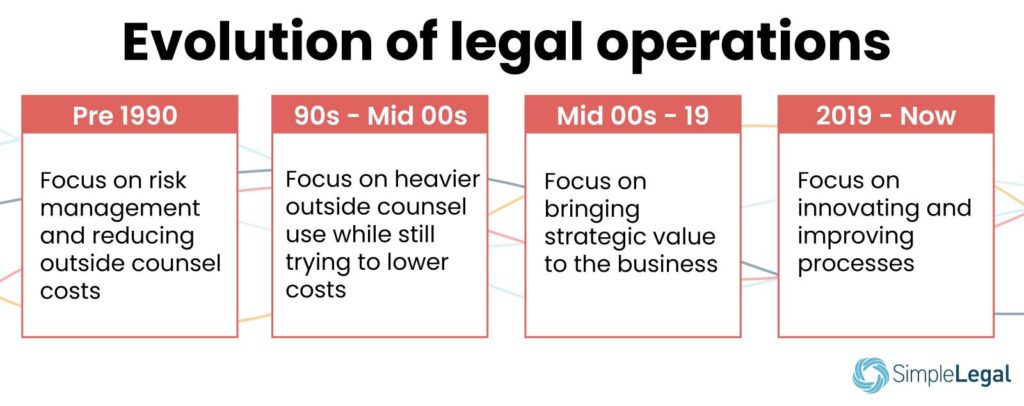
Before 1990, in-house legal departments were more focused on risk management than on maximizing resources. The goal was simple: Reduce outside counsel costs.

The ’90s through the mid-2000s saw the development of an official, more complex legal operations department that facilitated heavier use of outside counsel even though keeping costs low was still a goal.

The major transformation began in the mid-2000s and carried on to 2019.

Legal ops began to focus on not just reducing costs but also on the granular breakdown of those costs and the ROI they delivered. By embracing technology and automation, legal ops teams could break down spend by matter type and evaluate outside firms by their past performance.

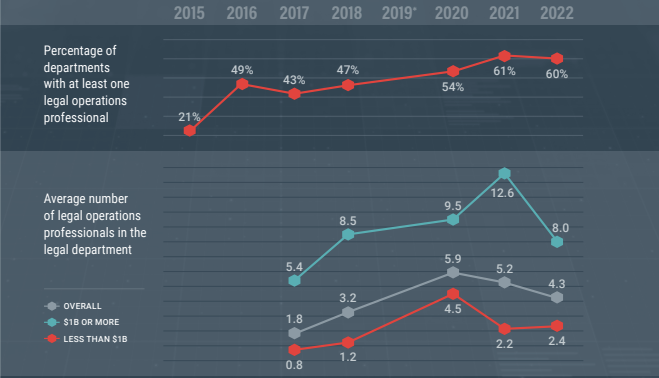
Because of the strategic insights legal ops delivered, legal departments could now see the value in having a legal ops team. Whereas only larger legal departments could afford a formal legal operations team before 2000, a formal legal operations team has become more common now, even at smaller companies.

In our own customer base, we’ve seen formal legal operations manager job titles in legal departments with as few as five people. But some teams are even smaller. A 2022 Association of Corporate Counsel (ACC) report found that 60% of legal departments have at least one legal operations professional on the team. (For comparison, in 2018, only 47% of departments had at least one legal ops professional employed.) On average, legal ops departments contain around four employees.

The 12 key functions of a legal ops team in 2022 and beyond

According to the Corporate Legal Operations Consortium’s (CLOC) “core 12” competencies list, these are the 12 key legal operations functions:

1. Business intelligence

Legal ops collects and analyzes business intelligence data based on important metrics to glean actionable insights for more strategic decision-making.

2. Financial management

Legal ops also plans legal spend, creates budgets, implements and monitors e-Billing for legal services, manages accruals, and forecasts expenses, among other things.

3. Firm and vendor management

Legal ops professionals choose the right firms by performing due diligence, uncovering opportunities, negotiating better rates, handling contract management, and, overall, onboarding new vendors quickly.

4. Information governance

With the goal of reducing corporate risk, legal ops is tasked with creating clear information governance policies, communicating those policies to employees, and managing data security and compliance.

5. Knowledge management

Legal ops also engages in knowledge management by facilitating knowledge hubs, creating templates, and preventing knowledge loss, e.g., from staff departure or role changes.

6. Organization optimization and health

Legal ops creates a hiring vision for cultural fit, encourages team members’ work/life balance, and maintains a good pipeline of talents — all in the interest of optimizing the health and productivity of their department.

7. Practice operations

Legal ops manages the practice by allocating tasks to the right skill level for better speed and efficiency.

8. Program and project management

The legal ops team comes up with ways to manage projects, workflows, and programs quickly (without compromising on quality).

9. Service delivery models

Legal ops defines and structures service provider relationships, breaks down larger projects into assignable tasks, and reduces reliance on more expensive law firms.

10. Strategic planning

Legal ops creates team goals that align with the priorities of internal and external stakeholders.

11. Legal Technology

Legal ops vets and leverages legal software to automate time-consuming and repetitive tasks and to increase accuracy in data collection.

12. Training and development

Legal ops also creates training resources for new hires and facilitates career development for employees.

Ideally, a good legal ops department will be able to carry out most of these functions to improve logistics and processes and, overall, allow your law team to focus on being better lawyers for your organization.

How do you build a legal operations team?

Building the right legal ops team for your department involves understanding what you need, hiring the right person for each role, and equipping them to do their job.

Determine what your department is ready for

There are three levels of legal operations:

  • Admin
  • Optimize
  • Strategizer

They all have different responsibilities. The admin-level focuses on basic management activities, such as vendor management, payments, compliance, and reporting. The optimizer-level focuses on improving those processes, and the strategizer focuses on maximizing results. Understanding your legal department’s maturity level will help you pinpoint what position you need to be hiring for.

Choose what role to hire for based on your needs

It can be overwhelming to try to build a complete team from scratch, and the time investment can be a drain on your internal resources. If you are just starting out (at the admin level), you need a manager more than you need an analyst.

Empower your team with the right tech

Legal operations is not nearly as effective without technology, and it seems like key decision-makers have begun to take notice. According to Gartner, the shake-up felt during the beginning of the pandemic led many business leaders to reevaluate their legal department’s tech use, with an eye toward increasing departmental capabilities to make strategic, data-driven decisions.

Tech allows you to automate manual legal work, streamline document management, and simplify data collection and reporting, to name a few benefits. Your team will need dedicated legal ops software that features e-Billing, reporting and analytics, spend, matter, and vendor management to run efficiently.

Typical legal ops jobs

There are three main legal operations jobs within corporate legal departments: the legal operations manager, the legal operations specialist, and the legal operations analyst. There’s a fourth position — the director of legal operations — who would be the overall head of the legal ops department, but it’s common for the department to be led by the legal operations manager.

These positions work together to manage, improve, and analyze activities in the legal ops department.

Here’s a brief rundown of what each role does.

Legal operations manager

Also called the legal operations director, the legal operations manager manages and supports the team around tasks like vendor management, budgeting, and staffing. Where there’s no director of legal operations (the head of legal operations), the legal operations manager also reports directly to the general counsel and oversees tasks like resource allocation, change management, and decision-making.

Legal ops managers may spend their day-to-day directly overseeing other members of the legal team. For the rest of the organization, they are the go-to source for project status updates, budget questions, and productivity reports.

Legal operations specialist

If the legal ops manager oversees the department, the specialist is the expert who executes on departmental projects and goals. The legal ops specialist works with the legal operations manager to create and improve processes for an efficient and effective legal team, facilitate change, and control costs. Specialists tackle the hands-on work of legal ops and report on their work to their manager.

Specialists may handle a variety of tasks, including updating each individual matter. Or they might handle the outreach to stakeholders in other departments who are needed to complete each step of the process.

Legal operations analyst

If a legal ops team uses a tech suite to track and understand analytics, the legal ops analyst would be the expert on those tools.

The legal ops analyst regularly examines the legal team’s operations to identify room for change and helps implement those changes. The analyst may study changes in the team’s budget to identify areas where they could better allocate resources and save costs. They may also handle other departmental reporting on core key performance indicators (KPIs), like average time spent per matter.

Qualities of good legal ops leaders

Legal ops leaders also have an increasingly important role to play as strategic advisors within the C-suite of the organization. According to the ACC, 98% of chief legal officers (CLOs) are consulted on important business decisions that affect the entire organization — not just legal. 36% say they spend more than one-third of their time advising business leaders on strategic initiatives, and 77% say they “almost always” attend board meetings.

Good legal operations leaders tend to fit one of four distinct personas:

  • The uber-analyst who brings quantitative rigor to the legal department
  • The MBA who brings additional operational and financial discipline to the legal department and their vendors
  • The lawyer who has chosen a more business-focused career path
  • The highly analytical JD/MBA who is valued for their legal and business expertise

And while a JD or an MBA is a great addition, the people you require for these roles don’t need to have those degrees. What they need to have is:

  • A strong understanding of the core business
  • The ability to translate the needs of business departments into legal requirements
  • The ability to manage outside law firm performance
  • A commitment to using the internal legal department to grow the company

It’s clear that, from the top down, business leaders have begun to see the strategic value in giving legal ops a seat at the decision-making table.

If building your legal operations team is something you want to focus on, we have four legal ops job description templates you can look at to get you started.

It’s time to embrace legal operations for a value-driven legal department

Legal departments have a company-wide responsibility to protect and grow the business while also managing internal and outside counsel budgets. They face increasing pressure to do more with less. That’s where the legal operations role comes in: these professionals drive efficiency and create value not just for their team of in-house lawyers but for the entire organization.

But a legal operations team is only as effective as the technology available to them. In fact, CLOC lists technology as one of the core competencies for effective legal operations professionals.

Want to empower your legal ops team with software that makes it easier to get results? SimpleLegal helps modern legal teams better manage their spend, matters, vendors, and so much more for efficient legal operations. Schedule a demo of SimpleLegal to learn more about how dedicated legal operations technology can help your team function.