Legal ops teams don’t need more data. They need the right data. The kind that clearly shows leadership how legal contributes to the business.
This quick cheat sheet highlights the core reporting metrics legal ops teams rely on to show control, efficiency, and credibility without overcomplicating their reports.
Inside the guide, you’ll find:
Spend to budget metrics that demonstrate financial control
Billing compliance metrics that reduce friction and rework
Vendor mix and performance metrics that turn outside counsel management into measurable outcomes
And more!
Use this cheat sheet to guide your next report, quarterly review, or leadership conversation and keep your reporting focused on outcomes, not noise.
If vendor management feels harder than it should, it probably is.
Invoices come in from everywhere. Approvals stall. Firms follow up on payments. Finance wants answers you can’t pull quickly. None of that is unusual. But it is a sign your current process is creating friction behind the scenes.
This quick checklist helps legal ops teams spot where vendor management breaks down and what those gaps are really costing you in time, money, and credibility.
In this checklist, you’ll get a sanity-check on:
How invoices enter your system and who owns approvals
Whether billing rules are enforced before errors hit your budget
Where payment delays are hurting vendor relationships
If your vendor and spend data can actually be trusted
If your team is still chasing invoices or managing vendors in spreadsheets, this checklist is a good place to start.
Legal departments are under pressure to do more with less: tighter budgets, rising workloads, and fast-moving expectations around generative AI.
Harbor’s latest benchmark data shows decisive shift toward AI adoption, tighter spend expectations, and a more strategic operationally mature legal function.
In this webinar, experts from Harbor and Onit break down what the data reveals and what it means for your legal ops teams. You will learn:
How legal departments are moving from AI exploration to structured, governed use
How your peers are reallocating inside and outside counsel spend
Where legal teams are deploying AI and the next wave of high-impact use cases
A practical roadmap for aligning your department’s priorities to the moves that high-performing legal ops teams are making
This session delivers clear, data-backed insights for legal ops professionals, finance leaders, and executives shaping the future of legal operations.
Speakers:
Kevin Clem, Chief Growth Officer, Corporations and Community at Harbor
Jeff Solomon, VP, GTM Strategy & Alliances at Onit
A practical guide to building legal operations that connect spend, data, and decision- making.
Legal teams are expected to deliver clearer insight and stronger control while managing growing complexity. Disconnected systems make that harder than it needs to be.
This guide outlines what connected legal operations look like in practice and how enterprise legal management supports visibility, coordination, and better decision- making across the legal function.
You’ll learn:
What connected legal operations really mean day to day
How enterprise legal management brings spend, matters, and reporting together
Why disconnected tools slow insight and planning
The foundational capabilities modern legal teams rely on
Built for legal operations leaders and in-house legal teams responsible for visibility, reporting, and planning.
Transform your department’s efficiency with Unity’s integrated task management! Our solution streamlines the way matters are worked and completed, minimizing errors and missed deadlines. Unlock your team’s potential and accomplish more with ease!
Resources
Learn more about task management and how to utilize the features!
We hope this success kit was useful and provided you with helpful information about SimpleLegal’s task management. If you have any further questions, please contact your CSM.
Welcome to Unity’s API Toolkit! You’ll find important information and links about our API to help you and your team get the most out of Unity.
Have questions or need help? Please contact [email protected] for assistance.
Introduction
Purpose of the API Toolkit
At a high level, the Unity API allows the customer to request approved invoices from Unity and Unity API provides that data back. The customer then updates the invoice status to “Sent to AP” in Unity. Once the invoice is paid, the Customer updates invoice status to “Paid” and provides payment details (optional) in Unity.
On a technical level, the Unity API is organized around REST. Our API has predictable, resource-oriented URLs, and uses HTTP response codes to indicate API errors. We use built-in HTTP features, like HTTP authentication and HTTP verbs, which are understood by off-the-shelf HTTP clients. We support cross-origin resource sharing, allowing you to interact securely with our API from a client-side web application (though you should never expose your secret API key in any public website’s client-side code). JSON is returned by all API responses, including errors.
Our formal documentation at developer.simplelegal.com uses PATCH methods throughout, however, POST can be used instead of PATCH to accommodate systems that can’t utilize the PATCH method.
How to use the API Toolkit
Step 1 / Customer
Send your IT team or IT consultant the link to our API development page. This provides all the details of building an API to Unity.
Step 2 / Customer
Confirm which business process/workflow steps will be needed for your integration, for example for finance integration:
Required: Retrieve Invoices to be paid
Optional: Retrieve Unity PDF copy
Optional: ACK/Payment confirmation
Record payment information
Update invoice status to Paid
Step 3 / Customer
Reach out to your Finance team to understand accounting and data requirements to post invoices into your finance system and pay an invoice.
Step 4 / Customer & Unity
Discuss attributes/data that needs to be in Unity for payment (see FAQ below: “What are the most common attributes and their definition?”)
Step 5 / Unity
Configure Unity with required attributes
Step 6 / Unity
Provide customer with Unity base URL and API Authorization token. Will be in the following format:
API base URL: https://<>.simplelegal.com
e.g. http://app.simplelegal.com or http://abccompany.simplelegal.com
API Authorization Token: <auth_token>
Step 7 / Customer
Test connection to Unity API
Step 8 / Customer
Build necessary integration calls and configuration based on integration needs
Step 9 / Customer & Unity
Test your connection by calling an endpoint and make sure you were able to retrieve data, and the relevant information is generated. For example, for finance integration, you should approve an invoice in Unity and make sure it can be retrieved, with the necessary information sent back to Unity.
Getting Started
The Unity API is organized around REST. Our API has predictable, resource-oriented URLs, and uses HTTP response codes to indicate API errors. We use built-in HTTP features, like HTTP authentication and HTTP verbs, which are understood by off-the-shelf HTTP clients. We support cross-origin resource sharing, allowing you to interact securely with our API from a client-side web application (though you should never expose your secret API key in any public website’s client-side code). JSON is returned by all API responses, including errors. We’ve documented PATCH methods throughout, however, POST can be used instead of PATCH to accommodate systems that can’t utilize the PATCH method.
Prerequisites
Determine API user details (first name, last name, email)
Typically, the API user has a generic name (e.g. first name: Oracle Integration, last name: Finance Integration, email: [email protected])
Provide API user details to Unity
Unity to generate API key
Unity to provide Unity API toolkit & API developer
Schedule and conduct API requirements and mapping (Client and Unity)
Schedule and conduct API development (Client)
Testing (Client and Unity)
Authentication
API authentication is a combination of technology and process that proves or verifies the identities of users who want access to an API. Specifically, API authentication involves the use of a software protocol to verify that users are who they claim to be when a client makes an API call.
Sandbox vs Production
Our sandbox APIs emulate the live environment and give you the opportunity to send test API calls and to receive a simulated response. Sandbox APIs are perfect for working with the client before the production API is available, allowing front-end progress to continue, even though there’s no real data or database backing it yet. The production APIs work with our live systems and data. Your application will run in this environment after you go live.
The Multi-tenant Sandbox data is refreshed monthly on the third Friday of the month. Your team can create or update data in the sandbox, and any alterations made will be reset and replaced with the data from the production environment during the monthly refresh.
API Basics
Understanding RESTful APIs
The basic function of a RESTful API is the same as browsing the internet. The client contacts the server by using the API when it requires a resource. API developers explain how the client should use the REST API in the server application API documentation. These are the general steps for any REST API call:
The client sends a request to the server. The client follows the API documentation to format the request in a way that the server understands.
The server authenticates the client and confirms that the client has the right to make that request.
The server receives the request and processes it internally.
The server returns a response to the client. The response contains information that tells the client whether the request was successful. The response also includes any information that the client requested.
The REST API request and response details vary slightly depending on how the API developers design the API.
HTTP Methods (GET, POST, PATCH)
The HTTP verbs comprise a major portion of our “uniform interface” constraint and provide us the action counterpart to the noun-based resource. The primary or most-commonly-used HTTP verbs (or methods, as they are properly called) are POST, GET, PUT, PATCH, and DELETE. These correspond to create, read, update, and delete (or CRUD) operations, respectively. There are a number of other verbs, too, but are utilized less frequently. Of those less-frequent methods, OPTIONS and HEAD are used more often than others.
Below is a table of recommended return values of the primary HTTP methods in combination with the resource URIs
Call / Type
Entire Collection
Specific Item
POST / Create
201 (Created), ‘Location’ header with link to /customers/{id} containing new ID.
404 (Not Found), 409 (Conflict) if resource already exists.
GET / Read
200 (OK), list of customers. Use pagination, sorting and filtering to navigate big lists.
PUT / Update/Replace
405 (Method Not Allowed), unless you want to update/replace every resource in the entire collection.
200 (OK) or 204 (No Content). 404 (Not Found), if ID not found or invalid.
PATCH / Update/Modify
405 (Method Not Allowed), unless you want to modify the collection itself.
200 (OK) or 204 (No Content). 404 (Not Found), if ID not found or invalid.
Delete / Delete
405 (Method Not Allowed), unless you want to delete the whole collection—not often desirable.
200 (OK). 404 (Not Found), if ID not found or invalid.
API Endpoints
In summary, an API endpoint is a specific location within an API that accepts requests and sends back responses. It’s a way for different systems and applications to communicate with each other, by sending and receiving information and instructions via the endpoint.
Response Formats (JSON, XML)
JSON supports numbers, objects, strings, and Boolean arrays. XML supports all JSON data types and additional types like Boolean, dates, images, and namespaces. JSON has smaller file sizes and faster data transmission. XML tag structure is more complex to write and read and results in bulky files.
JavaScript Object Notation (JSON) is a standard text-based format for representing structured data based on JavaScript object syntax. It is commonly used for transmitting data in web applications (e.g., sending some data from the server to the client, so it can be displayed on a web page, or vice versa)
An XML response message is sent by the SDS XML provisioning client in response to an XML request. Each response message consists of a 4-byte binary length value, followed by the XML response in ASCII characters. The length value contains the number of bytes in the XML response, excluding the 4-bytes for the length.
API Calls
An API call allows one application to request data or services from another application. Our API developer page is a comprehensive API document, containing all available API calls, their respective arguments, filters, and examples.
Request Parameters
API request parameters are options that can be passed with the endpoint to influence the response. Refer to request parameters located in the API developer page.
Response Structure
When you send a REST request, the appliance responds with a structured response in JSON format. The exact structure of the response depends on the resource and URI of the request, but all responses are similar. The response includes all available resources from any point within the API.
Common Workflows
API workflows are server-side workflows that you can schedule/trigger in your application and/or expose to be triggered from an external application or system through an API request.
Below are the most commonly requested calls for typical integration scenarios:
Finance Integration (Unity <> AP System)
Step 1: Retrieve all approved invoices
The first step is to fetch all approved invoices. This can be achieved with the invoices end point, filtering on Approved status. Refer to “What are the valid invoice statuses in Unity?” in the Q&A section for other supported statues.
If necessary to your integration, pull the PDF copy of the invoice (either summary or the full pdf). Retrieving the PDF is done on a per invoice basis, so a valid Invoice ID is required. Please note the PDF is base64 encoded so would require a decoder to view.
After retrieving the invoices, best practice is to record the invoice id, and update all invoices that are to be processed to Sent to AP status. This way, application users, and vendors will see that invoices have been submitted for payment. Optionally, you can use Posted to AP – the flow is dependent on your organizational needs.
Optional – Record acknowledgement of successful invoice posting
After successful posting of invoices, best practice is to record the invoice id, and update all invoices that are to be processed to Posted to AP status. This way users will see that invoices have been successfully posted without error.
Once payments are made to Vendors, two separate calls will be made for each invoice:
1. Record payment information for an invoice.
Create a Payment record on the individual Invoice endpoint. The required fields are payment_method (which can be defined by your organization; example: check, wire, ach, etc.), amount, currency, and payment date in YYYY-MM- DD format.
After paying / submitting payment for invoices, you should update the invoice status to Paid. This way, application users, and vendors will see that invoices have been marked Paid.
The first step is to fetch a list of all matters. The matters are returned sorted by matter name alphabetically. Available modifiers can be added onto the end of a search string joined by a double dash and are generally shorthands for more advanced searches that can be done:
First, compare the list of new matters against the existing list of matters from Step 1 to ensure no duplicate matters are created. For additional confirmation, you may pull the Client Matter ID associated with the matter for your records.
Second, create any new matters in Unity. Three fields are required for creating a new matter:
name
matter_lead_email
matter_lead_is_approver
The following optional fields are also recommended when creating a new matter:
Returns the list values for a specific custom attribute. The custom attribute id (e.g. attr_1234567890) is required to pull. The options are returned sorted by name alphabetically.
Updates an existing list value for a custom attribute. The custom attribute id (e.g. attr_1234567890) and the list value id (e.g. attr_opt_1234567890) is required to update.
The following optional fields are available to be updated:
Available modifiers can be added onto the end of a search string joined by a double dash and are generally shorthands for more advanced searches that can be done:
lt -> less than
lte -> less than equal to
gt -> greater than
gt -> greater than equal to
icontains -> contains, case insensitive
range -> two dates, everything between the dates matches (inclusive for the first, exclusive for second)
For a given period, retrieve all submitted accruals. The “period” argument is required to pull and must be in the YYYY-MM-DD format.
If a range of dates period can be specified with the range operator. For example, if only the accruals in the first three months are desired, the filter ?period__range=2018-01-31,2018-03-31 would display all relevant accruals. (Note that range is inclusive on both the beginning and the ending date)
Missing API key/token or Require new API key/token
Contact your implementation manager or our Unity support team ([email protected]) to identify if you have an API user already configured and which environment the key is needed for (production or sandbox).
Unity will either confirm a key exists or create a new key to send the key via personal email to a designated drop location.
What is the id/hash for this object?
The id or hash for an object will be dependent on what call(s) your team is making. First, determine the call(s) and end points within the API Documenter.
To obtain the id/hash for an object (e.g. a matter), retrieve all matters and locate the “id” key associated with that object. The hash follows a consistent format, where the first 3-4 characters represent the type of object (e.g., “mat” for matter), followed by an underscore (_) and the numerical ID. For instance, a matter hash could be represented as “mat_1234567890.”
API Call is Returning an Error
Contact our Support Team ([email protected]) or your Implementation Manager (if you are still in Implementation). Provide the full call and response you are attempting.
Our team will confirm if the object being called exists, and whether or not the API user has permission to see it.
If GET, Unity can test the call to determine if we get the same error.
If POST, Unity may test the call parameters in a demo environment.
API Call Returns No Results
Log into Unity and verify that there is at least one object for the call (e.g. matters, vendors, etc) and verify the parameters of the call are applicable to the data within Unity.
If the objects exist, this implies the API user has access to the database via API but does not have sufficient privileges to retrieve the data
Customers can reach out to the implementation manager or Unity Support ([email protected]) team to verify which email address is associated with their API token.
Unity will validate the user has a role which is sufficient in accessing the objects in question. API users should have a user role = “Administrative Role”.
Error Handling
In any integration process, encountering errors is a common scenario. Effective error handling is crucial to maintain the integrity and efficiency of the integration between Unity API and your corporate ERP system. Here are some best practices for monitoring and maintaining your system and errors that may arise:
Real Time Monitoring: Set up real-time monitoring and alerts for your API integration. This will enable immediate detection of errors as they occur. Utilize logging systems to record detailed error information, which can be invaluable for troubleshooting.
Designated Response Team: Identify a designated response team within your organization. This team should include members who are well-versed in both the Unity API and your ERP system.
Notification Procedures: Establish a clear procedure for notifying the designated response team when an error is detected. This can be automated through your monitoring systems or manually initiated by the team monitoring the integration.
Root Cause Analysis: Once the immediate issue is resolved, conduct a thorough root cause analysis to understand why the error occurred. This step is crucial to prevent similar issues in the future. Document the findings and update your integration processes and error-handling protocols accordingly.
Continuous Improvement: Treat every error as a learning opportunity to improve your integration setup. Regularly review your error-handling procedures and update them as needed. Encourage open communication and feedback within the team regarding the handling of integration errors. This collaborative approach can lead to more resilient and reliable integration.
General Unity API Features and Q&A
What features can the Unity API support for each team or process?
Finance
Legal Ops
Reporting
Paying invoicesUpdating invoice payment status on Unity Pulling a specific invoices by created date, invoice date, modified date, or statusCreating and updating cost codes
Creating and updating mattersCreating and updating most vendor dataCreating and updating custom attributesCreating and updating legal entitiesCreating, updating, and deactivating users including setting roles
Access matters, invoices, vendors by created date, modified date, closed datesSearch and filter via statusesEasily pull all custom attributes associated with matters, vendors, invoices
What features are not supported by the Unity API?
Access to timekeepers data
Access to budgets data
Cannot access contacts or vendor contacts / CounselGO users
Cannot set permissions/teams via API
Cannot set invoice intake rules or approver escalation rules via API
What are the most common invoice attributes and their definitions?
While this varies per customer, below are some common attributes used to retrieve invoice details and pay an invoice:
Field Name
Definition
Invoice_date
Invoice Date on the header (defined by the vendor)
Received_date
Date invoice was received into the Unity system
Invoice_number
The number or name as listed on the invoice, the main invoice identifier
Entity.id
Ent_123; unique identifier for legal entity
Cost_code.id
Cos_12345; unique identifier for the cost code
Custom_attributes.id
Attr_opt_12345; unique identifier for custom attribute
Native_currency
The currency the invoice was submitted in. (If null, the submitted currency is your base currency)
Native_total
The amount the vendor billed (as well as final amount as adjustments cannot be made on international currencies) on the invoice in the submitted currency.
Total
The amount the vendor billed on the invoice in the base currency of your environment.
Final_amount
Final amount of the invoice (after any adjustments) in the system/base currency.
Status
E.g. “Approved”, ”Paid”
id
Unity invoice reference number (e.g. inv_1234567890)
obj_id
On the invoice end point, this is the unique invoice id of the specific invoice, and is visible on the PDF and approver email
Can PDF attachments come through the API
Yes. You can retrieve invoice attachments through Retrieve an Invoice. You can also pull the Unity generated PDF through either Retrieve an Invoice Detail PDF or Retrieve an Invoice Summary PDF.
How do we know which invoices to pull from Unity to our finance system?
In a standard finance API integration, you will want to pull any invoiced in an “Approved” status. These are invoices that have been approved in Unity by all approvers and are ready for payment. As part of the API integration, you will want to update the status of the imported invoices to “Sent to AP” using PATCH. If the patch function isn’t available, you can also update the status using POST.
Is there anything else we can do with the API besides retrieve and update invoice information?
Yes. Through the API, you can access most components of Unity including matters, vendors, cost codes and legal entities. You can streamline your vendor intake process by pushing new vendors from your financial system into Unity. You can integrate with your patent software to push new patent & trademark matters into Unity. You can even use the API to update cost codes and legal entities.
Can you provide examples of how other partners have handled their integrations or technical references if we need additional help?
Our Implementation team can offer guidance if you have specific questions on how to get started, but unfortunately, we do not share client data or integration specifics.
What are the valid invoice statuses in Unity?
Received
Rejected
Approved
Paid
Sent to AP
Posted to AP
On Hold
How can I see an export of all the sample JSon?
You can download Postman and pull the full JSON export.
For the ‘Update an Invoice’ API the documentation states either a PATCH or POST could be used. Is this also true for the ‘Create Payment for an Invoice’ or must a POST be used?
Payment information can only be posted right now, it cannot be patched. We treat it as a log so you can only add to it.
How long would it take our team to integrate with the Unity API and how will Unity help?
This depends largely on the degree of integration in terms of what is required by the finance team, and the resources available on your development team to build it out. Unity can provide guidance in terms of understanding the documentation and in terms of what has been successful in the past.
What is the difference between the Reference Number and Batch Number in the ‘Create a Payment for Invoice’ API?
The reference number is unique per payment, whereas a batch number is used to group payments.
What is the difference between invoice_number and id and which should we use?
The id is a unique number that Unity assigns to each invoice and should serve as its unique identifier. Invoice_number is the number associated on the invoice itself, but this is not always.
Can you accommodate custom object IDs in the API? Currently we cannot support customization in the object IDs. However, depending on business needs, we may have recommendations for different ways to proceed to achieve the same result. We also support custom attributes with our platform, which may aid in capturing the information you require. Reach out to your implementation manager for guidance.
How do you recommend we update matters or vendors most efficiently?
For example, if your matter has 15 attributes and all attributes on a single matter need to be updated, that would be 15 calls. One method of reducing the number of calls is to check if the attribute values have changed. So instead of updating every single attribute value regardless if there was a change or not, you’ll want to validate if a change was made to the attribute value. Specifically, here is a step by step process recommendation:
Obtain the id of the vendor/and or matter you wish to update
Navigate to the attribute URL associated with that vendor/matter
Check what attribute values are associated, ideally with the `page_size` value set equal to the `count` value
Before deciding to update, compare the new value against the one seen on the page If different, then PUT, otherwise don’t PUT
Please note we do not recommend ‘page_size’ values over 100 as it may cause a timeout.
How are foreign (non-USD) invoice adjustments handled in the API?
Unity currently does not allow adjustments on foreign invoices because it has tax implications for vendors in most countries. Since foreign vendors are required to submit tax data to their respective governments, any adjustments made to invoices would result in a mismatch in reporting numbers vs actual numbers for your vendors. Instead we require that foreign invoices requiring adjustment be rejected with comments so that vendors can re-submit with the required corrections.
How do you get the final invoice amount? There are three options to get the final amount depending on the currency used to bill.
Is there a limit on any of the APIs for how many results are fetched?
By default the maximum number of items on a paginated list page is 25. This can be configured by post fixing a URL with ?page_size=100 if a page size of 100 is desired but it may timeout depending on the endpoint you hit and how much data comes through.
Can a customer create a matter and assign matter attributes in a single API call, or is it necessary to create the matter first and then update the attributes separately?
The API does not support creating and assigning matter attributes in a single call. To accomplish this, you will need to make multiple API calls. First, create the matter, and then make separate API calls for each attribute update.
Additional Resources
Unity Support is here to assist with your team’s product questions. Contact our Support team ([email protected]) when you have technical questions, would like assistance with functionality, or answering ‘how,’ ‘what,’ or ‘where,’ within your products.
At Onit, we recognize that effective event management is a critical part of successful matter management, and more broadly for the efficiency of your entire legal department. Our innovative solution seamlessly integrates event tracking and management into our comprehensive matter management platform, to ensure you stay on top of key dates and deadlines related to your matters.
Here’s what you can expect with event management:
Centralized platform: A single place to see important events and dates in an easy list or calendar view for streamlined visibility with notifications to avoid missed deadlines.
Seamless integrations: Our one-way integrations with popular calendars like Outlook, Google, and Apple enable you to track events from your preferred platform. Our CalendarRules integration provides real-time-insight into comprehensive legal calendaring events, ensuring accuracy and compliance with court rules and procedures.
Additionally, here are some common uses for the event management feature that your legal department can leverage:
Court Appearances: Schedule and track court dates, hearings, and other legal proceedings to ensure timely attendance and preparation.
Depositions: Coordinate dates and times for depositions, including arranging for court reporters and notifying all parties involved.
Mediation Sessions: Schedule mediation sessions and track their progress to facilitate dispute resolution.
Internal Team Meetings: Schedule meetings for case reviews, strategy discussions, and other internal coordination efforts.
Case Management Conferences: Schedule and manage case management conferences with the court to discuss case progress and timelines.
Trial Dates: Organize and track trial dates, including pre-trial conferences and jury selection, to ensure effective case management.
Check out our event management resources to the right 👉 for more information!
How to get started:
Event management is only available for Unity matter management customers:
Event settings: For administration accounts, you can access Event settings under the tab Administration > Events to begin integration with CalendarRules and manage event types.
Access Events: Add, edit, and view events within each of your specific matters under Matters > All Matters > [specific matter name] > Events (located on the top bar next to Tasks) to get a detailed list and calendar view of all events related to your matter.
Welcome to Unity’s Invoice Validation Rules Examples and Instructions! You’ll find important information regarding the process, setup, and possible configuration of Unity’s Invoice Validation Rules.
Introduction
Billing guidelines can be complex. Unity’s Invoice Validation Rules Examples and Instructions can provide an overview of the common configuration and rules. Whether you want to implement basic rules or explore advanced strategies to enhance your existing processes, we’ve provided a list of ideas that you can easily build upon.
Please note: Invoice Validation Rules are unique to each environment. The provided examples and configurations may need to be adjusted to adhere to your needs and/or billing guidelines.
What are Invoice Validation Rules?
Invoice Validation Rules provide the ability to take action on incoming vendor invoices based on set fields within your environment. In laymen’s terms, they are comprised of an if/then scenario, meaning, if a set of conditions are met then an action will occur. Your team will be able to select the set of conditions and the subsequent action using our Invoice Validation Rules.
For example, if the practice area on an invoice is Litigation and the invoice is over $10,000, then we will flag an invoice for review.
Training Options
Prior to building your rules, Unity recommends the following training modules to better understand how to use and maintain your rules
Basic maintenance of your rules to begin drafting and building your Invoice Validation Rules
Create a Rule
1. To get started, click Add Rule in the top-right corner of the rules list page.
2. Title your rule. Enter information for the following fields:
Name (required): Up to 150 characters allowed (including spaces)
Category (required): Select an option from the dropdown list
Description (optional): Useful for providing more context or instructions for other admins
3. Add a Condition. Conditions are statements that set which criteria must be met for the action to trigger. A rule can have one or multiple conditions depending on how broad or narrow the criteria. For example, a simple rule can have a condition that looks for and flags line items with specific expense codes. A more complex rule, on the other hand, can have multiple conditions to look for and adjust line items with specific expense codes that exceed a threshold.
4. Add an Action. Click + Add Actions from the right side of the Rule Editor.
Select the action type (e.g., Flag Invoice, Add Activity Code, etc.). For more detailed information on supported actions, including how they are applied when a rule is triggered, review Rule Actions. Complete the additional required/optional fields for the action, such as entering a default comment.
5. Save rule. Click Save Rule in the bottom-right corner. By default, this will store the rule as inactive, which is recommended for all new rules.
Clone an Existing Rule
Making a copy of an existing invoice validation rule is useful if:
You want to create a new rule by customizing an existing rule instead of starting from scratch.
You need to redo and replace a rule without impacting or deactivating the current version.
You want to save an existing rule as an inactive draft so it can be used as a template.
There are two ways to clone a rule:
Option 1: Click on the … (more) option from the rules list page and select Clone.
Option 2: Open the rule and select Clone from the … (more) menu in the top-right corner.
This will take you to the cloned rule, which is automatically set to inactive. The Name field populates “(Clone)” followed by the original rule’s name. Make sure to customize the name and other fields.
The remaining fields (i.e., Name, Description, and Category) and the conditions and actions are copied over from the original rule as-is. Modify and/or add conditions and actions and then click Save rule in the bottom-right corner.
Edit an Existing Rule
Click on a rule name from the list page to open the Rule Editor.
Alternatively, you can click on the … (more) option at the end of the row and select Edit. From the Rule Editor, you can update the name, description, category, conditions, and/or actions. Click Save Rule in the bottom-right corner when finished.
Rule Actions An overview of rule actions and their outcomes
Action
Description
Example Use Case
Flag Invoice
Add a comment to an invoice record to describe a potential billing guideline violation before it lands in the review queue.
If the total for an IP invoice exceeds $6000.00, then flag the whole invoice with a comment describing the billing guideline violation.
Flag Line Item
Add a comment and flag to a line item to describe a potential billing guideline violation before it lands in the review queue.
If an invoice has Task Codes for administrative tasks that are not billable, then flag the line items and add a comment.
Reject Invoice
Reject an invoice before it lands in the review queue if it is unacceptable based on billing guidelines.
If an invoice does not include a previously discussed vendor discount, then auto-reject the invoice.
Adjust Line Item Total
Adjust the total for a line item to a selected amount before the invoice lands in the review queue.
If an invoice for US provisional patents has a line item total that exceeds $6000.00, then auto-adjust the line total to $6000.00 per AFA.
Adjust Line Item Rate
Adjust the rate for a service on a line item based on billing guidelines or vendor agreements before the invoice lands in the review queue.
If an invoice for a litigation matter includes the keyword “discovery motion” for a line item description and the rate exceeds $400.00, then auto-adjust the line item rate to $400.00.
Add Activity Code
Assign an Activity Code to a line item before the invoice lands in the review queue.
If an invoice includes the keyword “research” in the line item description but the Activity Code is empty, then set the Activity Code to A102.
Add Expense Code
Assign an Expense Code to a line item before the invoice lands in the review queue.
If an invoice includes the keyword “copy” or “copied” in the line item description but the Expense Code is empty, then set the Expense Code to COPY.
Add Task Code
Assign a Task Code to a line item before the invoice lands in the review queue.
If the Matter Group for an invoice is Litigation and the line item description includes the keyword “deposition,” then set the Task Code to L330.
Common IVR Rules
Please note: Invoice Validation Rules are unique to each environment. The provided examples and configurations may need to be adjusted to adhere to your needs and/or billing guidelines.
Keywords and Phrases Search for a specific keyword or phrase within an invoice
Scenario: Flag line items for keywords related to copies. Configuration:
After creating and labeling your rule, add conditions for Line Item – Description – Contains input necessary keyword.
Using the “OR” parameter, add additional keywords Line Item Descriptions for keywords (e.g. copy, copies, scan, duplicate).
—
Scenario: Flag invoice description for keywords related to resubmission. Configuration:
After creating and labeling your rule, add conditions for Invoice Subject – Contains input necessary keyword.
Using the “OR” parameter, add additional keywords to review Invoice Description for keywords (e.g. resubmission, resubmit, resend).
—
Scenario: Adjust a line item to “0” for copy expense codes. Configuration:
After creating and labeling your rule, add condition for Line Item Expense Code – Is one of and input applicable codes.
Next, select the Adjust Line Item Total and set the threshold to the applicable value “0.”
Populate the Vendor and Internal Comments with the message for both Unity users and CounselGO contacts.
Fees and Expenses Validate for or against line item type
Scenario: Flag litigation line items that are missing expense line item type. Configuration:
After creating and labeling your rule, add condition for Practice Area – Is to validate against the matter’s practice area.
Next, using the “AND” parameter, add condition for Line Item Type – Is not equal to for the applicable type “E.”
—
Scenario: Flag expense line items where the expense code is blank. Configuration:
After creating and labeling your rule, add condition for Line Item Type – Is for the applicable type “E.”
Next, using the “AND” parameter, add condition for Line Item Expense Code – Is empty.
Positive and Negative Amounts Search for positive and/or negative amounts
Scenario: Flag line items that contain keywords for “copy” and are more than “0.” Configuration:
After creating and labeling your rule, add conditions for Line Item – Description – Contains input necessary keyword.
Using the “OR” parameter, add additional keywords Line Item Descriptions for keywords (e.g. copy, copies, scan, duplicate).
Next, select “Add additional condition” of “AND” and add condition of Line Item Total – Is great than for the applicable value of “0.”
—
Scenario: Flag negative line items for a specific matter. Configuration:
After creating and labeling your rule, add condition for Matter id – Is to validate against a matter.
Next, using the “AND” parameter, add condition for Line Item Total – Is less than for the applicable value of “0.”
Scenario: Flag negative line items for a specific matter. Configuration:
Spend Limits Validate a spend amount against Unity values
Scenario: Flag a total spend limit for a matter. Configuration:
After creating and labeling your rule, add condition for Spend – Is greater than and input your spend amount.
Next, using the Add additional subparameters, add conditions for Matter.
—
Scenario: Flag an annual spend limit for a matter and vendor combination. Configuration:
After creating and labeling your rule, add condition for Annual Spend – Is greater than and input your spend amount.
Next, using the Add additional subparameters, add conditions for Matter and Vendor.
—
Scenario: Flag a total spend limit for an activity code for a matter and vendor combination. Configuration:
After creating and labeling your rule, add condition for Spend – Is greater than and input your spend amount.
Next, using the Add additional subparameters, add conditions for Matter, Vendor, and Activity Code.
—
Scenario: Flag a total spend limit for a designated start and end date for a matter and vendor combination. Configuration:
After creating and labeling your rule, add condition for Spend – Is greater than and input your spend amount.
Next, using the Add additional subparameters, add conditions for Matter, Vendor, Start Date, and End Date.
Expense, Task, and/or Activity Codes Search for or validate against expense, task, and/or activity codes
Scenario: Flag an expense code for a specific vendor. Configuration:
After creating and labeling your rule, add condition Line Item Expense Code – Is and input your expense code.
Next, using the “AND” parameter, add condition for Vendor id – Is for the applicable vendor.
—
Scenario: Flag multiple expense codes. Configuration: After creating and labeling your rule, add condition for Line Item Expense Code – Is one of and input applicable codes (e.g. E107, E108, X112, X113).
—
Scenario: Flag for a specific code set. Configuration: After creating and labeling your rule, add condition for Line Item Activity Code – Contains and input either the first letter of the code set (e.g. “L” or “A”) or the letter and number combination (e.g. “L3” or “B2”).
—
Scenario: Flag expense line items where the expense code is blank. Configuration:
After creating and labeling your rule, add condition for Line Item Type – Is for the applicable type “E.”
Next, using the “AND” parameter, add condition for Line Item Expense Code – Is empty.
Validating Against Custom Attributes Search for or validate against your Unity custom attributes
Scenario: Validate an invoice against a vendor Yes/No custom attribute. Configuration: After creating and labeling your rule, add condition for Vendor – [Custom Attribute] and input applicable value (e.g. Yes/No, list value). Note: Any custom attribute type may be used (e.g. Yes/No, text, list, currency)
—
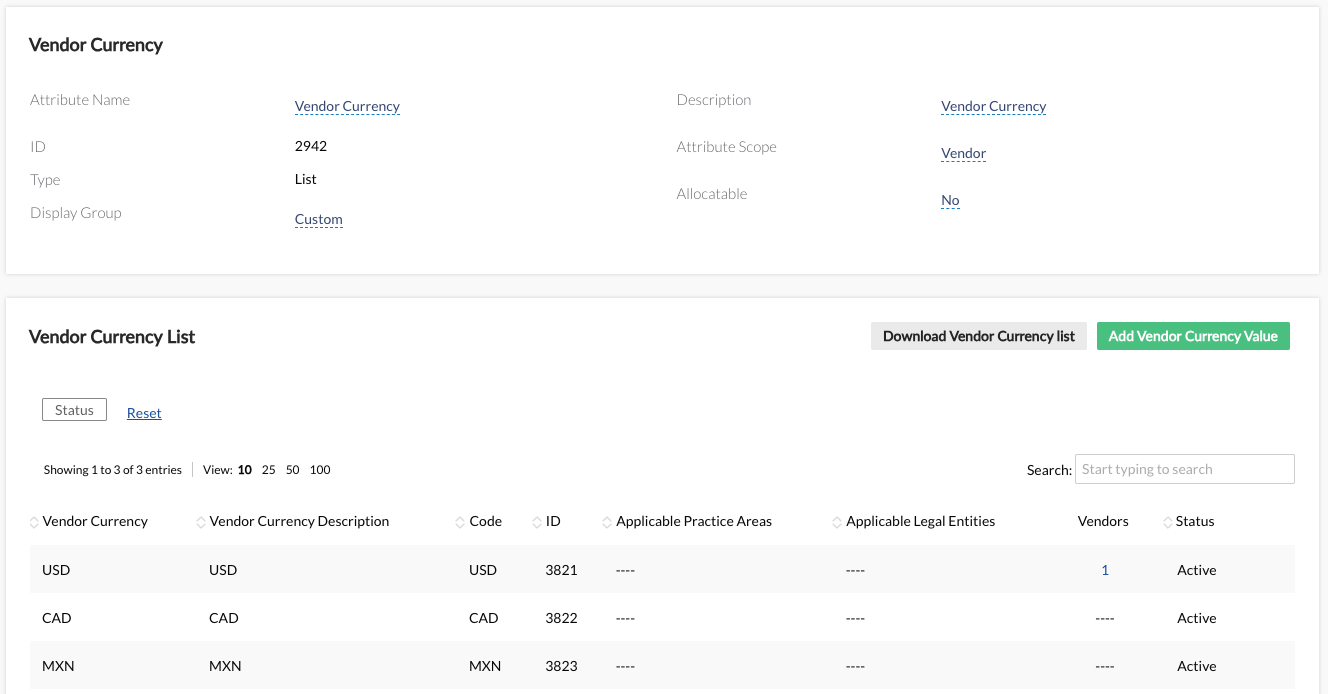
Scenario: Validate an invoice against a selected vendor currency.
Configuration Step 1: Create a vendor currency custom attribute.
Create a custom attribute labeled “Vendor Currency” or similar.
Set the custom attribute as a “list” attribute and not allocatable
Load any applicable currencies for your vendors in their 3-letter currency code (e.g. USD, CAD)
Configuration Step 2: Assign vendor currencies to vendors. Locate the vendors’ profile and assign the currency using the newly created custom attribute. Note: Unity’s bulk functionality can also be utilized.
Configuration Step 3:
After creating and labeling your rule, add condition for Vendor – [Vendor Currency Custom Attribute – Is and input your first currency. Note: The currency must be the 3-letter currency code and match your custom attribute list value.
Next, using the Add additional subparameters, add conditions for Invoice Currency – Is not equal to, and the 3-letter code from the step above.
Configuration Step 4: Clone your rule from Step 3 and update the values to the next currency value until all currencies are covered.
—
Scenario: Flag an invoice associated with multiple custom attribute list values. Configuration: After creating and labeling your rule, add condition for Matter – [Customer Attribute] id – Is one of of and input applicable custom attribute values (e.g. Product A, Product B). Note: Any custom attribute type may be used (e.g. Yes/No, text, list, currency)
Flat Vendor Discounts Validate against a set (1) vendor discount
Scenario: Validate a vendor discount. Configuration:
After creating and labeling your rule, add condition for Vendor id – Is and select your vendor.
Next, using the “AND” parameter, add condition for Invoice Discount total – Is less than and input your vendor discount.
—
Scenario: Validate a vendor discount against a custom attribute. Note: This is typically reserved for Unity environment’s with a large volume of vendors with flat discounts. 10+ vendors with discounts is the threshold we typically encounter but is variable based on how your team decides to manage your discounts. Configuration Step 1: Create a custom list attribute for the vendor discount rate (e.g. Vendor Flat Discount Rate) scoped to Vendors and create a list value for each discount rate to be applied to all vendors.
Configuration Step 2: Assign a discount rate to applicable vendors. Note: Unity bulk functionality can also be utilized.
Configuration Step 3:
For each custom setting list value, create an IVR rule. After creating and labeling your rule, add condition for Vendor [Custom Attribute Name] id – Is and select the first list value.
Next, using the “AND” parameter, add condition for Invoice Discount total – Is less than and input the rate associated with the selected list value discount.
Configuration Step 4: Clone your rule from Step 3
Configuration Step 5: Update the following rule values to the new discount rule.
Name
Description (if applicable)
Vendor [Custom Attribute Name] id
Invoice Discount total
Action Comment
Tiered Vendor Discounts Validate against a set of (2+) discounts for a vendor
Scenario: Vendor ABC has three tiers of discounts with the following structure
Tier 1: 5% up to $10,000 annual spend
Tier 2: 10% up to $50,000 annual spend
Tier 3: 15% up to $100,000 annual spend
Configuration Step 1: Build your tier 1 threshold rule. Note: Multiple vendors can be assigned to tier rules if they share the same tier thresholds and rates.
Create a rule for Tier 1, populate rule Name, Category, and Description. Recommended to name the rule with the Vendor Name and Tier 1 Discount and use the Discount category.
Next, add a condition for Annual Spend – Is less than or equal to the tier 1 threshold (10000 USD)
Then, using the Add additional subparameter select the vendor (Vendor ABC).
Finally, using the “AND” parameter, add a condition for Invoice Discount total – Is less than and input the tier 1 discount rate (5%). It is recommended to input the tier and rate in the action comment.
Configuration Step 2: Clone your rule from Step 1.
Configuration Step 3: Update the following rule values to the new discount rule tier and rates.
Action Comment: Update to Tier 2 comment (e.g. Vendor ABC Tier 2 Discount of 10% is not met.)
Configuration Step 4: Build your tier 2 threshold rule.
Create your lower tier and higher tier thresholds. Update condition Annual Spend – Is less than or equal to and input your tier 2 threshold (50000 USD).
Using the “AND” parameter, add condition Annual Spend – Is greater than and input the tier 1 threshold (10000USD), this creates the tier 1 and tier 2 parameters.
Lastly, adjust the Invoice Discount total – Is less than to the tier 2 discount rate (10%).
Configuration Step 5: Clone your rule from Step 4.
Configuration Step 6: Update the following rule values to the new discount rule tier and rates.
Action Comment: Update to Tier 3 comment (e.g. Vendor ABC Tier 3 Discount of 10% is not met.)
Configuration Step 7: Build your tier 3 threshold rule.
Create your lower tier and higher tier thresholds. Update condition Annual Spend – Is less than or equal to and input your tier 3 threshold (100000 USD).
Using the “AND” parameter, add condition Annual Spend – Is greater than and input the tier 2 threshold (50000 USD), this creates the tier 1 and tier 2 parameters.
Lastly, adjust the Invoice Discount total – Is less than to the tier 3 discount rate (15%).
Configuration Step 8: Create additional Tiers by replicating Step 7 until all tier rules are created for the vendor.
Unity Invoice Validation Rules (IVR) reduces your legal spend by enforcing your billing guidelines with vendors. IVR lets you set your own configurable rules to programmatically enforce complex alternative fee arrangements (AFAs), billing guidelines, vendor discounts, invoice approval routing, and more. It’s simple – validation rules automatically catch invoice violations according to the billing guidelines you set, saving you time in manual invoice reviews.
Implementing Invoice Validation Rules into your invoice review and approval process lets you take control of your e-Billing and spend management. Read on to learn how to start using IVR, or reference our additional resources on the right.
How to get started:
First, start by compiling your billing guidelines. Our recommended categories to place invoice guidelines on include: administrative, communication, copies, deliveries, overhead, research, subscription, and travel costs.
Create and implement your compiled invoice validation rules with any conditional values (under Administration > Rule Management). If you need help setting up rules, read through our linked Help Center articles for guidance.
Note: We have now added a new Category field. This will be used for our upcoming reporting around Adjustment Reasons. We suggest reviewing our default categories in the Invoice Settings area of Administration. You can deactivate existing values or add new ones that make the most sense for your business!
If you need further help configuring a rule, sign up for our Invoice Validation Rules office hour sessions! Our team is dedicated to supporting and guiding you through this process, so IVR can start working for you faster.
Need more help?
We hope this success kit helps guide you on how to use Invoice Validation Rules, maximizing efficiency in your invoice review process. If you have any further questions, please reference our other resources on the right-hand side of this page.
Feel free to contact your CSM for any additional questions.