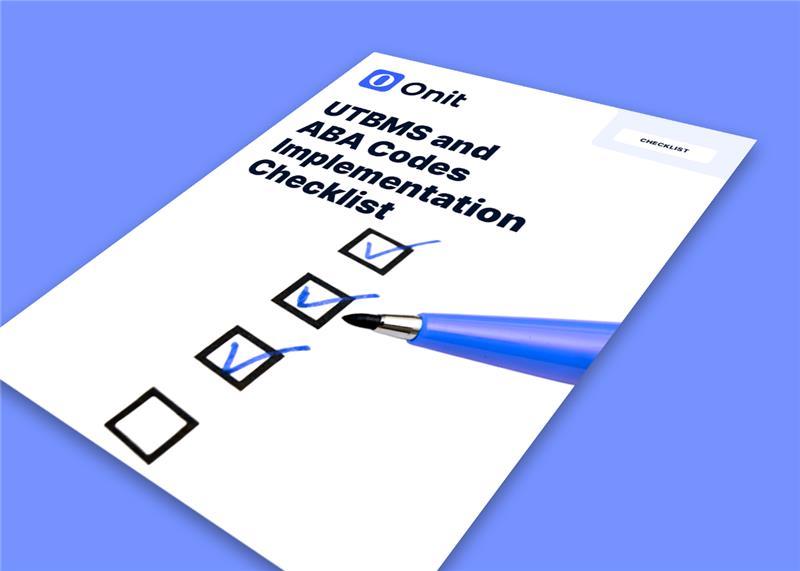
A practical guide to eliminating bottlenecks, improving cross-team collaboration, and accelerating contract turnaround
Contract drafting and collaboration are where deals often slow down. Disconnected tools, endless email threads, and unclear ownership create delays, increase risk, and frustrate stakeholders across the business.
This ebook breaks down how legal teams are simplifying the process with better workflows, standardized content, and modern technology.
In this ebook, you’ll learn how to:
Reduce drafting delays and eliminate version confusion
Standardize templates and clauses for greater consistency
Collaborate more effectively with business stakeholders
Streamline reviews and approvals without bottlenecks
Use automation and AI to speed up contract creation
Improve visibility into contract status and ownership
Get a clear, practical look at how to move contracts forward faster while maintaining control and consistency. Download the ebook today
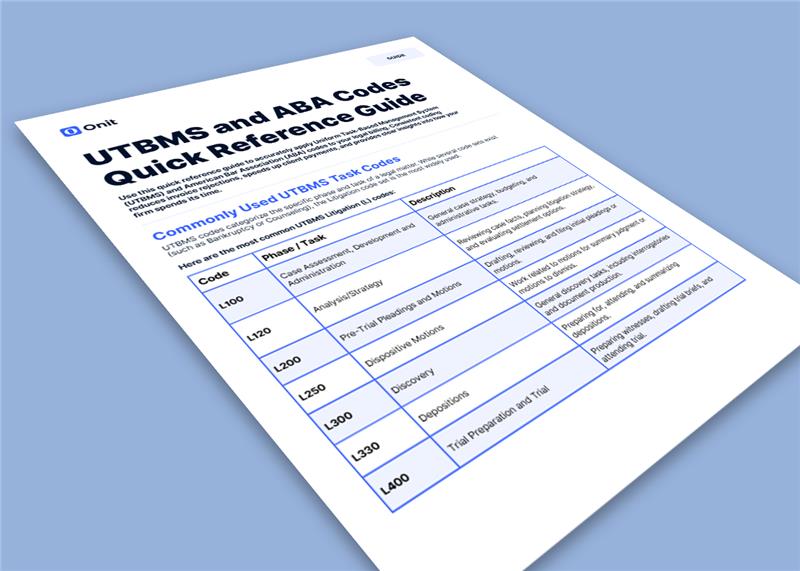
A quick reference guide to UTBMS and ADA codes so your team can code accurately, reduce invoice rejections, and keep billing moving.
Legal billing shouldn’t slow your team down. But when UTBMS and ADA codes aren’t applied consistently, invoices get rejected, time gets written down, and payments get delayed.
This quick reference guide gives your team a fast, reliable way to apply the right codes without digging through documentation or guessing.
Whether you’re reviewing invoices or entering time, this is the resource you keep open while you work.
What you’ll get
Common UTBMS litigation task codes with clear descriptions
Frequently used ABA activity codes and when to use them
Real-world billing examples that show how codes and narratives align
Practical tips to avoid common mistakes like block billing and mismatched descriptions
Consistent coding does more than clean up invoices. It speeds up approvals, improves visibility into legal spend, and reduces friction with outside counsel.
This guide helps your team get it right the first time.
Communication is key during implementation! To best support your team and vendors during implementation, we offer a set of templated communications based on your implementation inclusions. These templates are available for you to utilize and edit as required by your team to encapsulate your voice and communication needs.
How to Use the Templates
Locate the necessary template(s) to send to your internal team(s) or vendors
Copy and paste the email template into your preferred email system
Populate any fields highlighted in yellow and add or adjust the emails with any necessary details (e.g. holiday greeting, meeting reminder)
Using your preferred email system, send the email to the recipients listed in the “To” field
Note: If you are sending an email to a large number of recipients, we recommend sending the email to yourself and then Bcc’ing all recipients to hide their addresses
Internal – Team Communications
These communications are intended to be sent to your internal legal team(s) to communicate the upcoming Unity implementation and planned go-live date.
Unity Onboarding, New ELM System
Purpose: Notify your legal team members of upcoming Unity implementation of a new ELM system When to Send: At the start of implementation, ideally at least 1 month prior to the go-live date
To: Client legal team members From: Client implementation lead or project sponsor Suggested Subject: [COMPANY] New Legal Operations Process
Email Body:
[COMPANY] is implementing a new legal operations software, Unity. This platform will assist [COMPANY] in streamline our legal billing/invoicing and matter management processes. [add any other reasoning, communications to internal team for adding Unity].
Unity will give us more control of our processes and increased visibility into matters and spend. With this new platform:
Matters created in Unity can be assigned to Vendors for billing.
Vendors / law firms can submit invoices (digital LEDES and PDFs) through the Unity vendor portal, Counsel Exchange.
[COMPANY]’s approval process and rules are applied to the invoice in Unity allowing [COMPANY] members to approve within the application.
Approved invoices will get processed directly to accounts payable.
Report on legal matter and spend data from the same application.
Unity is slated to go live in [month of designated go-live date]. Prior to go live we will be coordinating training for the new system as well as cutover dates/process for final invoice submission into the old system. If you’d like to begin training in advance, please sign up for Unity’s Customer Webinars to learn more. In addition to live training; recorded training sessions and a variety of help tools, including frequently asked questions documentation, and customer support will also be available.
Finally, vendors will be notified separately of the upcoming changes and expectations with the new invoicing process.
If you have any questions about the new process, please reach out to [client implementation lead or project sponsor].
Unity Onboarding, Migrating ELM Systems
Purpose: Notify your legal team members of upcoming Unity implementation of migrating from an existing ELM system to Unity When to Send: At the start of implementation, ideally at least 1 month prior to the go-live date
To: Client legal team members From: Client implementation lead or project sponsor Suggested Subject: [COMPANY] New Legal Operations Process
Email Body:
[COMPANY] is implementing a new legal operations software, Unity. This platform will assist [COMPANY] in streamline our legal billing/invoicing and matter management processes. [add any other reasoning, communications to internal team for adding Unity].
We understand that change can be scary, but we are excited for this upgrade to our team! After deliberation, we have decided to make this move due to [insert purpose for the migration (e.g. streamlining services, vendor ease, additional spend insights, etc)]
Unity will give us more control of our processes and increased visibility into matters and spend. With this new platform:
Matters created in Unity can be assigned to Vendors for billing.
Vendors / law firms can submit invoices (digital LEDES and PDFs) through the Unity vendor portal, Counsel Exchange.
[COMPANY]’s approval process and rules are applied to the invoice in Unity allowing [COMPANY] members to approve within the application.
Approved invoices will get processed directly to accounts payable.
Report on legal matter and spend data from the same application.
Unity is slated to go live in [month of designated go-live date]. Prior to go live we will be coordinating training for the new system as well as cutover dates/process for final invoice submission into the old system. If you’d like to begin training in advance, please sign up for Unity’s Customer Webinars to learn more. In addition to live training; recorded training sessions and a variety of help tools, including frequently asked questions documentation, and customer support will also be available.
Finally, vendors will be notified separately of the upcoming changes and expectations with the new invoicing process.
If you have any questions about the new process, please reach out to [client implementation lead or project sponsor].
Unity Training
Purpose: Instruct Legal Team members on signing up for Unity training When to Send: At the start of implementation, ideally at least 1 month prior to the go-live date
To: Internal Legal team members who will be attending training From: Internal Unity Implementation Lead Suggested Subject: REQUIRED – Unity Training Sign-up
Email Body:
[COMPANY] is now using eBilling provider Unity to make it easier to manage and pay your legal bills. To ensure our team is ready for our Unity go-live of [GO-LIVE DATE], we are asking that everyone sign-up for and attend the following trainings:
Administrative Training: Admin Training will cover all things you need to know when working in Unity. We’ll show you how to use the Unity Dashboard, go over Administrative functions such as User Management and Invoice Review Rules, and walk you through Matter Management and Vendor Management.
Required Attendees: [INSERT TEAM MEMBERS REQUIRED FOR TRAINING]
Suggested Training Session: [INSERT SUGGESTED TRAINING TIME]
Training Due Date: [INSERT DATE TRAINING TO BE COMPLETED BY]
Invoice Review Training: Invoice Review Training we’ll take you through the life of a Unity invoice and show you important dashboards and reports you should utilize. In addition, we’ll walk you through approving, rejecting, and adjusting an invoice.
Required Attendees: [INSERT TEAM MEMBERS REQUIRED FOR TRAINING]
Suggested Training Session: [INSERT SUGGESTED TRAINING TIME]
Training Due Date: [INSERT DATE TRAINING TO BE COMPLETED BY]
How to Sign-up: Under “Register for Webinars” enter your name and select your preferred session. If you are not able to attend your session (or any sessions provided) please sign up to receive a recording of the session once completed.
External – Vendor Communications
These communications are intended to be sent to your primary vendor contacts to communicate the upcoming Counsel Exchange go-live date.
Initial Counsel Exchange Onboarding Notice
Purpose: Notify your vendors of upcoming Counsel Exchange roll out. When to Send: At the start of implementation, recommended 2–4 weeks prior to the “Counsel Exchange Onboarding” email template. To: Law Firm Billing Contacts or Relationship Contacts From: Company Relationship Contact Suggested Subject: [COMPANY] Updated Invoicing Process
Email Body:
[COMPANY] is implementing a new legal operations software, Unity. This platform will help [COMPANY] streamline our legal billing/invoicing and matter management processes. We are targeting to roll out the system in [MONTH, YEAR] and will provide further communication as we get closer.
To prepare for the onboarding, please begin collecting the following details:
Law Firm/Vendor Name
Law Firm/Vendor Billing Address (Street, City, State, Zip, Country)
Law Firm/Vendor Billing Contact Name*
Law Firm/Vendor Billing Contact Email*
*Please provide a billing or AP contact, not a legal contact.
The upcoming implementation will include a subscription fee but, for now, no action is required on your part, and we kindly ask that you hold any questions until we share more details in a future communication.
Counsel Exchange Onboarding
Purpose: Notify your vendors of upcoming Counsel Exchange roll out When to Send: Recommended 4-6 weeks prior to the go-live date
To: Law Firm Billing Contacts or Relationship Contacts From: Company Relationship Contact Suggested Subject: [COMPANY] Updated Invoicing Process
Email Body:
[COMPANY] is now using eBilling provider Unity to make it easier to manage and pay your legal bills. Unity provides a vendor portal called Counsel Exchange to submit invoices, check invoice status, and see a list of matters assigned to your firm.
How to Obtain Counsel Exchange Access
(exclude this step if your team is not using the Google form) Please fill out the following form [GOOGLE FORM LINK provided by your Implementation Manager] to collect your billing administrator. Please do not send generic email addresses such as “ebilling@” Generic addresses are not allowed for security reasons.
[COMPANY] will add your firm as a vendor in Counsel Exchange on [GO-LIVE DATE], you will not have Counsel Exchange access until this date. If you are not the correct contact person to register for Counsel Exchange, please forward this information to the appropriate person(s).
Once your account is set up:
New to Counsel Exchange? Your billing admin will receive an email with a link to your account. They should log in and create a password as soon as possible. The link will expire in 5 days.
Already using Counsel Exchange? [COMPANY] will appear on the Counsel Exchange dashboard(s) of your billing specialist(s) on [GO-LIVE DATE].
Counsel Exchange has been designed to be intuitive and easy to use. There is a “wizard” that walks the billing specialist(s) through the invoice submission process.
All invoices prior to [GO-LIVE DATE] should be submitted via the old process.
All invoices starting on [GO-LIVE DATE] should be submitted via Counsel Exchange.
Invoice file submission:
LEDES Invoices: [COMPANY] would like your firm to submit invoices in LEDES format with the PDF version. You may submit multiple LEDES/PDF invoices at the same time. Simply drag and drop, or select the files from your computer, and click SUBMIT.
Non LEDES Invoices: If you are unable to produce LEDES files, you will need to enter the invoice information manually via the invoice entry screens. Be sure to list flat fee line items separately from those where the timekeeper is billing hourly. Be sure to drag and drop or select the PDF invoice prior to submission.
Law Firm Subscription Fees
As part of the onboarding process, similar to all other e-billing systems, a subscription fee will be included with your setup. These fees are designed to ensure you receive the best tools and support for a seamless and successful partnership.
Once your onboarding is complete, Onit’s accounting team will send invoices for these fees. Expect an email from [insert current billing sender address, e.g. [email protected]]. We’re committed to making this process straightforward and transparent, and we’re here to ensure everything runs smoothly.
Thank you for your attention to this change in process. For technical questions, check our user guide. Please contact [COMPANY or COMPANY CONTACT] with any questions, or your Counsel Exchange Administrator to add additional Counsel Exchange users (more information on updating Counsel Exchange user roles can be found here).
Counsel Exchange Onboarding Reminder
Purpose: Remind your vendors of upcoming Counsel Exchange roll out When to Send: Recommended 2 weeks prior to the go-live date
To: Law Firm Billing Contacts or Relationship Contacts From: Company Relationship Contact Suggested Subject: Reminder: [COMPANY] Updated Invoicing Process
Email Body:
As a reminder to the communication sent on [DATE OF INITIAL COMMUNICATION], [COMPANY] is now using eBilling provider Unity to make it easier to manage and pay your legal bills. Unity provides a vendor portal called Counsel Exchange to submit invoices, check invoice status, and see a list of matters assigned to your firm.
How to Obtain Counsel Exchange Access
(exclude this step if your team is not using the Google form) Please fill out the following form [GOOGLE FORM LINK provided by your Implementation Manager] to collect your billing administrator. Please do not send generic email addresses such as “ebilling@” Generic addresses are not allowed for security reasons.
[COMPANY] will add your firm as a vendor in Counsel Exchange on [GO-LIVE DATE], you will not have Counsel Exchange access until this date. If you are not the correct contact person to register for Counsel Exchange, please forward this information to the appropriate person(s).
Once your account is set up:
New to Counsel Exchange? Your billing admin will receive an email with a link to your account. They should log in and create a password as soon as possible. The link will expire in 5 days.
Already using Counsel Exchange? [COMPANY] will appear on the Counsel Exchange dashboard(s) of your billing specialist(s) on [GO-LIVE DATE].
Counsel Exchange has been designed to be intuitive and easy to use. There is a “wizard” that walks the billing specialist(s) through the invoice submission process.
All invoices prior to [GO-LIVE DATE] should be submitted via the old process.
All invoices starting on [GO-LIVE DATE] should be submitted via Counsel Exchange.
Invoice file submission:
LEDES Invoices: [COMPANY] would like your firm to submit invoices in LEDES format with the PDF version. You may submit multiple LEDES/PDF invoices at the same time. Simply drag and drop, or select the files from your computer, and click SUBMIT.
Non LEDES Invoices: If you are unable to produce LEDES files, you will need to enter the invoice information manually via the invoice entry screens. Be sure to list flat fee line items separately from those where the timekeeper is billing hourly. Be sure to drag and drop or select the PDF invoice prior to submission.
Thank you for your attention to this change in process. For technical questions, check our user guide. Please contact [COMPANY or COMPANY CONTACT] with any questions or your Counsel Exchange Administrator to add additional Counsel Exchange users within Counsel Exchange (more information on updating Counsel Exchange user roles can be found here).
Law Firm Subscription Overview
Purpose: Notify your vendors of Counsel Exchange’s legal vendor subscription. When to Send: Recommended ~4 weeks prior to the go-live date. To: Law Firm Billing Contacts or Relationship Contacts From: Company Relationship Contact Suggested Subject: [COMPANY] Important Update: Annual e-Billing Platform Fee
Email Body:
To streamline and improve our billing and payment processes, we will be transitioning to Counsel Exchange by Onit for e-billing. This platform ensures invoices are submitted, tracked, and processed in alignment with our billing guidelines, helping reduce delays and improving the overall payment experience.
As with all major e-billing platforms, Counsel Exchange includes a standard annual platform fee for firms. Invoices for this fee will come from [insert current billing sender address].
To avoid any confusion, here are the essentials:
Why This Fee Exists The fee supports your continued access to the Counsel Exchange platform. This structure is common across legal e-billing systems and helps maintain a reliable, efficient environment for invoice submission and management.
How the Fee is Calculated The platform fee is based on your firm’s annual invoice volume. You are placed in a tier that aligns with your actual billing, ensuring the fee reflects your usage.
[Insert your law firm subscription tiers, or provide the vendor’s subscription tier and associated fee.]
When This Takes Effect Beginning [GO-LIVE DATE], firms will receive an invoice from Onit for the applicable tier. Tiering is reviewed periodically, and firms will be notified if billing volume increases to a higher tier during the subscription year. Future renewals will follow the same structure.
We are sharing this information in advance to ensure a smooth transition. Our goal is to minimize administrative friction and support timely, predictable payment processing for all our partners.
If anything needs clarification, feel free to reach out, but no action is required at this time.
Thank you for your ongoing partnership.
Accruals Onboarding
Purpose: Notify your vendors of upcoming accrual roll out When to Send: Recommended 2-4 weeks prior to the first accrual email request
To: Law Firm Billing Contacts or Accrual Contacts From: Company Relationship Contact Suggested Subject: [COMPANY] Updated Accrual Collection
Email Body:
[COMPANY] is now using eBilling provider Unity to make it easier to manage and pay your legal bills. Unity provides a vendor portal called Counsel Exchange to submit invoices, check invoice status, and see a list of matters assigned to your firm. Additionally, [COMPANY] will use Unity to collect and track accruals.
What are accruals? Also known as Work in Process or Unbilled Estimates, include costs and expenses, such as legal fees, for services that have been provided but not yet invoiced as of a cut-off date. Securities and financial requirements mandate that companies keep and report accurate accounting records. Accruals are critical to these reporting obligations.
How to submit accruals? Each period, Unity will send you up to 3 email reminders:
Click the email link to “Submit Unbilled Amount” or “We Have No Unbilled Activity” if there are no unbilled estimates to submit
Enter the unbilled amounts for the applicable period
Confirm the last invoice submitted is correct and there are no missing billed invoices
Click “Submit Unbilled Amount”
The first email reminder to submit accruals for [MONTH, YEAR] will go out on [DATE]. You will have until [EXPIRATION DATE] to submit your accruals before the link expires.
Please contact [COMPANY or COMPANY CONTACT] with any questions or your Counsel Exchange Administrator to update your Accruals contacts within Counsel Exchange (more information on updating Counsel Exchange user roles can be found here).
Timekeeper Onboarding
Purpose: Notify your vendors of upcoming Timekeeper roll out When to Send: Recommended 2-4 weeks prior to the go-live date
To: Law Firm Billing Contacts or Relationship Contacts From: Company Relationship Contact Suggested Subject: [COMPANY] Updated Timekeeper Approval Process
Email Body:
[COMPANY] is now using eBilling provider Unity to make it easier to manage and pay your legal bills. Unity provides a vendor portal called Counsel Exchange to submit invoices, check invoice status, and see a list of matters assigned to your firm. Additionally, [COMPANY] will be using Unity to validate approved timekeeper rates on incoming invoices, to support our business relationships and streamline invoice reviews.
Effective [DATE], [COMPANY] will begin tracking approved timekeeper rates through Counsel Exchange. Please submit your firm’s timekeepers and their current rates, instructions for submitting rates can be found here.
Thank you for your attention to this change in process. For technical questions, check our user guide.
Change management is the process of preparing your legal and surrounding teams for the addition of Unity into your company’s process. It is a critical step in ensuring the proper onboarding of the software and building long-term acceptance of the new system.
Why is Change Management Important?
Successful adoption of a new tool or process sets the stage for how your organization will co-exist with Unity. Change management prepares your team for the “why” and “what” of implementation: why are you bringing on Unity and what problems are you solving by the addition of Unity? If your team understands these two items, the implementation becomes a goal for the entire organization to work towards.
What is Unity?
This may be the first time your team members are hearing about Unity. Below is a product overview that provides insights into the tool and its uses to get your team up to speed.
How to Prepare Your Team
The following items will prepare your teams for onboarding Unity. Keep in mind, each team is unique and these items may need to be adjusted or customized for your needs and style. Your implementation manager will discuss each item below in detail prior to going live.
Communications
Communication is Key! Provide expected delivery dates, system expectations, and training opportunities early and often. If necessary, Unity has communication templates available to assist with starting these conversations. View the Unity Implementation Communications Library and view the “Internal – Team Communications” templates. During implementation, your team will also have discussions about notifying your vendors of the transition and templates will be provided.
Provide Assurance: Do you have team members who need extra assistance or are hesitant of a SaaS solution? Provide a list of resources for asking questions during implementation and opportunities to showcase the tool in action. Early exposure lessens the uncertainty of your team members.
Plan for Change: Your Unity system will change. As your team grows and evolves, your SimpleLegal system will as well. Providing assurances to your team that Unity does not need to function as it does at go-live, nor should it, they can provide insight, feedback, and suggestions as they use the tool. More importantly, allow Unity to mature alongside your needs.
System Training
To unlock the full potential of Unity, join our regular training sessions and explore our library of training videos and feature success kits. These resources are designed to help you quickly grasp the platform’s capabilities, giving you a competitive advantage in managing your legal operations. Dive into our Learning Library to browse through our various training options today! Browse through our learning library.
Create/upload vendor contacts in Unity and give them Counsel Exchange Admin role (Recommended two weeks before go live so that vendors can submit timekeepers, review their open matters, and add additional Counsel Exchange users)
Turn on system invoicing and agreed upon day/time (to be determined with client during a weekly call)
Stabilization period – Review the first few invoices together, discuss invoice/line-item flags, and confirm AP receipt of approved invoices.
Common Questions and Answers
Can you provide insights into the vendor portal, Counsel Exchange? Counsel Exchange is a portal for submitting invoices to clients who are using Unity to manage their e-billing and legal matters. Counsel Exchange also helps track matters referred by clients and the timekeepers who work billable hours on those matters. Using Counsel Exchange allows vendor law firms to deliver invoices to clients in a manner that makes tracking, review, and processing efficient. It’s very likely that your vendors are already using Counsel Exchange with other Unity clients so this should be a somewhat seamless process for them. If they have not used Counsel Exchange in the past, the vendor communications will provide insights, training, and next steps to get them prepared.
What to expect with user adoption and training? Communications and training options will be provided during implementation as part of the change management of Unity. Keep in mind, each team onboards differently so your team may mix and match onboarding options.
How to keep projects on track? It is highly recommended to hold weekly Internal meetings with Legal, AP, Finance, IT etc. so that we can make the most productive use of our Unity weekly meetings.
Implementation Tips and Tricks
Tell your team why you’ve decided to add Unity to your legal team! What problems are you trying to solve and what are you excited or eager to implement with this new system? Your excitement will help your team get on board.
Provide updates and your progress. Your team will be more responsive to onboarding a new system if they understand the work that is happening to assist them in the future. Updates and progress reports, even milestones you have accomplished, will build excitement for the coming launch.
Give your team ample time to learn about the tool and opportunities to ask questions (e.g. training, documentation) and provide feedback to your implementation team with scheduled Q&A sessions or an inbox to send suggestions.
Take some time to review your existing data (e.g. matters, vendors, etc) to see what data is working and, more importantly, what is no longer working for your team. Does all data need to be brought over? Should anything be cleaned up or organized in a more meaningful way?
Welcome to Unity’s API Toolkit! You’ll find important information and links about our API to help you and your team get the most out of Unity.
Have questions or need help? Please contact [email protected] for assistance.
Introduction
Purpose of the API Toolkit
At a high level, the Unity API allows the customer to request approved invoices from Unity and Unity API provides that data back. The customer then updates the invoice status to “Sent to AP” in Unity. Once the invoice is paid, the Customer updates invoice status to “Paid” and provides payment details (optional) in Unity.
On a technical level, the Unity API is organized around REST. Our API has predictable, resource-oriented URLs, and uses HTTP response codes to indicate API errors. We use built-in HTTP features, like HTTP authentication and HTTP verbs, which are understood by off-the-shelf HTTP clients. We support cross-origin resource sharing, allowing you to interact securely with our API from a client-side web application (though you should never expose your secret API key in any public website’s client-side code). JSON is returned by all API responses, including errors.
Our formal documentation at developer.simplelegal.com uses PATCH methods throughout, however, POST can be used instead of PATCH to accommodate systems that can’t utilize the PATCH method.
How to use the API Toolkit
Step 1 / Customer
Send your IT team or IT consultant the link to our API development page. This provides all the details of building an API to Unity.
Step 2 / Customer
Confirm which business process/workflow steps will be needed for your integration, for example for finance integration:
Required: Retrieve Invoices to be paid
Optional: Retrieve Unity PDF copy
Optional: ACK/Payment confirmation
Record payment information
Update invoice status to Paid
Step 3 / Customer
Reach out to your Finance team to understand accounting and data requirements to post invoices into your finance system and pay an invoice.
Step 4 / Customer & Unity
Discuss attributes/data that needs to be in Unity for payment (see FAQ below: “What are the most common attributes and their definition?”)
Step 5 / Unity
Configure Unity with required attributes
Step 6 / Unity
Provide customer with Unity base URL and API Authorization token. Will be in the following format:
API base URL: https://<>.simplelegal.com
e.g. http://app.simplelegal.com or http://abccompany.simplelegal.com
API Authorization Token: <auth_token>
Step 7 / Customer
Test connection to Unity API
Step 8 / Customer
Build necessary integration calls and configuration based on integration needs
Step 9 / Customer & Unity
Test your connection by calling an endpoint and make sure you were able to retrieve data, and the relevant information is generated. For example, for finance integration, you should approve an invoice in Unity and make sure it can be retrieved, with the necessary information sent back to Unity.
Getting Started
The Unity API is organized around REST. Our API has predictable, resource-oriented URLs, and uses HTTP response codes to indicate API errors. We use built-in HTTP features, like HTTP authentication and HTTP verbs, which are understood by off-the-shelf HTTP clients. We support cross-origin resource sharing, allowing you to interact securely with our API from a client-side web application (though you should never expose your secret API key in any public website’s client-side code). JSON is returned by all API responses, including errors. We’ve documented PATCH methods throughout, however, POST can be used instead of PATCH to accommodate systems that can’t utilize the PATCH method.
Prerequisites
Determine API user details (first name, last name, email)
Typically, the API user has a generic name (e.g. first name: Oracle Integration, last name: Finance Integration, email: [email protected])
Provide API user details to Unity
Unity to generate API key
Unity to provide Unity API toolkit & API developer
Schedule and conduct API requirements and mapping (Client and Unity)
Schedule and conduct API development (Client)
Testing (Client and Unity)
Authentication
API authentication is a combination of technology and process that proves or verifies the identities of users who want access to an API. Specifically, API authentication involves the use of a software protocol to verify that users are who they claim to be when a client makes an API call.
Sandbox vs Production
Our sandbox APIs emulate the live environment and give you the opportunity to send test API calls and to receive a simulated response. Sandbox APIs are perfect for working with the client before the production API is available, allowing front-end progress to continue, even though there’s no real data or database backing it yet. The production APIs work with our live systems and data. Your application will run in this environment after you go live.
The Multi-tenant Sandbox data is refreshed monthly on the third Friday of the month. Your team can create or update data in the sandbox, and any alterations made will be reset and replaced with the data from the production environment during the monthly refresh.
API Basics
Understanding RESTful APIs
The basic function of a RESTful API is the same as browsing the internet. The client contacts the server by using the API when it requires a resource. API developers explain how the client should use the REST API in the server application API documentation. These are the general steps for any REST API call:
The client sends a request to the server. The client follows the API documentation to format the request in a way that the server understands.
The server authenticates the client and confirms that the client has the right to make that request.
The server receives the request and processes it internally.
The server returns a response to the client. The response contains information that tells the client whether the request was successful. The response also includes any information that the client requested.
The REST API request and response details vary slightly depending on how the API developers design the API.
HTTP Methods (GET, POST, PATCH)
The HTTP verbs comprise a major portion of our “uniform interface” constraint and provide us the action counterpart to the noun-based resource. The primary or most-commonly-used HTTP verbs (or methods, as they are properly called) are POST, GET, PUT, PATCH, and DELETE. These correspond to create, read, update, and delete (or CRUD) operations, respectively. There are a number of other verbs, too, but are utilized less frequently. Of those less-frequent methods, OPTIONS and HEAD are used more often than others.
Below is a table of recommended return values of the primary HTTP methods in combination with the resource URIs
Call / Type
Entire Collection
Specific Item
POST / Create
201 (Created), ‘Location’ header with link to /customers/{id} containing new ID.
404 (Not Found), 409 (Conflict) if resource already exists.
GET / Read
200 (OK), list of customers. Use pagination, sorting and filtering to navigate big lists.
PUT / Update/Replace
405 (Method Not Allowed), unless you want to update/replace every resource in the entire collection.
200 (OK) or 204 (No Content). 404 (Not Found), if ID not found or invalid.
PATCH / Update/Modify
405 (Method Not Allowed), unless you want to modify the collection itself.
200 (OK) or 204 (No Content). 404 (Not Found), if ID not found or invalid.
Delete / Delete
405 (Method Not Allowed), unless you want to delete the whole collection—not often desirable.
200 (OK). 404 (Not Found), if ID not found or invalid.
API Endpoints
In summary, an API endpoint is a specific location within an API that accepts requests and sends back responses. It’s a way for different systems and applications to communicate with each other, by sending and receiving information and instructions via the endpoint.
Response Formats (JSON, XML)
JSON supports numbers, objects, strings, and Boolean arrays. XML supports all JSON data types and additional types like Boolean, dates, images, and namespaces. JSON has smaller file sizes and faster data transmission. XML tag structure is more complex to write and read and results in bulky files.
JavaScript Object Notation (JSON) is a standard text-based format for representing structured data based on JavaScript object syntax. It is commonly used for transmitting data in web applications (e.g., sending some data from the server to the client, so it can be displayed on a web page, or vice versa)
An XML response message is sent by the SDS XML provisioning client in response to an XML request. Each response message consists of a 4-byte binary length value, followed by the XML response in ASCII characters. The length value contains the number of bytes in the XML response, excluding the 4-bytes for the length.
API Calls
An API call allows one application to request data or services from another application. Our API developer page is a comprehensive API document, containing all available API calls, their respective arguments, filters, and examples.
Request Parameters
API request parameters are options that can be passed with the endpoint to influence the response. Refer to request parameters located in the API developer page.
Response Structure
When you send a REST request, the appliance responds with a structured response in JSON format. The exact structure of the response depends on the resource and URI of the request, but all responses are similar. The response includes all available resources from any point within the API.
Common Workflows
API workflows are server-side workflows that you can schedule/trigger in your application and/or expose to be triggered from an external application or system through an API request.
Below are the most commonly requested calls for typical integration scenarios:
Finance Integration (Unity <> AP System)
Step 1: Retrieve all approved invoices
The first step is to fetch all approved invoices. This can be achieved with the invoices end point, filtering on Approved status. Refer to “What are the valid invoice statuses in Unity?” in the Q&A section for other supported statues.
If necessary to your integration, pull the PDF copy of the invoice (either summary or the full pdf). Retrieving the PDF is done on a per invoice basis, so a valid Invoice ID is required. Please note the PDF is base64 encoded so would require a decoder to view.
After retrieving the invoices, best practice is to record the invoice id, and update all invoices that are to be processed to Sent to AP status. This way, application users, and vendors will see that invoices have been submitted for payment. Optionally, you can use Posted to AP – the flow is dependent on your organizational needs.
Optional – Record acknowledgement of successful invoice posting
After successful posting of invoices, best practice is to record the invoice id, and update all invoices that are to be processed to Posted to AP status. This way users will see that invoices have been successfully posted without error.
Once payments are made to Vendors, two separate calls will be made for each invoice:
1. Record payment information for an invoice.
Create a Payment record on the individual Invoice endpoint. The required fields are payment_method (which can be defined by your organization; example: check, wire, ach, etc.), amount, currency, and payment date in YYYY-MM- DD format.
After paying / submitting payment for invoices, you should update the invoice status to Paid. This way, application users, and vendors will see that invoices have been marked Paid.
The first step is to fetch a list of all matters. The matters are returned sorted by matter name alphabetically. Available modifiers can be added onto the end of a search string joined by a double dash and are generally shorthands for more advanced searches that can be done:
First, compare the list of new matters against the existing list of matters from Step 1 to ensure no duplicate matters are created. For additional confirmation, you may pull the Client Matter ID associated with the matter for your records.
Second, create any new matters in Unity. Three fields are required for creating a new matter:
name
matter_lead_email
matter_lead_is_approver
The following optional fields are also recommended when creating a new matter:
Returns the list values for a specific custom attribute. The custom attribute id (e.g. attr_1234567890) is required to pull. The options are returned sorted by name alphabetically.
Updates an existing list value for a custom attribute. The custom attribute id (e.g. attr_1234567890) and the list value id (e.g. attr_opt_1234567890) is required to update.
The following optional fields are available to be updated:
Available modifiers can be added onto the end of a search string joined by a double dash and are generally shorthands for more advanced searches that can be done:
lt -> less than
lte -> less than equal to
gt -> greater than
gt -> greater than equal to
icontains -> contains, case insensitive
range -> two dates, everything between the dates matches (inclusive for the first, exclusive for second)
For a given period, retrieve all submitted accruals. The “period” argument is required to pull and must be in the YYYY-MM-DD format.
If a range of dates period can be specified with the range operator. For example, if only the accruals in the first three months are desired, the filter ?period__range=2018-01-31,2018-03-31 would display all relevant accruals. (Note that range is inclusive on both the beginning and the ending date)
Missing API key/token or Require new API key/token
Contact your implementation manager or our Unity support team ([email protected]) to identify if you have an API user already configured and which environment the key is needed for (production or sandbox).
Unity will either confirm a key exists or create a new key to send the key via personal email to a designated drop location.
What is the id/hash for this object?
The id or hash for an object will be dependent on what call(s) your team is making. First, determine the call(s) and end points within the API Documenter.
To obtain the id/hash for an object (e.g. a matter), retrieve all matters and locate the “id” key associated with that object. The hash follows a consistent format, where the first 3-4 characters represent the type of object (e.g., “mat” for matter), followed by an underscore (_) and the numerical ID. For instance, a matter hash could be represented as “mat_1234567890.”
API Call is Returning an Error
Contact our Support Team ([email protected]) or your Implementation Manager (if you are still in Implementation). Provide the full call and response you are attempting.
Our team will confirm if the object being called exists, and whether or not the API user has permission to see it.
If GET, Unity can test the call to determine if we get the same error.
If POST, Unity may test the call parameters in a demo environment.
API Call Returns No Results
Log into Unity and verify that there is at least one object for the call (e.g. matters, vendors, etc) and verify the parameters of the call are applicable to the data within Unity.
If the objects exist, this implies the API user has access to the database via API but does not have sufficient privileges to retrieve the data
Customers can reach out to the implementation manager or Unity Support ([email protected]) team to verify which email address is associated with their API token.
Unity will validate the user has a role which is sufficient in accessing the objects in question. API users should have a user role = “Administrative Role”.
Error Handling
In any integration process, encountering errors is a common scenario. Effective error handling is crucial to maintain the integrity and efficiency of the integration between Unity API and your corporate ERP system. Here are some best practices for monitoring and maintaining your system and errors that may arise:
Real Time Monitoring: Set up real-time monitoring and alerts for your API integration. This will enable immediate detection of errors as they occur. Utilize logging systems to record detailed error information, which can be invaluable for troubleshooting.
Designated Response Team: Identify a designated response team within your organization. This team should include members who are well-versed in both the Unity API and your ERP system.
Notification Procedures: Establish a clear procedure for notifying the designated response team when an error is detected. This can be automated through your monitoring systems or manually initiated by the team monitoring the integration.
Root Cause Analysis: Once the immediate issue is resolved, conduct a thorough root cause analysis to understand why the error occurred. This step is crucial to prevent similar issues in the future. Document the findings and update your integration processes and error-handling protocols accordingly.
Continuous Improvement: Treat every error as a learning opportunity to improve your integration setup. Regularly review your error-handling procedures and update them as needed. Encourage open communication and feedback within the team regarding the handling of integration errors. This collaborative approach can lead to more resilient and reliable integration.
General Unity API Features and Q&A
What features can the Unity API support for each team or process?
Finance
Legal Ops
Reporting
Paying invoicesUpdating invoice payment status on Unity. Pulling a specific invoices by created date, invoice date, modified date, or statusCreating and updating cost codes
Creating and updating mattersCreating and updating most vendor dataCreating and updating custom attributesCreating and updating legal entitiesCreating, updating, and deactivating users including setting roles
Access matters, invoices, vendors by created date, modified date, closed datesSearch and filter via statusesEasily pull all custom attributes associated with matters, vendors, invoices
What features are not supported by the Unity API?
Access to timekeepers data
Access to budgets data
Cannot access contacts or vendor contacts / CounselGO users
Cannot set permissions/teams via API
Cannot set invoice intake rules or approver escalation rules via API
What are the most common invoice attributes and their definitions?
While this varies per customer, below are some common attributes used to retrieve invoice details and pay an invoice:
Field Name
Definition
Invoice_date
Invoice Date on the header (defined by the vendor)
Received_date
Date invoice was received into the Unity system
Invoice_number
The number or name as listed on the invoice, the main invoice identifier
Entity.id
Ent_123; unique identifier for legal entity
Cost_code.id
Cos_12345; unique identifier for the cost code
Custom_attributes.id
Attr_opt_12345; unique identifier for custom attribute
Native_currency
The currency the invoice was submitted in. (If null, the submitted currency is your base currency)
Native_total
The amount the vendor billed (as well as final amount as adjustments cannot be made on international currencies) on the invoice in the submitted currency.
Total
The amount the vendor billed on the invoice in the base currency of your environment.
Final_amount
Final amount of the invoice (after any adjustments) in the system/base currency.
Status
E.g. “Approved”, ”Paid”
id
Unity invoice reference number (e.g. inv_1234567890)
obj_id
On the invoice end point, this is the unique invoice id of the specific invoice, and is visible on the PDF and approver email
Can PDF attachments come through the API
Yes. You can retrieve invoice attachments through Retrieve an Invoice. You can also pull the Unity generated PDF through either Retrieve an Invoice Detail PDF or Retrieve an Invoice Summary PDF.
How do we know which invoices to pull from Unity to our finance system?
In a standard finance API integration, you will want to pull any invoiced in an “Approved” status. These are invoices that have been approved in Unity by all approvers and are ready for payment. As part of the API integration, you will want to update the status of the imported invoices to “Sent to AP” using PATCH. If the patch function isn’t available, you can also update the status using POST.
Is there anything else we can do with the API besides retrieve and update invoice information?
Yes. Through the API, you can access most components of Unity including matters, vendors, cost codes and legal entities. You can streamline your vendor intake process by pushing new vendors from your financial system into Unity. You can integrate with your patent software to push new patent & trademark matters into Unity. You can even use the API to update cost codes and legal entities.
Can you provide examples of how other partners have handled their integrations or technical references if we need additional help?
Our Implementation team can offer guidance if you have specific questions on how to get started, but unfortunately, we do not share client data or integration specifics.
What are the valid invoice statuses in Unity?
Received
Rejected
Approved
Paid
Sent to AP
Posted to AP
On Hold
How can I see an export of all the sample JSon?
You can download Postman and pull the full JSON export.
For the ‘Update an Invoice’ API the documentation states either a PATCH or POST could be used. Is this also true for the ‘Create Payment for an Invoice’ or must a POST be used?
Payment information can only be posted right now, it cannot be patched. We treat it as a log so you can only add to it.
How long would it take our team to integrate with the Unity API and how will Unity help?
This depends largely on the degree of integration in terms of what is required by the finance team, and the resources available on your development team to build it out. Unity can provide guidance in terms of understanding the documentation and in terms of what has been successful in the past.
What is the difference between the Reference Number and Batch Number in the ‘Create a Payment for Invoice’ API?
The reference number is unique per payment, whereas a batch number is used to group payments.
What is the difference between invoice_number and id and which should we use?
The id is a unique number that Unity assigns to each invoice and should serve as its unique identifier. Invoice_number is the number associated on the invoice itself, but this is not always.
Can you accommodate custom object IDs in the API? Currently we cannot support customization in the object IDs. However, depending on business needs, we may have recommendations for different ways to proceed to achieve the same result. We also support custom attributes with our platform, which may aid in capturing the information you require. Reach out to your implementation manager for guidance.
How do you recommend we update matters or vendors most efficiently?
For example, if your matter has 15 attributes and all attributes on a single matter need to be updated, that would be 15 calls. One method of reducing the number of calls is to check if the attribute values have changed. So instead of updating every single attribute value regardless if there was a change or not, you’ll want to validate if a change was made to the attribute value. Specifically, here is a step by step process recommendation:
Obtain the id of the vendor/and or matter you wish to update
Navigate to the attribute URL associated with that vendor/matter
Check what attribute values are associated, ideally with the `page_size` value set equal to the `count` value
Before deciding to update, compare the new value against the one seen on the page If different, then PUT, otherwise don’t PUT
Please note we do not recommend ‘page_size’ values over 100 as it may cause a timeout.
How are foreign (non-USD) invoice adjustments handled in the API?
Unity currently does not allow adjustments on foreign invoices because it has tax implications for vendors in most countries. Since foreign vendors are required to submit tax data to their respective governments, any adjustments made to invoices would result in a mismatch in reporting numbers vs actual numbers for your vendors. Instead we require that foreign invoices requiring adjustment be rejected with comments so that vendors can re-submit with the required corrections.
How do you get the final invoice amount? There are three options to get the final amount depending on the currency used to bill.
Is there a limit on any of the APIs for how many results are fetched?
By default the maximum number of items on a paginated list page is 25. This can be configured by post fixing a URL with ?page_size=100 if a page size of 100 is desired but it may timeout depending on the endpoint you hit and how much data comes through.
Can a customer create a matter and assign matter attributes in a single API call, or is it necessary to create the matter first and then update the attributes separately?
The API does not support creating and assigning matter attributes in a single call. To accomplish this, you will need to make multiple API calls. First, create the matter, and then make separate API calls for each attribute update.
Additional Resources
Unity Support is here to assist with your team’s product questions. Contact our Support team ([email protected]) when you have technical questions, would like assistance with functionality, or answering ‘how,’ ‘what,’ or ‘where,’ within your products.
Accruals are estimates for unbilled work that can be collected from vendors to anticipate fees and expenses for the reporting period. Please review this page to learn more about how to set up and start collecting and reporting on accruals.
Key considerations before accruals setup:
1. Would you like the vendors to provide accruals estimates separately for each matter? If not, they will be asked for a lump accrual sum.
Pros: More detailed accrual reporting
Cons: Vendors may be doing work for matters not yet in Unity
Recommendation: By Matter
2. When a Vendor is submitting their Accruals, would you like to include a “previous month” bucket as part of the period?
Pros: Ability to collect prior accruals
Cons: This total amount cannot be moved into existing matters. The lump sum for the previous month will remain outside of the existing period in an “other” bucket.
Recommendation: Do not include previous months
3. When submitting accruals, would you like your Vendors to include accrual totals for forward months? If so, how many forward months?
Pros: Good option if you process accruals on a quarterly basis.
Cons: Estimates will be less accurate when you accrue months in advance.
Recommendation: Do not allow forward months unless this was requested by your Finance or AP teams.
4. Would you like any budgets associated with a Vendor to be shown in the accruals screen when a vendor submit accruals?
Pros: Increased visibility of approved budgets
Cons: May encourage vendors to hut budget when otherwise not necessary
Recommendation: Do not show associated budgets
5. Would you like to include an “Other” option on your accrual forms?
Pros: Allows vendors to submit amounts for not yet available matters
Cons: This total amount cannot be moved into existing matters. The lump sum for the “Other” will remain outside of the existing period.
Recommendation: Do not allow ‘Other’ accrual submissions.
6. Would your team like the ability to manually trigger the Accrual notification emails?
Pros: Can request accruals outside of the normal schedule
Cons: None
Recommendation: Allow manual accrual requests.
Accrual reports
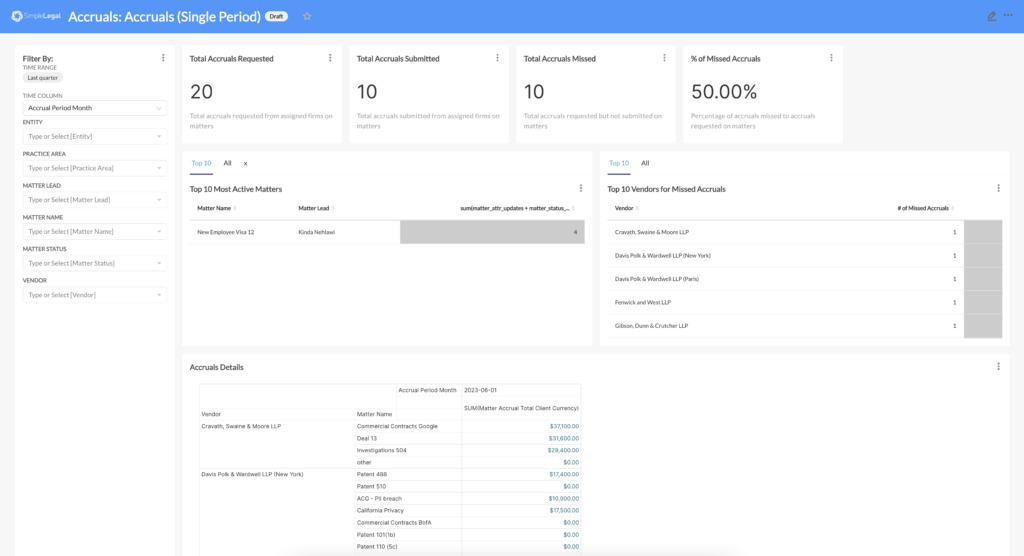
Accruals (single period)
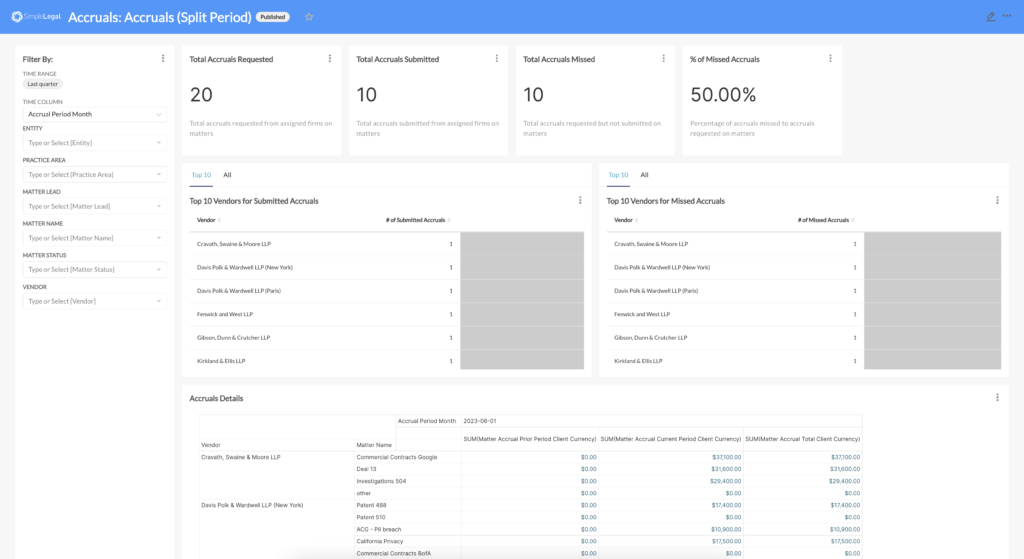
Showcases metrics and detailed information about accruals for single (current) period requests and submissions from vendors.
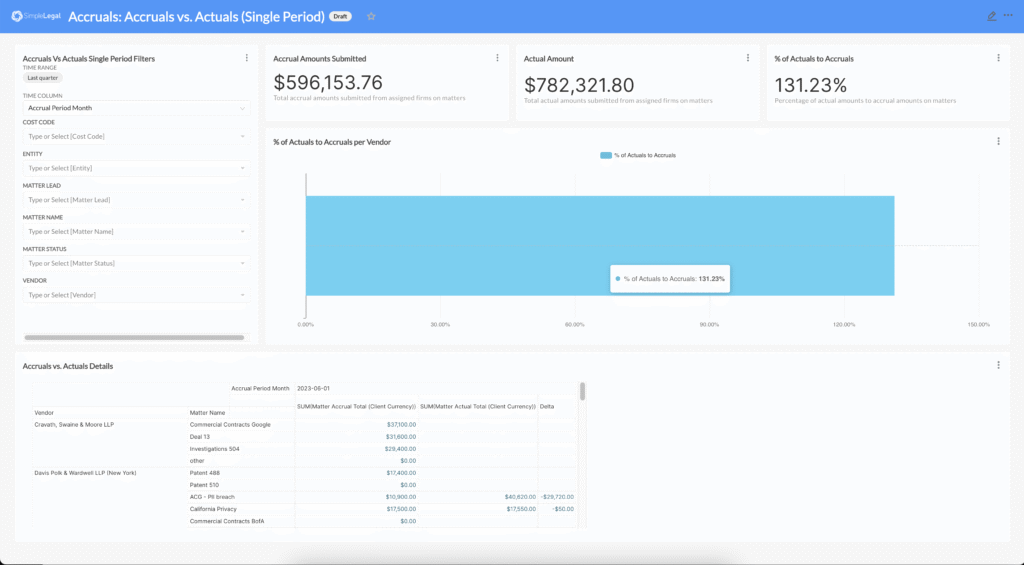
Accruals vs. actuals (single period)
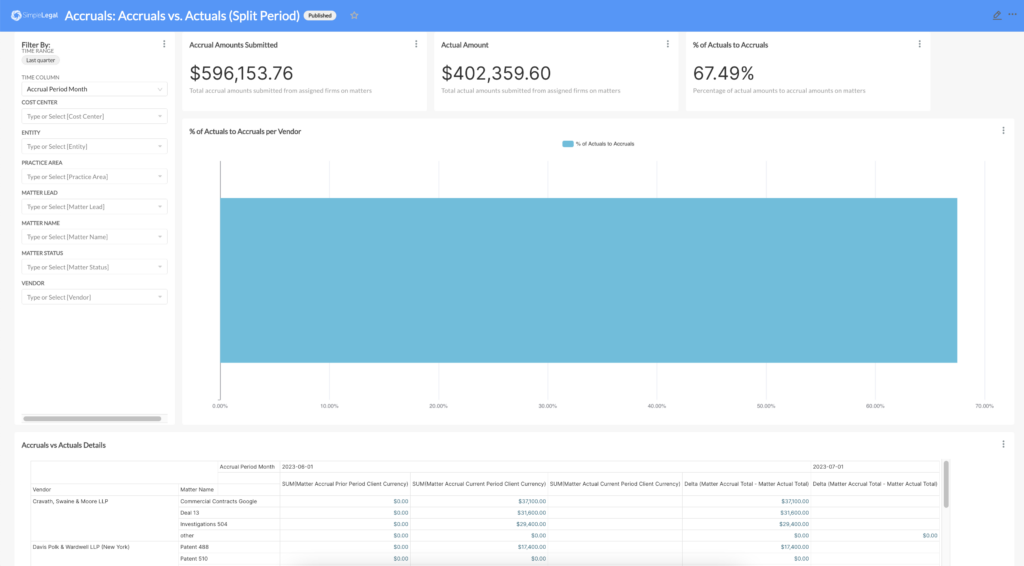
Showcases metrics and detailed information about accruals for single (current) period submissions from vendors compared to actual spend.
Accruals (split period)
Showcases metrics and detailed information about accruals for split (prior and current) period requests and submissions from vendors.
Accruals vs. actuals (split period)
Showcases metrics and detailed information about accruals for split (prior and current) period submissions from vendors compared to actual spend.
Accruals FAQs
Are Submitted but unapproved invoices included in reporting?
Submitted but unapproved invoices are not included in reporting.
We see accruals truly as unbilled estimates. Since the received invoices have been billed, we do not include them. If your accruals process includes received but not fully approved invoices, you will need to combine two reports together to get your totals.
Can we only send a single request?
No, but if the vendor responds to the first request, we will not send out any further reminders. If they do not provide their estimates, we will send up to two reminders.
When does the accrual period end?
This is two parts. The first part is when the accruals form expires, which is controlled in the custom settings. This, however, can be extended out manually for a single vendor, or for all vendors. The period truly ends once the requests are sent out for the following period/month.
What currency are accruals submitted in?
The vendor has the ability to select any currency when submitting, but the currency they choose is for all matters – they can not detail currency by matter. We recommend that vendors submit in the same currency as their invoices are submitted.
Change management is the process of preparing your legal and surrounding teams for the addition of Unity into your company’s process. It is a critical step in ensuring the proper onboarding of the software and building long-term acceptance of the new system.
Why is Change Management Important?
Successful adoption of a new tool or process sets the stage for how your organization will co-exist with Unity. Change management prepares your team for the “why” and “what” of implementation: why are you bringing on Unity and what problems are you solving by the addition of Unity? If your team understands these two items, the implementation of Unity becomes a goal for the entire organization to work towards.
How to Prepare Your Team
Communication is key! Provide expected delivery dates, system expectations, and training opportunities early and often. If necessary, Unity has communication templates available to assist with starting these conversations. View the Unity Implementation Communications Library and select the “Unity Onboarding, New ELM System” template.
Do you have team members who need extra assistance or are hesitant of a SaaS solution? Provide a list of resources for asking questions during implementation and opportunities to showcase the tool in action. Early exposure lessens the uncertainty of your team members.
Your Unity system will change. As your team grows and evolves, your Unity system will as well. Providing assurances to your team that Unity does not need to function as it does at go-live, nor should it, they can provide insight, feedback, and suggestions as they use the tool. More importantly, allow Unity to mature alongside your needs.
Implementation Recommendation Tips and Tricks
Tell your team why you’ve decided to add Unity to your legal team! What problems are you trying to solve and what are you hoping to get out of the new product?
Provide updates and your progress. Your team will be more responsive to onboarding a new system if they understand the work that is happening to assist them in the future. Updates and progress reports, even milestones you have accomplished, will build excitement for the coming launch.
Give your team ample time to learn about the tool and opportunities to ask questions (e.g. training, documentation) and provide feedback to your implementation team with scheduled Q&A sessions or an inbox to send suggestions.
Change management is the process of preparing your legal and surrounding teams for the swap from an existing Legal Ops e-Billing tool to Unity. It is a critical step in ensuring the proper onboarding of the software and building long-term acceptance of the new system.
Why is Change Management Important?
Successful adoption of a new tool or process sets the stage for how your organization will co-exist with Unity. Change management prepares your team for the “why” and “what” of migrating from one system to another. The most important question to answer for your team is: what problems are you solving by migrating to Unity? If your team understands this, the implementation of Unity becomes a goal for the entire organization to work towards.
How to Prepare Your Team
Communication is key! Provide delivery dates, why your team is making this switch, and training opportunities early and often. If necessary, Unity has communication templates available to assist with starting these conversations. View the Unity Implementation Communications Library and select the “Unity Onboarding, Migrating ELM Systems” template.
Do you have team members who could be resistant to change or need extra assistance? Provide opportunities to explain why this change is occurring, what the benefits are the change, and resources for asking questions during implementation and after launching Unity. Early exposure lessens the uncertainty of your team members.
Your Unity system does not need to match your existing workflow. Your team is making a conscious decision to bring on a new system, ensure that you are not bringing over old processes or data “just because” it was in your old system if it no longer supports your workflows.
Implementation Recommendation Tips and Tricks
Tell your team why you’ve decided to switch to Unity to your legal team! What problems are you trying to solve and what are you excited or eager to implement with this new system? Your excitement will help your team get on board.
Take some time to review your existing data (e.g. matters, vendors, etc) to see what data is working and, more importantly, what is no longer working for your team. Does all data need to be brought over? Should anything be cleaned up or organized in a more meaningful way?
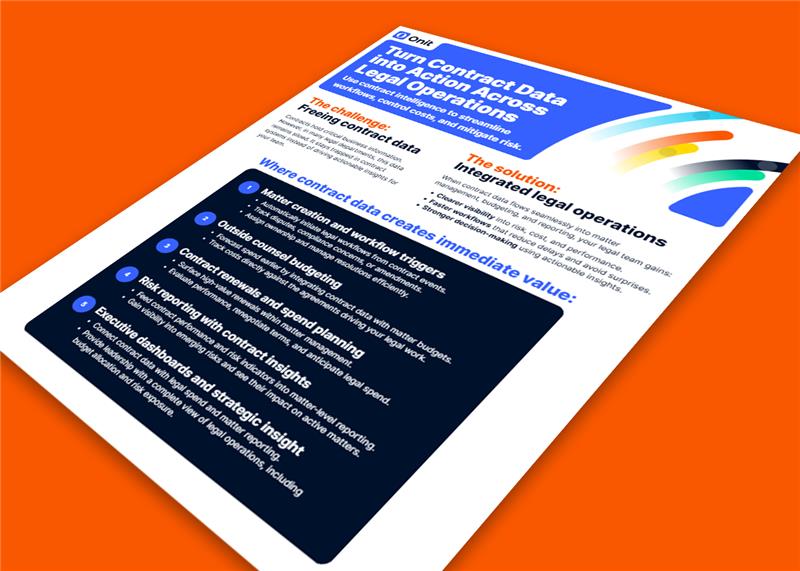
Use contract intelligence to streamline workflows, control costs, and reduce risk.
Contracts hold critical business data, but in most legal departments, it stays siloed instead of driving decisions. When that data connects to your legal operations, your team moves faster, sees risk earlier, and makes better decisions with real context.
Clear visibility into risk, cost, and performance
Faster workflows triggered by contract events
More predictable spend tied to real obligations
A more connected legal function starts with data that actually works for you, not against you. Bring contracts, matters, budgets, and risk into one connected view so your team can operate with clarity, control, and confidence.